- Every table figure right
- All 15 PDF points used
- One layout fault in 32 slides
4.5/5
Curipod reviewFree plan
Try Curipod
The most comprehensive AI presentation maker test ever conducted
Out of 49, I tested and ranked the 10 best AI presentation makers to see which ones really live up to their claims. The whole list is on the AI presentation makers page. Part of the AI tools directory on RankDude.

Tested and written by Miles Foster
Based on hands-on reviews, each graded on the same 10 tests, ranked by grade.
I signed up to every AI presentation maker on this page myself, gave each the same briefs, published the sites for real and ran the same 10 tests on what was live. Every grade, screenshot and measurement is on its review, and each test site stays monitored for 30 days after the test. Here are the 10 best, highest first.
The 10 AI presentation makers in grade order: three findings from each review, the grade out of 5 and the lowest plan price its pricing page lists. The 10 test grades are on each review.
Free plan
Try CuripodFree trial
Try Simplified$6/mo
Try SlideEgg$24.65/mo
Try SlideSpeakFree plan
Try SlidesPilot$7.49/mo
Try SlidesGPT$9/mo
Try AiPPT$19.80/mo
Try Storydoc$12.99/mo
Try WonderslideFree plan
Try PopAiI gave every tool the same fixed briefs and the same twelve edits as far as its free plan allowed, checked every figure against my table and every slide for faults, and read what each plan costs. Here is what I found.
Use an AI presentation maker when you want a first draft fast and you will check it before you present. None of the decks was ready to send as it came. The tools differ most on keeping your own figures, because some invented numbers I never gave, and on exports, because few offered a PowerPoint file on the free plan. For a chart you can edit as data, use an AI chart generator instead.
I tested, reviewed and ranked every AI presentation maker below. Each block has my verdict, its best and worst test results, the video review and the full story.

My pick for an accurate lesson or deck from a short brief. Every figure from my table was right, all 15 key points of my PDF were used and each deck was ready in about a minute. The first draft had no real charts, and the free plan gives no export.
Video review · 2:52
Curipod got every figure right and used all 15 key points of my six-page PDF. The 32 slides had one layout fault, and the decks were ready in 67 and 39 seconds after I confirmed the outline. The free plan showed no credit meter.
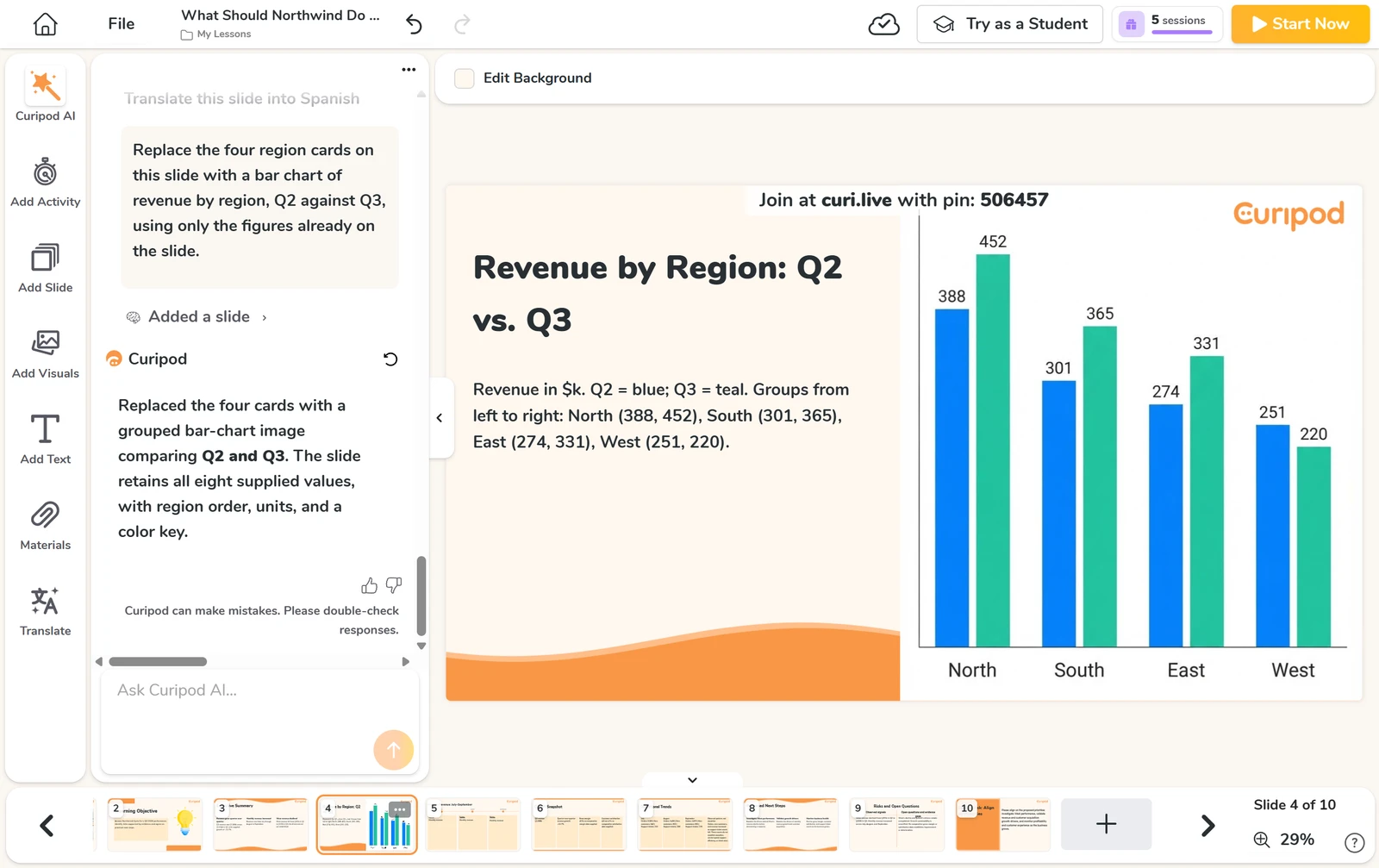
The first draft had no real charts; the assistant added two as pictures when I asked, with no data to edit. It refused my font and logo, so all ten slides were off-brand, only eight of twelve edits worked, and the free plan gave me no PDF or PowerPoint export.
It is built for teachers first, and lessons are public by default unless you opt out. If you want an accurate, interactive first draft and can live without a file to take away, Curipod is the one. No paid plan has a public price; the school plans are by quote. I tested on the free plan.

My pick for a quick, accurate deck you share as a PDF. Every figure was right, all 15 key points of my PDF were used and each deck took under six minutes. The only exports are PDF and PNG, never PowerPoint, and I could not grade editing.
Video review · 2:32
Simplified's agent built three decks in 2.7 to 5.4 minutes from the confirmed outline, at 57 to 70 credits each. Every figure and fact was right, all 15 key points of my PDF were used with nothing invented, and the brand colours came out exact. The free account held 1,000 AI credits.
The only exports are PDF and PNG, never PowerPoint. The body font ignored my brand kit, so all ten slides were off-brand, the agent's extra chart drew no bars, and I saw no pictures in any deck. The app stopped loading after seven edit requests, so editing has no grade.
If you want a fast, accurate deck from a brief, a table or a PDF, and you will present it or share it as a PDF, Simplified is the one. Its low grades are for what it cannot export, not for what it got wrong. The Pay As You Go plan is free to start.

My pick for a fast business deck with charts you can edit. Every figure from my table was right, both charts opened as data and I found a PowerPoint export on the free plan. The layout had three faults in ten slides, and one deck used half the free credits.
Video review · 2:33
SlideEgg built the ten-slide quarterly review in 158 seconds. Every figure from my table was right, all seven structure points were met, and both charts were real charts with data to edit. Eight of twelve edits worked, and I found a PowerPoint export on the free plan.
The layout had three faults in ten slides, and I counted three items that were wrong or not in my brief. The assistant refused to change the finished slides. That one deck used 100 of the 200 free credits, so I ran one of the three briefs, and the create box has no place to attach a file.
If you want a first draft with your figures kept right that you will tidy by hand, SlideEgg is worth trying. Free slides carry a SlideEgg logo, and the credit cost of a deck is not stated. I graded seven of ten tests on the free plan, and I could not open the exported file in PowerPoint.

My pick for a very fast first draft with cheap assistant fixes. A ten-slide deck took 67 seconds, every figure matched my table and ten of twelve edits worked. I counted seven layout faults in ten slides, and every export needs a paid plan.
Video review · 2:37
SlideSpeak built the ten-slide review in 67 seconds, with every figure matching my table and all seven structure points met. Ten of twelve edits worked, and an assistant fix cost one credit each. The outline shows the price before it builds.
I counted seven layout faults in ten slides, with wrapped figures and labels, and the first-draft charts are shapes, not data. Every export, PowerPoint, PDF and Google Slides, opens the upgrade box on the free plan, and I found no deck-wide theme and no comments. One deck used 50 of the 100 free credits.
If you want a fast first draft and can tidy the layout yourself, SlideSpeak is worth trying. I graded seven of ten tests; the other three were behind a paid plan or needed credits the free plan did not have. I tested on the free plan.

My pick for a fast draft from a document. All 15 key points of my PDF were kept, charts keep their data and every deck took about a minute. But asked to use only my figures, it invented more than thirty of its own.
Video review · 2:51
SlidesPilot built each deck in under a minute, 53 seconds at the median, and the pitch deck from my six-page document kept all 15 key points, with four statements added. Charts keep their data and can be edited, and a slide costs one credit out of 80 to start.
Asked to use only my figures, the business review invented more than thirty of its own. One deck ran long, and I counted 13 layout faults in 37 slides, with legends and labels cut off. Every download and custom theme is paid.
If you want a fast first draft from a document or a topic and you will check every figure yourself, SlidesPilot is worth trying. Its terms say no refunds while the plan box says otherwise. I graded eight of ten tests on the free plan and never opened a paid export.

My pick for the fastest decks and a free brand theme. A finished deck took 36 seconds every time, and the theme took two colours, a font and a logo. Every deck had extra slides, two carried percentages I never gave and every export needs a paid plan.
Video review · 2:44
SlidesGPT built all three decks in 36 seconds each. The free theme editor took two colours, a font and a logo, though the logo was mostly missing from the slides. Every figure from my table was right, eight of twelve edits worked, and every slide had speaker notes.
Every deck had extra or repeated slides, with 17 of 21 structure points met. Two decks carried percentages I never gave, 11 of 15 key points from my PDF were covered with five items not in it, and the monthly line chart came back as bars. I counted 29 layout faults in 38 slides, mostly pale subtitles.
If you want a very fast first draft and a brand theme without paying, and you will check every figure and tidy the layout, SlidesGPT is worth trying. Every export needs a paid plan, the undo did not work and there are no comments. The free plan showed no credit meter and I hit no limit.

My pick when you will pay to finish the deck. Its Agent got every figure and both charts right, and Classic made ten slides in 40 seconds. But the Agent used 104 of my 140 free credits and paused at slide five of ten.
Video review · 2:41
AiPPT gave me two different decks from one brief. The Agent got every figure right and built real charts with a source line, and the chart editor has a data grid. Classic made ten slides in 40 seconds for 20 credits, but with none of my figures on them.
The Agent run used 104 of my 140 free credits and paused at slide five of ten, and its cost is not shown before it starts. File import and every export need a paid plan, so I could not run the document test. Seven of twelve edits worked, with no notes or comments.
If you want a first draft with your own figures in real charts and you are ready to pay for more than half a deck, AiPPT is worth trying. The free plan gave 140 credits once and no monthly credits. I graded seven of ten tests.

My pick for a strong editor behind a fast draft. All 21 structure points were met, every figure from my table was right and charts open in a data sheet. It invented a $1.3M target, and two of the three charts I asked for were wrong.
Video review · 3:08
Storydoc built all three decks in 36 seconds at the median, ten, twelve and ten slides, with all 21 structure points met and every figure from my table right. Charts open in a data sheet, brand colours change for the whole deck in one step, and a comment on a slide worked.
It invented a $1.3M target and one product detail, and two of the three charts I asked for were wrong. I counted 12 layout faults in 32 slides, with placeholder logos, faces and contact details. The only export is a PDF, which first asks you to activate your account; I found no PowerPoint.
If you want a fast first draft of a business deck with a strong editor and you will read it before sending, Storydoc is worth trying. The free plan has 25 AI text tokens and no logo or template import. I graded nine of ten tests; export was left out because the PDF asks for account activation first.

My pick for a quick draft from a message or a document. A ten-slide deck took 134 seconds and the pitch deck covered 14 of 15 document points. I counted 13 layout faults in 20 slides, and only four of twelve edits worked.
Video review · 3:03
Wonderslide built a ten-slide review in 134 seconds and a pitch deck from my document in 322 seconds, both meeting all seven structure points. The pitch covered 14 of 15 key points, logo upload works on the free plan and the terms on using your decks are plain. The free licence is for non-commercial use.
I counted 13 layout faults in 20 slides, a figure I never gave appeared, and the pitch deck carried added claims. Only four of twelve edits worked, because chat edits did not change my deck, and new slides and fonts need a plan. The charts have the right values but are not editable data.
If you want a fast first draft and you will fix the slides and figures by hand, Wonderslide is worth trying. The free plan allows three decks a month of up to ten slides, so I graded two decks and eight of ten tests. PowerPoint export needs a paid plan.

My pick for a fast business deck with real charts, if you will pay. The ten-slide deck took 129 seconds, every figure matched my table and two charts open a data sheet. That one deck used 347 credits against 250 free ones, and slides 6 to 10 are blurred.
Video review · 2:41
PopAi built the ten-slide review in 129 seconds, with every figure matching my table and two real charts that open a data sheet. Free themes change the whole deck in one click, version history restores earlier versions, and the terms say you keep ownership of your content.
That one deck used 347 credits against 250 free ones, and the cost is not shown before you press Enter. Slides 6 to 10 are blurred on the free plan, the PowerPoint download is locked, and only four of twelve edits worked once the credits were gone. The agent also picked a premium theme for me.
If you want a fast first draft with your own figures kept right and you will pay before you need the whole deck, PopAi is worth trying. I could not read the price of any paid plan, because the upgrade box asks for a human check I did not pass. I graded seven of ten tests, on one deck.
The ten above in one table: the measured average, my verdict, the final grade, and every test grade behind it.
| Rank | Tool | Price from | Test average | My verdict | Final grade | Tier |
|---|---|---|---|---|---|---|
| 1 | Curipod | on the review | 3.79 of 10 tests | +0.8 | 4.5/5 | Excellent |
| 2 | Simplified | on the review | 3.39 of 10 tests | +0.8 | 4.1/5 | Good |
| 3 | SlideEgg | $6/mo | 3.67 of 10 tests | +0.4 | 4.0/5 | Good |
| 4 | SlideSpeak | $24.65/mo | 3.67 of 10 tests | +0.4 | 4.0/5 | Good |
| 5 | SlidesPilot | on the review | 3.38 of 10 tests | +0.6 | 3.9/5 | Good |
| 6 | SlidesGPT | $7.49/mo | 3.19 of 10 tests | +0.8 | 3.9/5 | Good |
| 7 | AiPPT | $9/mo | 3.47 of 10 tests | +0.4 | 3.8/5 | Good |
| 8 | Storydoc | $19.80/mo | 3.09 of 10 tests | +0.8 | 3.8/5 | Good |
| 9 | Wonderslide | $12.99/mo | 3.08 of 10 tests | +0.6 | 3.6/5 | Good |
| 10 | PopAi | on the review | 3.47 of 10 tests | 0.0 | 3.4/5 | Average |
I gave every tool the same fixed briefs: a ten-slide quarterly review built on a table of figures, a twelve-slide water cycle deck from a one-line prompt and a ten-slide pitch deck from a six-page PDF, plus one brand kit and the same twelve edits. I checked every slide for layout faults, every figure against my table and two reference sources, and 15 key points of the PDF that I listed before the test, and I timed each deck. Every tool was tested on its free plan with no card, so a test the free plan could not reach, such as an export, gets no grade and the review says so. Up to ten tests, graded 1 to 5; the grade is the average of the graded tests plus my verdict, which can move it by up to one point. Every deck, count and screenshot sits in the test results linked from each review.
| Test | What I do | Example: Curipod (#1) | Grade |
|---|---|---|---|
| Structure from a Prompt | Three first drafts checked against a seven-point structure list, 21 points in all. | 20 of 21 points; the water cycle deck ended on a quiz, not a closing slide | 5/5 |
| Slide Design | Every slide checked for layout faults, counted per ten slides. | 1 layout fault in 32 slides, 0.3 per ten; one heading sat on top of text | 5/5 |
| Content Accuracy | Every claim and figure checked against two sources and my table. | 0 figures from my table wrong; the title slide named operating costs and inventory I never gave | 4/5 |
| Use of a Supplied Document | A pitch deck from a six-page document, checked against 15 key points. | All 15 key points used; four figures were not in the document | 4/5 |
| Editing Control | Twelve fixed edits on the business review, the same for every tool. | 8 of 12 edits worked; no layout change, and the two charts are pictures | 3/5 |
| Brand & Theme Control | My colours, font, logo and template applied, then every slide checked. | Both colours applied exactly; font and logo refused, so 10 of 10 slides were off-brand | 2/5 |
| Charts & Images | Three charts built from my table; every image checked for relevance. | No real charts in the first draft; both came back right after one request, as pictures | 3/5 |
| Export Fidelity | Exports to PowerPoint, Google Slides and PDF compared slide by slide. | Not graded: Download as PDF needs the school plan | |
| Speed | Time from sending the brief to a complete, editable deck. | 53 seconds median from the outline to a finished deck; the slowest took 67 | 5/5 |
| Pricing & Value | Every plan read at the checkout; the monthly cost of an unbranded .pptx export. | Free plan; no paid plan has a public price, only a quote | 2/5 |
Every measured grade comes from a tool I built and ran on every builder the same way. Each has its own page with how it works and the figure it gave every review.
You can see all the checkers I built on the checkers page.
| Tool | What it does | Reviews graded |
|---|---|---|
| Deck brief set | Gives every AI presentation maker the same three briefs and the same supplied files, so no tool gets an easier question. | 12 |
| Deck timer | Times a brief from confirming the outline to a finished deck, and reads the credit meter before and after. | 12 |
| Slide inspector | Captures every slide of a first draft at 2x and counts layout faults per ten slides. | 11 |
| Deck edit runner | Tries the twelve fixed edits on a finished deck with the same controls a person uses. | 12 |
| PowerPoint file inspector | Opens the downloaded .pptx and lists slides, text, words per slide, fonts, colours, pictures, charts and notes. | 8 |
| Slide capture | Captures every slide of a finished deck at twice the size and lays them on contact sheets for checking. | 12 |
These monitors keep measuring the test sites after the review is live. You can see all of them, with their charts, in the monitors lobby.
| Monitor | How often | Builders |
|---|---|---|
| Uptime monitor | Every 5 minutes | 25 |
| Page speed tests | Every day | 23 |
| Security and privacy checks | Every day | 25 |
| Price tracker | Every day | 130 |
The place on this page is the headline grade of the review, highest first. When two tools share a grade, the higher measured score goes first, then the name. The grade words mean: 4.5 and up excellent, 3.5 to 4.4 good, 2.5 to 3.4 average, under 2.5 below average or poor.
The full procedure is on the AI presentation makers methodology page, and every tool I test with is on the checkers page.
Compare every figure with your own source, because some tools invented numbers I never gave. Look at the exports before you build anything: on the free plans few gave a PowerPoint file, so read what the paid plan unlocks. Watch the credits, because a first deck can use most of a free allowance and the cost is not always shown first. Check that a chart opens as data you can edit, and read the licence on a free plan.

Reviewed under the dedicated AI agent tests.

Reviewed under the AI design tool tests.

Reviewed under the AI logo generator tests.
Ten tools, the same fixed briefs, the same tests on each free plan. One came out on top.

Curipod won because it got the facts right and finished fast. Every figure from my table was right, all 15 key points of my PDF reached the pitch deck, the 32 slides had one layout fault, and each deck was ready in about a minute after I confirmed the outline. That is on the free plan, with no card and no credit meter I could see.
It is not perfect. The first draft had no real charts, it refused my font and logo, eight of twelve edits worked, and the free plan gave me no PDF or PowerPoint export, so export fidelity was not graded. It is built for teachers first, lessons are public by default and no paid plan has a public price. If you want an accurate, interactive first draft of a lesson or a deck, it is the one I would start with.
The other nine are in the complete rankings, each with a one-line verdict on its card.
Curipod ranks first at 4.5 out of 5 in my tests. Simplified (4.1) and SlideEgg (4.0) follow.
Curipod, at 4.5 out of 5, is the highest-ranked AI presentation maker here whose own pricing page offers a free plan (free plan at $0 a month). SlideEgg (4.0), SlideSpeak (4.0), SlidesPilot (3.9), SlidesGPT (3.9), AiPPT (3.8), Wonderslide (3.6), PopAi (3.4) also have a free plan. A free trial that ends, or a plan that needs a card up front, does not count as free.
I tested all ten on a free plan with no card. Curipod showed no credit meter, and SlidesGPT showed none and I hit no limit on three decks. Simplified held 1,000 AI credits, SlideEgg 200 credits and 3 free downloads a day, SlideSpeak 100 credits, SlidesPilot 80 credits, AiPPT 140 credits once and PopAi 250 credits. Wonderslide allows 3 decks a month and Storydoc gave 25 AI text tokens.
In my tests only SlideEgg: I found its PowerPoint export on the free plan, with a SlideEgg logo on free slides and 3 free downloads a day. I could not open that file in PowerPoint, so I did not grade its fidelity. Simplified exports only PDF and PNG, and in SlideSpeak, SlidesPilot, SlidesGPT, AiPPT, Wonderslide and PopAi the export opened an upgrade box. Curipod's PDF download needs its school plan.
Each tool's grade is the average of the same 10 tests, run by hand on sites I published, plus my verdict, which can move it by up to one point and is explained on every review. The list is in grade order, highest first; a tie goes to the higher measured score. The full procedure is on the AI presentation makers methodology page.
Written by Miles Foster, Owner and tester, RankDude.
 Tested and ranked by