
Curipod Review: AI Presentation Maker, Pricing & My Test Results
My rating
An accurate, fast first draft. Just no real charts, and no export on free.
Best for: teachers who want a quick lesson draft. Not for branded business decks or files you can take away on the free plan.

Tested and written by Miles Foster
Based on 9 graded tests and my verdict. How I rate
I tested Curipod hands-on on its free plan, the way I test every AI presentation maker. It got the three fixed briefs: a quarterly review from a table of figures, a water cycle deck for 11-year-olds and an investor pitch from a six-page PDF. Then I checked seven structure points, all 32 slides, twelve edits, a brand kit and the terms. Curipod ranks #1 of the ten on my best AI presentation makers page.
Every measurement is in the Curipod test results.
My Curipod AI Presentation Maker Test Results
| Category | Grade | In short |
|---|---|---|
| Structure from a PromptRight slide counts, one deck missed a closing | 5/5Excellent | |
| Slide DesignOne heading overlapped text, nothing else broke | 5/5Excellent | |
| Content AccuracyFigures right, one topic I never gave | 4/5Good | |
| Use of a Supplied DocumentEvery key point from the PDF was used | 4/5Good | |
| Editing ControlMost edits worked, no layout or notes | 3/5Average | |
| Brand & Theme ControlColours applied, font and logo refused | 2/5Below average | |
| Charts & ImagesNo charts at first, then pictures | 3/5Average | |
| SpeedUnder a minute once the outline is set | 5/5Excellent | |
| Pricing & ValueA free plan, but no public paid price | 2/5Below average | |
| My verdict | +0.8 | |
| Overall | 4.5/5Excellent |
What Is Curipod?
Curipod is a lesson maker for teachers. You describe a lesson, answer a few questions, and it builds slides with polls, quizzes and writing tasks that students can join live with a pin.
It also works as a deck maker if you give it a business brief, which is how I tested it. Its terms are written for Norway, with disputes heard in Oslo, and the free plan is for every teacher.
How I Tested Curipod
Every AI presentation maker gets the same three briefs: a ten-slide quarterly review built on a table of figures, a twelve-slide teaching deck on the water cycle, and a ten-slide pitch deck from a six-page document. I ran all three on the free plan. Nine of the ten tests were graded; export was left out.
My tools
Last checked 12 Nov 2026Curipod pros and cons
Pros
- Every figure from my table was right
- All 15 key points of the PDF used
- One layout fault in 32 slides
- A deck in under a minute after the outline
- Assistant changed the theme across the deck
- Free plan with no credit meter
Cons
- First draft had no real charts
- No PDF or PowerPoint export on free
- Font and logo cannot be applied
- No layout, notes or comment tools
- Lessons are public by default
- No public price for a paid plan
Curipod Pricing
Curipod's free plan is free, and the two paid plans have custom pricing with a quote or a demo. No paid price is printed on the page.
Curipod plans and prices
Live data· last check 12 November 2026| Plan | Price a month | |
|---|---|---|
| FreeWeekly teaching sessions, limited usage and answers up to 1,000 characters | Free | Weekly teaching sessions, limited usage and answers up to 1,000 characters |
| School & DistrictRequest a quote: unlimited sessions, PDF download, reports | Custom pricing | Request a quote: unlimited sessions, PDF download, reports |
| ELA Curriculum AlignmentBook a demo: writing tasks mapped to a district curriculum | Custom pricing | Book a demo: writing tasks mapped to a district curriculum |
- Free plan is listed at $0/month for teachers, with limited ELA and Science/Social Studies writing practice and limited content translations
- School & District and ELA Curriculum Alignment plans are custom pricing (request a quote or book a demo), so no price is printed
- No renewal increase, transaction fees, or add-ons are stated on the page
The free plan's student answers are capped at 1,000 characters, against 5,000 on the paid plans. I did not request a quote, so I do not know what the plan that unlocks PDF download costs.
Curipod Free Plan Limits
The free plan has no credit meter. The only limit I saw is teaching sessions, which are live classes with students, and my three decks and all the assistant requests did not use one.
I did not use the school plan trials. Export fidelity was left out, because the free plan has no export I could use; the exports section below shows the gate. Brand control was graded, but only on one deck.
Curipod Brief to Finished Deck
Once I confirmed the outline, Curipod finished the water cycle deck in 67 seconds and the pitch deck in 39. The median of the two is 53 seconds. I did not time the quarterly review's build.
Before that, Curipod asks one to three questions and shows an outline you confirm. The first questions came about 33 seconds after I sent the quarterly brief, and the outline about 30 seconds after my answer, so plan on about two minutes in all.
Curipod Deck Structure
Curipod met 20 of 21 structure points across the three decks. The slide counts were exact: 10, 12 and 10.
The water cycle deck ends on a quiz question, with no recap. In two decks, slide 2 is a Learning Objective slide where I asked for an agenda, a habit that comes from lesson plans, and it reads oddly in an investor pitch.
Curipod Accuracy
Curipod got every figure in my table right, and invented none. The one slip is a topic: the title slide says the team reviews operating costs and bike inventory, which I never gave.
The water cycle deck had no errors against the USGS and NASA pages, and it takes on the common mistake that a cloud is water vapour.
Curipod Slide Design
Curipod's slides had one layout fault in 32 slides. On the Risks slide, a heading's second line sits on top of the text below it.
The look is plain and tidy, with one font. Many cards are mostly empty, the poll answers are small, and the editor puts a join line over the top of every slide. I checked all of this by eye, and did not measure text contrast.
Curipod Charts and Images
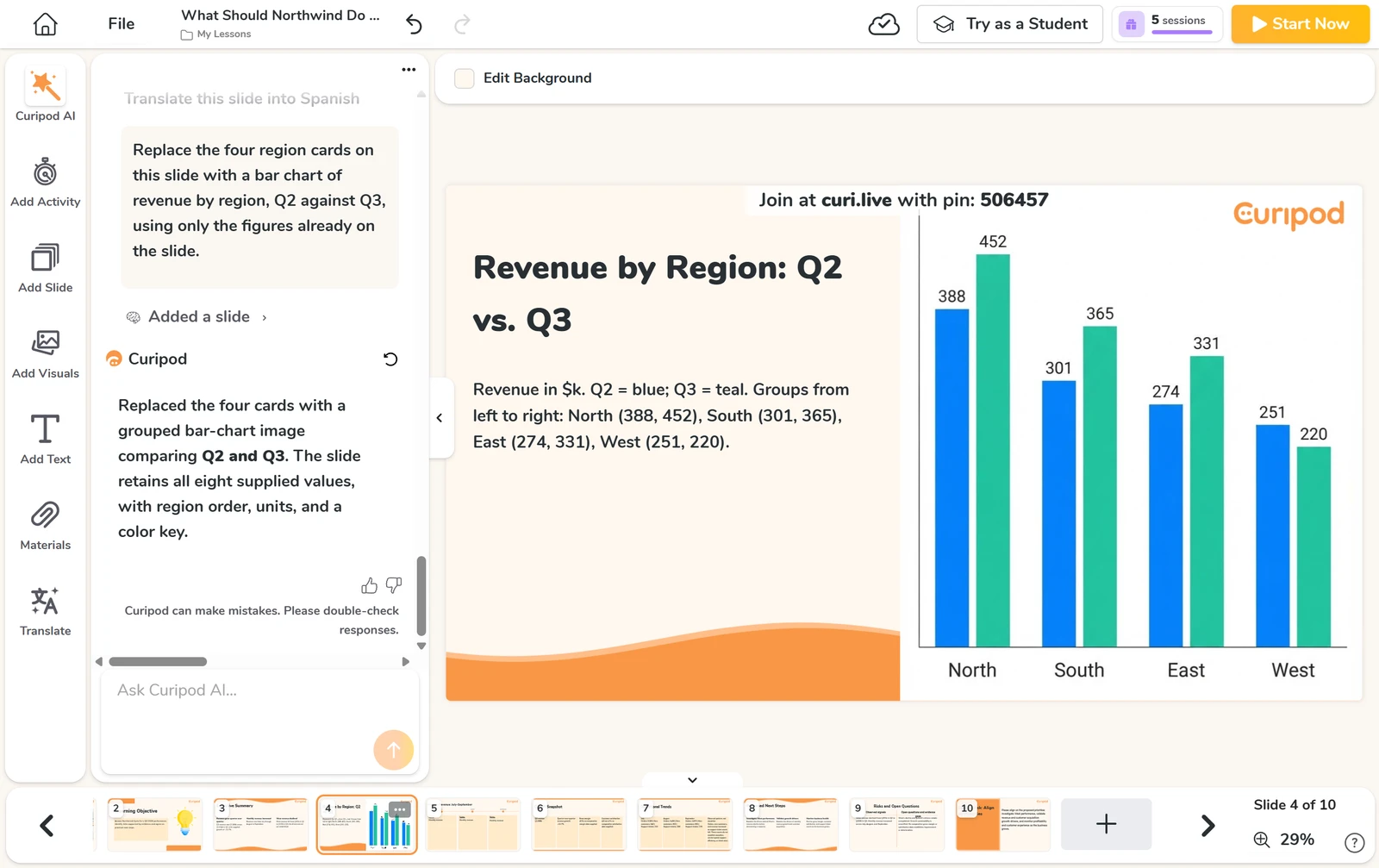
Curipod's first draft had no real charts. Where I asked for a bar chart and a line chart, I got rows of cards with the numbers as text.
One request each fixed it, with every value right. But both charts are pictures, so you cannot edit their data. The illustrations in the decks fit their slides, and none states a source.
Curipod Editing
Eight of twelve edits worked: reorder, regenerate a slide, shorten text, insert a slide, replace a picture, move an object, change the theme and undo three steps.
Four did not: there is no layout control, the charts have no data to edit, speaker notes are not possible and there is no way to comment. A theme change reached the whole deck in one request, and the undo put everything back.
Curipod Brand Control
Curipod applied both brand colours exactly, but could not apply the font or the logo, so all ten slides I checked were off-brand.
I sampled the captured pixels and they were #0b3c5d and #f2a900. I had no .pptx template, so I did not test an import.
Curipod Supplied Document Test
Curipod used every key point of my six-page PDF. You attach it with Add Materials, and Curipod asks whether to use it as source material or keep its pages.
It also added four figures that are not in the memo, such as a ratio of about 6.6 and the dollar split of the use of funds. They are correct sums, but check any figure you did not write.
Curipod Exports
On the free plan I could not export a deck. Download as PDF opens a box that says "This feature requires the school plan".
I saw no PowerPoint or Google Slides export in the File menu, so I could not compare a file with the editor. You can share a link that lets anyone copy the lesson.
Curipod Usage Rights
Curipod's terms say "You retain ownership of all rights" in what you create, but your lessons are public by default unless you opt out or are on a school plan.
For public content you give Curipod a perpetual, non-exclusive licence to use and change it. To keep a lesson private on the free plan, change the lesson setting or the default in your profile. Legal questions go to eirik@curipod.com.
Final verdict: is Curipod worth it?
Curipod is worth trying if you are a teacher, or want an accurate interactive first draft of a lesson or a deck. It kept my figures right, used every key point of my PDF and finished each deck in under a minute once I had confirmed the outline.
It is not the tool if you need a PowerPoint or PDF file on the free plan, a branded deck with your font and logo, or charts with data you can edit. It also publishes your lessons by default, so check the privacy setting first.
The nine tests I could grade average 3.7 out of 5. I rate Curipod 4.5, because the free plan let me run 9 of 10 tests and the accuracy, document use and speed were strong.
See the Curipod test results and how I rate.
Best for: Teachers who want an accurate, interactive first draft of a lesson from a short brief, and who do not need a PowerPoint or PDF file on the free plan.
Video review · 2:52
Watch me test Curipod
The whole test in a few minutes, from screen recordings of the tests. Captions and the full transcript are one click away, and the video has a page of its own.
Transcript
Hi, I'm Miles. I tested Curipod hands on, on its free plan, and here's the short version. It asked a few questions, then built each of my three decks in about a minute. Every figure in my table was right, and every key point of my PDF was used. But the first draft had no real charts, and the free plan gave me no export.
So what is Curipod? It's a lesson maker for teachers. You describe a lesson, answer a few questions, and it builds slides with polls and quizzes. I used it as a deck maker, with the same three briefs as every other tool.
The free plan has no credit meter. The only limit I saw is weekly teaching sessions, and my three decks and all my assistant requests did not use one. I left out export fidelity, because the PDF download needs the school plan.
Now the speed. Curipod chats first: a few questions, then an outline. The first questions came after about thirty three seconds. After I confirmed the outline, the water cycle deck was ready in sixty seven seconds, and the pitch deck in thirty nine.
On structure, twenty of twenty one points. The water cycle deck ends on a quiz question with no recap, and slide two of two decks is a learning objective, where I asked for an agenda. On accuracy, every figure was right. One slip: the title slide says operating costs and bike inventory, which I never gave.
The design was tidy. I counted one layout fault in thirty two slides: a heading that sits on top of the text below it. Many cards are mostly empty, but nothing else broke.
Charts were the weak spot. I asked for a bar chart and a line chart, and got cards of text. One request each fixed it, with every value right. But both are pictures, so you can't edit their data.
Next, twelve edits. Eight worked, including reorder, regenerate a slide, a new theme for the whole deck, and undo. There is no layout control, no speaker notes, no comments. The assistant applied my two brand colours exactly, but refused the font and the logo.
With the six page PDF, all fifteen key points reached the pitch deck. It added four figures that aren't in the memo, such as a ratio of about six point six. The sums are right, but check anything you didn't write.
On exports, I hit a wall. Download as PDF says this feature requires the school plan, and I saw no PowerPoint or Google Slides export. So I did not grade export fidelity.
On rights, the terms say you retain ownership of all rights. But your lessons are public by default, unless you opt out or are on a school plan, and public content carries a licence to Curipod.
On price, the free plan is free. The two paid plans have custom pricing, with a quote or a demo. No paid price is printed on the page.
So, is Curipod worth it? Yes, for teachers who want a quick, accurate lesson draft. It's not for branded business decks, or files you can take away on the free plan. The nine tests average three point seven, and I rate it four point five.
Chapters · 14
Frequently asked questions
How much does Curipod cost, and is there a free plan?
Yes, free. The free plan has weekly teaching sessions and no credit meter I could see. The school plans have custom pricing: you request a quote.
Is Curipod legit and safe?
It worked. I signed in with Google, entered no card and had no problem. Its AI page lists OpenAI among its model families and says teacher and student data is not used to train them. Trustpilot has no page for it.
Who owns the decks I make with Curipod?
You do, by the terms: "You retain ownership of all rights". Your lessons are public by default unless you opt out, and public content carries a licence to Curipod.
Can I export a Curipod deck to PowerPoint or PDF?
Not on free. Download as PDF needs the school plan, and I saw no PowerPoint or Google Slides export.
What did I not test?
Export fidelity. The PDF download is behind the school plan, so I could not compare a file. I also did not import a .pptx template.

Miles FosterOwner and tester, RankDudeMiles Foster is a pen name: the owner of RankDude, a private person, runs every test himself.
Disclosure. I tested on the free demo account anyone can open on Curipod’s site. I signed up myself and paid Curipod nothing. Curipod didn’t see this review first and had no say in my rating. How RankDude makes money is on the disclosure page.