
SlideEgg Review: AI Presentation Maker, Pricing & My Test Results
My rating
A quick first draft with figures right and editable charts. The layout has faults.
Best for: quick business decks you will tidy by hand. Not for decks from a document or an assistant that reworks slides.

Tested and written by Miles Foster
Based on 7 graded tests and my verdict. How I rate
I tested SlideEgg hands-on on its free plan, the way I test every AI presentation maker. It got a fixed quarterly review brief with a table of figures. Then I checked seven structure points, every slide for faults, twelve edits, the PowerPoint export and the terms. SlideEgg ranks #3 of the ten on my best AI presentation makers page.
Every measurement is in the SlideEgg test results.
My SlideEgg AI Presentation Maker Test Results
| Category | Grade | In short |
|---|---|---|
| Structure from a PromptEvery point of the structure was there | 5/5Excellent | |
| Slide DesignClean slides, but text touches card edges | 3/5Average | |
| Content AccuracyFigures right, a few extras I never gave | 3/5Average | |
| Editing ControlMost edits worked, the assistant said no | 3/5Average | |
| Charts & ImagesRight values, and real charts with data | 4/5Good | |
| SpeedA full deck in under three minutes | 3/5Average | |
| Pricing & ValueCheap paid plans, unclear credit costs | 4/5Good | |
| My verdict | +0.4 | |
| Overall | 4.0/5Good |
What Is SlideEgg?
SlideEgg is a template library for PowerPoint, Google Slides and Canva that now also has an AI presentation maker. It is run by Deckzi Solutions Private Limited in Chennai, India.
You type a brief, press Generate and get a deck of slides to edit. The free plan gives 200 AI credits and 3 downloads a day, and the paid plans start at $6 a month paid yearly.
How I Tested SlideEgg
Every AI presentation maker gets the same three briefs: a ten-slide quarterly review built on a table of figures, a twelve-slide teaching deck on the water cycle, and a ten-slide pitch deck from a six-page document. I ran the quarterly review and stopped there, because one deck used half of the free credits. Seven of the ten tests were graded.
My tools
Last checked 12 Nov 2026SlideEgg pros and cons
Pros
- Every figure from my table was right
- Both charts have data to edit
- All seven structure points met
- A ten-slide deck in 158 seconds
- PowerPoint export on the free plan
- Paid plan from $6 a month
Cons
- Assistant refused to edit slides
- Three layout faults in ten slides
- One deck used half the credits
- Credit cost per deck not stated
- SlideEgg logo on free slides
- No file upload for a document
SlideEgg Pricing
The cheapest paid plan is Yearly (Pro) at $6 a month, billed yearly, with 2,000 AI credits a month and custom branding. Quarterly (Basic) is $8 a month, billed $24 every three months.
SlideEgg plans and prices
Live data· last check 12 November 2026| Plan | Price a month | |
|---|---|---|
| Free200 AI credits and 3 downloads a day | $0 | 200 AI credits and 3 downloads a day |
| BasicQuarterly: 1,000 AI credits a month and 1,000 downloads a month | $8 | Quarterly: 1,000 AI credits a month and 1,000 downloads a month |
| ProYearly: 2,000 AI credits a month, unlimited downloads, custom logo and branding | $6 | Yearly: 2,000 AI credits a month, unlimited downloads, custom logo and branding |
| LifetimeOne payment: 75,000 AI credits and unlimited downloads | $120 | One payment: 75,000 AI credits and unlimited downloads |
- Lifetime is a one-time $120 payment, with no per-month price shown
- Teams is license-based per user; enterprise contact plans not listed
- Cancel anytime, with no long-term contracts stated
The page shows a crossed-out higher price and a countdown, "Limited-time pricing ends in". I did not buy a plan, so I could not see what a paid export gives you.
SlideEgg Free Plan Limits
The free plan gives 200 AI credits, and a slide costs 10. The ten-slide review used 100, so a second ten-slide deck would have used the last 100 and passed the 85 per cent line where I stop. It also allows 3 downloads a day.
I left out three tests: the pitch deck, because the create box has no place to attach a file; brand control, which sits under the paid Pro plan; and export fidelity, because I had no PowerPoint to compare with. I also did not make the water cycle deck.
SlideEgg Brief to Finished Deck
SlideEgg finished the ten-slide review 158 seconds after I sent the brief. There is no outline to confirm and no design to choose: slides appear one by one in a strip beside the plan.
The deck cost 100 credits, so a slide costs 10. The pricing page does not tell you that. I read it from the account menu afterwards.
SlideEgg Deck Structure
SlideEgg met all seven points: ten slides, a title, an agenda, a logical order, one idea per slide, a closing ask and no repeats.
The brief asked for ten slides, and I got ten. There was no length setting, so the number came from my words, and you should write the count into your brief.
SlideEgg Accuracy
SlideEgg got every figure from my table right. Revenue, the four regions, the margin and the satisfaction score all matched. Both charts plot the same numbers.
Three items were wrong or not mine. The KPI slide shows September's orders as the quarter's KPI, slide 8 sets a target of "above 4.6", and slide 9 has a quotation with no speaker.
SlideEgg Slide Design
SlideEgg's slides had three layout faults in ten slides. The look is clean, with one font family and plenty of space, but text sometimes touches the edge of its card.
On slide 2 one line runs past the right edge of its card. Half of the title slide is an empty pale panel, and the editor puts the SlideEgg logo on every slide of a free deck, so you will see it too. I checked all of this by eye and did not measure text contrast.
SlideEgg Charts and Images
SlideEgg's charts are real charts. In the editor, you click the bar chart or the line chart and see Edit Data, and the box lists every value.
I changed West's Q3 value and its bar moved. Both charts repeat their legend, once inside and once above. The deck has no photographs, so you get no images to judge here.
SlideEgg Editing
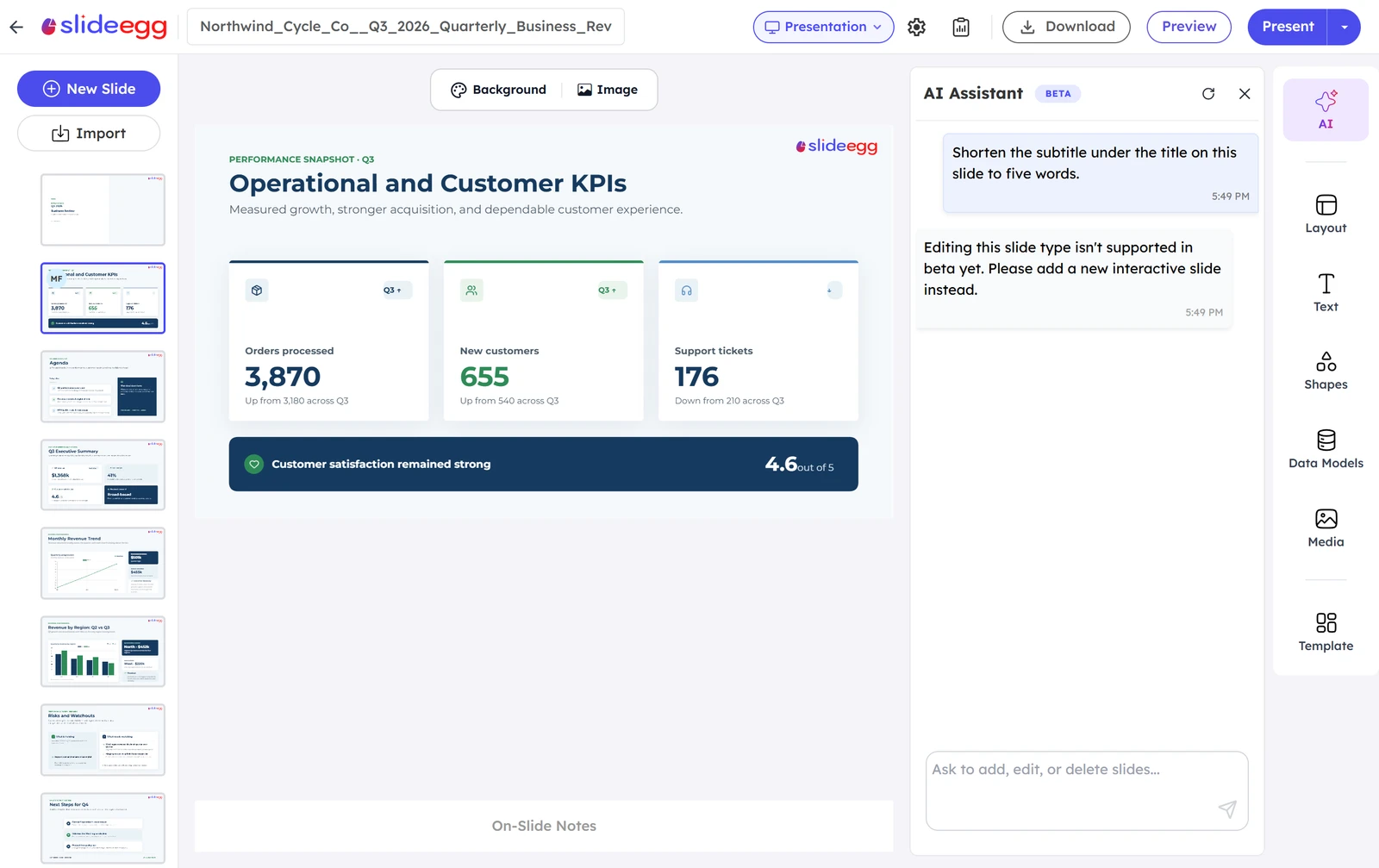
Eight of twelve edits worked with normal controls: reorder, layout, a new slide, chart data, an image, notes, moving a chart and undo. The assistant refused two, a theme did not apply, and I found no comments.
It said "Editing this slide type isn't supported in beta yet. Please add a new interactive slide instead." Asked to apply a theme, it opened a themes panel, but picking Slid Dark changed no slide.
SlideEgg Exports
SlideEgg exports to PowerPoint only, and it works on the free plan. The Download box says "Audio and video are not included. Popular slides and quiz slides are not exported."
The file held my slides, with text as text and both charts as charts. I could not open it in PowerPoint or Google Slides, so I did not grade how closely it matches what you see in the editor. The meter still read 0 of 3 free downloads afterwards.
SlideEgg Usage Rights
SlideEgg's terms do not say who owns a deck the AI writes. They say the website and its content belong to the company, and they license you to download and modify its content for personal, professional or educational presentations.
One rule matters on the free plan: "Free Users must retain the SlideEgg attribution sections generated within the templates." Paid users may remove it while subscribed. If you have questions, write to admin@slideegg.com.
SlideEgg Reviews: What Other Users Say
Trustpilot shows SlideEgg at 4.4 out of 5 from 144 reviews, and 80 per cent of them are 5 stars.
Five per cent are 1 star. The profile is marked "Paid Trustpilot subscription", and most praise is for the template library, not the AI deck maker you may be buying it for.
Final verdict: is SlideEgg worth it?
SlideEgg is worth trying if you want a fast first draft of a deck with your own figures kept right and charts you can edit. It built a ten-slide business review in 158 seconds, and eight of the twelve edits worked.
It is not the tool if you need to build a deck from a document, want the AI assistant to rework slides, or want no SlideEgg logo without paying. The free plan also gives you about two ten-slide decks.
The seven tests I could grade average 3.6 out of 5. I rate SlideEgg 4.0, because the free plan let me run 7 of 10 tests and the figures, charts and PowerPoint export all worked.
See the SlideEgg test results and how I rate.
Best for: People who want an AI first draft of a deck with their figures kept right and charts they can still edit, and who accept a SlideEgg logo on a free deck.
Video review · 2:33
Watch me test SlideEgg
The whole test in a few minutes, from screen recordings of the tests. Captions and the full transcript are one click away, and the video has a page of its own.
Transcript
Hi, I'm Miles. I tested SlideEgg hands on, on its free plan, and here's the short version. It built a ten slide business review in about two and a half minutes, with every figure from my table right and both charts editable. Eight of my twelve edits worked. But the layout has small faults, the assistant refused to edit slides, and one deck used half the free credits. My rating is four point oh out of five, from seven tests.
So what is SlideEgg? It's a library of PowerPoint and Google Slides templates that now has an AI presentation maker. You type a brief, press generate, and get a deck to edit. The free plan gives you two hundred AI credits.
A slide costs ten credits. My ten slide review used a hundred of the two hundred, so a second deck would have gone past eighty five per cent. I stopped there, which is why I ran one of the three briefs.
Now the speed. I typed the brief and sent it. There is no outline and no design to choose. The slides appeared one by one, and a hundred and fifty eight seconds later the whole deck was finished.
Then accuracy. All seven structure points were there, and every figure from my table was right, from the revenue to the four regions. But three things were not mine: the key numbers slide used one month, not the quarter, a target of above four point six, and an invented quotation.
The design was clean but not tidy. I counted three layout faults in ten slides. Text touches the bottom edge of its card on two slides, and one line runs past the edge of a card on the agenda.
The charts are real charts. When I clicked the bar chart, I got an edit data button, and the box listed every value. I changed one number, and its bar moved.
Next, twelve fixed edits. Eight worked: reordering, a new layout, a new slide, chart data, an image, notes, moving a chart and undo. The assistant said no to editing the slides, a theme did not apply, and I found no comments.
Exports work on the free plan, but only as PowerPoint. The box warns that audio, video, popular slides and quiz slides are not exported. I could not open the file in PowerPoint, so I did not grade how close it is.
On rights, the terms don't say who owns a deck the AI writes. They license you to download and edit their content, and free users must keep SlideEgg's attribution.
On price, the cheapest paid plan is Pro, six dollars a month billed yearly, with two thousand credits a month. The page never says what a deck costs in credits.
So, is SlideEgg worth it? Yes, if you want a fast first draft with your figures kept right and charts you can edit. The seven tests average three point six, and I rate it four point oh, because the free plan let me run seven of ten tests.
Chapters · 13
Frequently asked questions
How much does SlideEgg cost, and is there a free plan?
Yes, free. It gives 200 AI credits and 3 downloads a day, and a ten-slide deck used 100 credits. Paid plans start at $6 a month paid yearly.
Is SlideEgg legit and safe?
It worked. I signed in with Google, entered no card and had no problem. Trustpilot shows 4.4 from 144 reviews, mostly about its templates.
Who owns the decks I make with SlideEgg?
Not stated. The terms license you to download and modify SlideEgg content, and free users must keep its attribution. Ask admin@slideegg.com if it matters to you.
Can I export a SlideEgg deck to PowerPoint?
Yes, as a .pptx file. The free plan allows 3 downloads a day, and I saw no PDF or Google Slides export in the Download box.
What did I not test?
Three tests. The pitch deck from a document, brand control and export fidelity were left out, and the water cycle deck was not made, because a second deck passes 85 per cent of the free credits.

Miles FosterOwner and tester, RankDudeMiles Foster is a pen name: the owner of RankDude, a private person, runs every test himself.
Disclosure. I tested on the free demo account anyone can open on SlideEgg’s site. I signed up myself and paid SlideEgg nothing. SlideEgg didn’t see this review first and had no say in my rating. How RankDude makes money is on the disclosure page.