
Canva Review: AI Logo Generator, Pricing & My Test Results
My rating
A fast AI logo maker. The free AI limit ran out after three prompts.
Best for: trying an AI logo in a design tool you may already use. Not for a logo you want to register as a trademark.

Tested and written by Miles Foster
Based on 6 graded tests and my verdict. How I rate
I tested Canva hands-on on its free plan, the way I test every AI logo generator: two briefs typed as prompts, ten edits on the coffee logo, the files you can save and the terms you agree to. Canva ranks #7 of the ten on my best AI logo generators page.
Every measurement is in the Canva test results.
My Canva AI Logo Generator Test Results
| Category | Grade | In short |
|---|---|---|
| Legibility at Small SizesThe name reads at medium sizes | 4/5Good | |
| Editing ControlMost edits worked, not the icon shape | 4/5Good | |
| File FormatsA big PNG, no vector on free | 2/5Below average | |
| Usage Rights & OwnershipBusiness use, but not as a trademark | 2/5Below average | |
| Ease of Use & SpeedA logo in under a minute | 5/5Excellent | |
| Pricing & ValueA subscription is needed for vector files | 3/5Average | |
| My verdict | +0.2 | |
| Overall | 3.5/5Good |
What Is Canva?
Canva is an online design tool with a drag and drop editor. Its logo maker opens a blank logo design, and the Canva AI side panel takes a typed prompt and makes a logo from it, with no questions for you to answer first.
The free plan gives you the editor and a limited share of the AI tools. SVG files, a transparent background and a larger AI allowance come with Pro, at $15 a month.
How I Tested Canva
Every logo generator gets three briefs: a speciality coffee roaster, a family law firm and a children's coding school. I typed two of them into Canva AI as one prompt each. They had the same kind of details (name, tagline, three personality words, two colours to avoid), but my own invented names. The monthly AI limit stopped the third, so I ran six of the ten tests and left four out.
My tools
Last checked 12 Nov 2026Canva pros and cons
Pros
- A logo in about 40 seconds
- Name and tagline spelled right twice
- Five more concepts from one follow-up
- Live text and a hex colour field
- Eight of ten edits worked
- Free PNG at 2,000 pixels
- Business use is allowed in the licence
Cons
- Monthly AI limit after three prompts
- No counter for the AI allowance
- Free PNG has no transparency
- SVG needs a paid plan
- Icon shape cannot be edited
- Licence bars use as a trademark
Canva Pricing
- Pricing & Value
- 3/5Average
Canva's cheapest paid plan is Pro, at $15 a month or $144 a year; Business is $21 a month per person. The table shows what each plan costs as my price tracker reads it, last read on 12 November 2026.
Canva plans and prices
Live data· last check 12 November 2026| Plan | Price a month | |
|---|---|---|
| FreeLimited access to Standard and Premium AI tools; PNG, JPG, PDF | $0 | Limited access to Standard and Premium AI tools; PNG, JPG, PDF |
| Pro10 times the AI allowance of Free; SVG and a transparent background | $12 | 10 times the AI allowance of Free; SVG and a transparent background |
| Business20 times the AI allowance of Free; per person | $20.83 | 20 times the AI allowance of Free; per person |
- Prices exclude applicable tax.
- AI add-ons (AI Pass, AI top-ups) cost extra.
- Enterprise is contact-sales only and not priced.
I did not buy a plan or start a trial. Vector files need a paid plan, and there is no one-off option, so you pay for as long as you want to make them. I grade the value average.
Canva Logo Quality
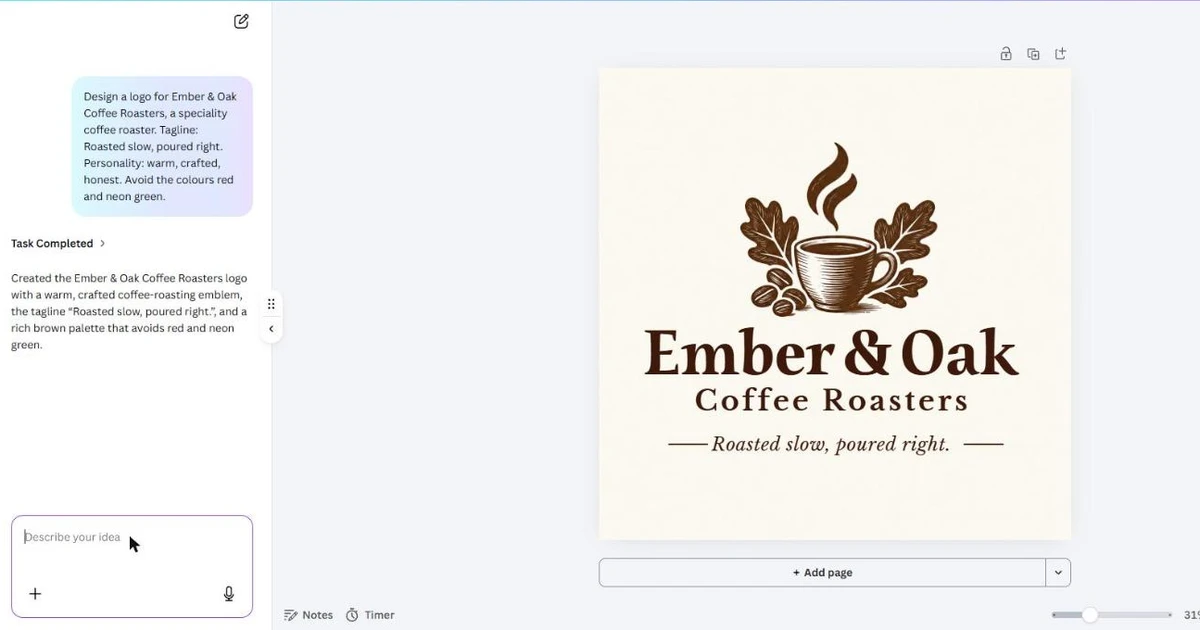
Canva AI's logos for my two briefs were clean and correct. The coffee logo is a steaming cup with oak leaves and coffee beans above Ember & Oak in a brown serif, and the law firm logo is columns with family figures in navy. Names and taglines are spelled right, and none of the avoided colours appears.
A follow-up asked for five more concepts and returned five pages in about a minute, though one is a wordmark with no symbol. You can judge them yourself in the picture; I judged them by eye only, so I could not grade design quality, originality or variety.
Canva Free Plan Limits
The free plan stopped me after three prompts. The second prompt came back with a warning that I was close to the plan's monthly AI limit, and after the law firm logo the panel said the limit was reached and resets on 1 December.
Canva shows no counter for the allowance, so you cannot see how close you are, and I could not stop at 85 percent as I do with other tools. I used an existing account, so I cannot tell whether earlier use this month had already counted against it. The coding school brief was not run, and I tried no workaround.
Canva Editing
- Editing Control
- 4/5Good
I made the ten fixed edits on the coffee logo and eight worked: typeface, hex colour, moving and resizing the icon, letter spacing, swapping the icon, the tagline and a one-colour version. The name stays live text, so you get the usual text controls.
Two did not work: the icon's shape cannot be edited, and ten undo presses brought back the name but left the emblem black. The icon swap went through a stock photo search, and the tagline was already in the logo. I grade it good.
Canva Logos at Small Sizes
- Legibility at Small Sizes
- 4/5Good
The name reads at 64 pixels. At 32 it is soft but can be made out and the cup and leaves still read as a symbol. At 16 the mark is a smudge, and the tagline is unreadable at 32 and 16.
I judged this on one logo, not three, and did not check for a simplified icon. I did not run the printed 1 cm test. I grade it good.
Canva File Formats
- File Formats
- 2/5Below average
The free download is a 2,000 pixel PNG with the cream background as part of the picture, and no vector file. In the download panel the size slider and the transparent background switch are locked, and SVG carries Canva's crown, which marks a paid feature.
JPG and PDF are listed but I did not download them, and no CMYK file is offered on free. That is a below average result for the free plan.
Canva Usage Rights
- Usage Rights & Ownership
- 2/5Below average
Canva's licence allows business use but bars one thing a logo needs. Section 9 says you cannot "use any of the Content as part of a trade-mark, design-mark, trade-name, business name or service mark (excluding fonts)".
The page does not say whether an AI logo counts as Content. It also does not state ownership, a design kept from other users, trademark registration or fonts licensed for logos. I count one of my five rights, so I grade this below average.
Canva Speed and Ease of Use
- Ease of Use & Speed
- 5/5Excellent
Canva is fast: the first logo came about 40 seconds after I sent the prompt, in about six steps from opening the logo maker to sending the brief.
From the logo maker page to a PNG on disk took about three minutes. I timed two briefs, not three, on an account that was already signed in. I grade it excellent.
Final verdict: is Canva worth it?
Canva is worth trying if you want a quick AI logo in a tool you may already use, and you can wait to pay until you need vector files. The logos came back fast and correct, and the editor let me change most of what I asked.
It is not the tool if you need to register the logo as a trademark or want a vector file without paying. On free the monthly AI limit arrived after three prompts, the file has no transparency, and the licence bars using its Content as part of a trade-mark.
The six tests I could run average 3.3 out of 5. I rate it 3.5 because the free plan let me run six of the ten tests and both logos were correct. Four tests need more concepts or a bought package.
See the Canva test results and how I rate.
Best for: People who want to try an AI logo in a tool they may already use, and will pay for a plan before they need vector files or a transparent logo.
Video review · 3:22
Watch me test Canva
The whole test in a few minutes: the briefs, the logos, the edits, files, rights and prices. Captions and the full transcript are one click away, and the video has a page of its own.
Transcript
Hi, I'm Miles. I tested Canva, the online design tool, as an AI logo generator on its free plan. Here's the short version. It made my coffee roaster logo in about forty seconds, with the name and the tagline spelled right, and five more concepts in about a minute. But after three prompts the free plan said its monthly AI limit was reached. The free file is a PNG with no transparency, and SVG needs a paid plan. My rating is three and a half out of five, from the six tests I could run.
So what is Canva? It is an online design tool with a drag and drop editor. The logo maker opens a blank logo design, and the Canva AI panel makes a logo from one typed prompt. Pro adds SVG files, a transparent background and more AI.
Every logo generator gets the same kind of briefs: a coffee roaster, a family law firm and a children's coding school. I typed the first two. The coffee logo is a steaming cup with oak leaves above the name. The law firm logo is columns with family figures in navy. Names and taglines are right, and none of the colours I asked to avoid appear. I only judged them by eye, so I did not grade design quality.
Then the free plan ran out. After the second prompt Canva warned me I was close to the monthly AI limit, and after the third it said the limit was reached and resets on the first of December. There is no counter, so I could not see it coming. The coding school brief was not run.
Now the ten fixed edits on the coffee logo. Eight worked: the typeface, a hex colour, moving and resizing the icon, letter spacing, swapping the icon, the tagline and a one colour version. Two did not: the icon's shape cannot be edited, and undo left the emblem black. Notice the letter spacing pushed the name onto two lines over the tagline.
I shrank the logo to sixteen, thirty two and sixty four pixels. The name reads at sixty four. At thirty two it is soft but the cup still reads. At sixteen it is a smudge, and the tagline never reads.
The free file is a PNG, two thousand pixels square, with the cream background baked in. The size slider and the transparent background switch are locked, and SVG carries a crown. No vector file on free.
Here is the catch. The licence allows business use, but section nine says you cannot use its content as part of a trademark, a business name or a service mark. It does not say whether an AI logo counts as content, and it does not state ownership.
It is quick. The first logo came about forty seconds after I sent the prompt, in about six steps, and a PNG reached my disk in about three minutes.
The cheapest paid plan is Pro, with Business above it. Vector files need a paid plan, and there is no one off option. I did not buy a plan or start a trial.
My verdict. Canva is worth trying if you want a quick AI logo in a tool you may already use. It is not the tool if you need to register the logo as a trademark, or want a vector file without paying. The six tests average three point three, and I rate it three and a half, because the free plan let me run six of the ten tests and both logos were correct.
Chapters · 13
Frequently asked questions
How much does Canva cost, and is there a free plan?
Yes. Free is $0 with a limited share of the AI tools and a monthly AI allowance. The cheapest paid plan, Pro, is $15 a month or $144 a year.
Is Canva legit and safe?
Yes, in my test. I used an existing signed-in account, bought nothing, started no trial and entered no card.
Who owns the logo I make with Canva?
Not stated. The licence allows business use but does not give ownership, and section 9 bars using Content as part of a trade-mark or business name. It does not say whether an AI logo counts as Content.
Which files do you get from Canva?
A PNG, 2,000 pixels square, with a background and no transparency, on the free plan. You need a paid plan for SVG and a transparent background.
How do I cancel Canva?
Not tested. I stayed on the free plan and started no trial, so I did not see the cancel steps.

Miles FosterOwner and tester, RankDudeMiles Foster is a pen name: the owner of RankDude, a private person, runs every test himself.
Disclosure. I tested on the free demo account anyone can open on Canva’s site. I signed up myself and paid Canva nothing. Canva didn’t see this review first and had no say in my rating. How RankDude makes money is on the disclosure page.