
Looka Review: AI Logo Generator, Pricing & My Test Results
My rating
A strong free editor and plenty of ideas. Nothing downloads until you pay.
Best for: small businesses that want to see and edit a logo before paying once for the files.

Tested and written by Miles Foster
Based on 5 graded tests and my verdict. How I rate
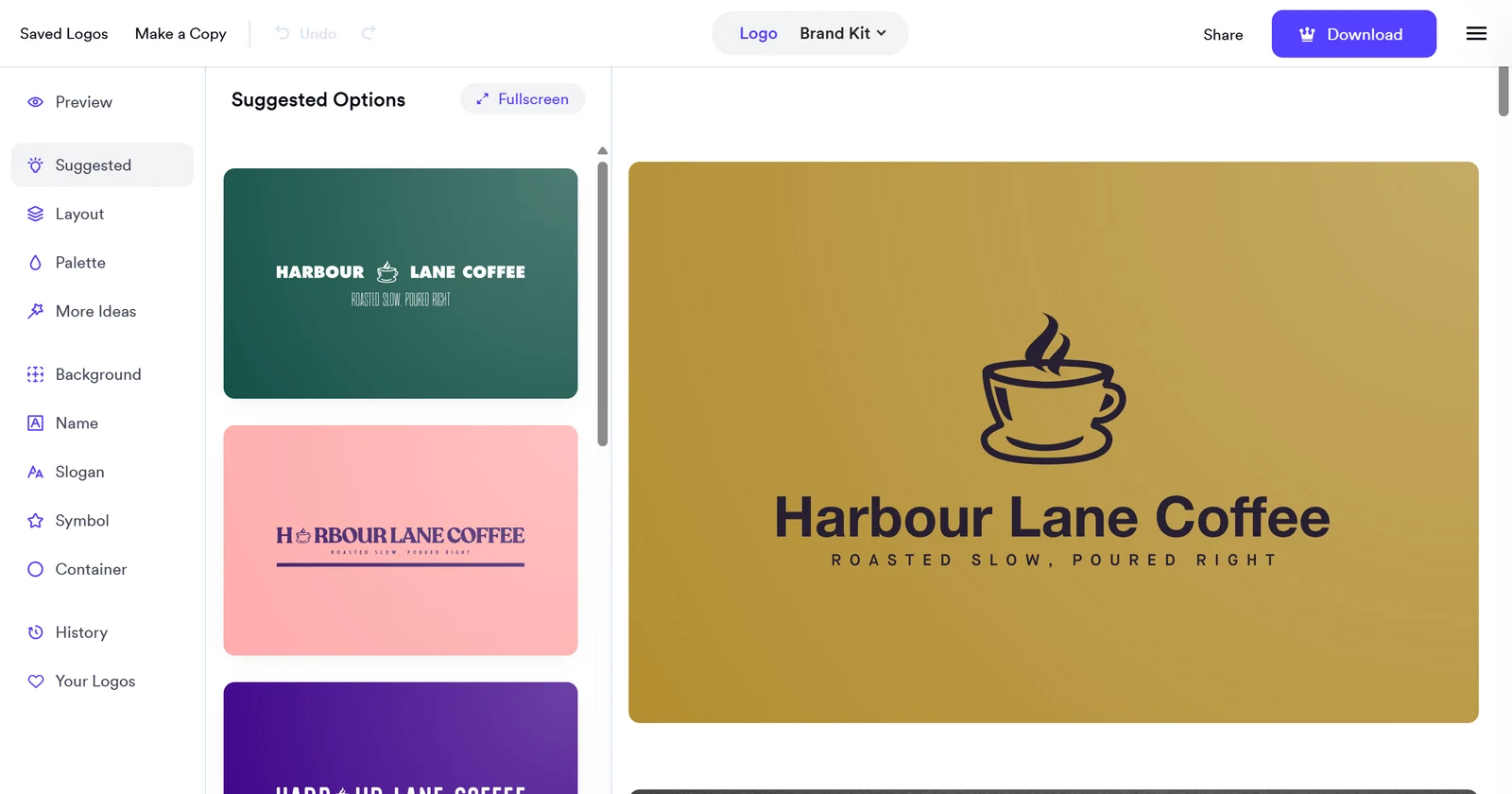
I tested Looka, an AI logo generator, on the free plan with three briefs: a coffee roaster, a family law firm and a children's coding school. I counted the first 20 concepts of each, ran ten edits in the editor, rendered the chosen logos at 16, 32 and 64 pixels and read the terms and the package screen. The free plan gave designs only: nothing could be downloaded. Looka ranks #6 of the ten on my best AI logo generators page.
Every measurement is in the Looka test results.
My Looka AI Logo Generator Test Results
| Category | Grade | In short |
|---|---|---|
| Legibility at Small SizesNames stay readable small, thin icons fade | 4/5Good | |
| Variety of ConceptsPlenty of different ideas on every brief | 4/5Good | |
| Editing ControlNearly every change worked, except icon shape | 4/5Good | |
| Usage Rights & OwnershipCommercial use is allowed, little else | 2/5Below average | |
| Pricing & ValueFree to design, files start at $20 | 3/5Average | |
| My verdict | +0.1 | |
| Overall | 3.5/5Good |
What Is Looka?
Looka makes a logo from a few answers. You give an industry, a colour, your name and a tagline, and it shows a page of concepts you can open in an editor. Looka is made by Looka Inc., a Canadian company, and sells logos and a yearly Brand Kit of 300+ branded designs.
I tested it on the free plan. Designing and editing cost nothing, but every download is paid, so the free plan gives designs only.
How I Tested Looka
Every logo generator gets the same three business types and the same ten edits. This run used its own names and taglines (Harbour Lane Coffee, Calloway & Reid Family Law, Pixel Pond Coding School), not the fixed briefs file; the grades do not depend on the names. I tested Looka on the free plan, so five of the ten tests could not be run; the sections on files, speed and the design score say which and why.
My tools
Looka pros and cons
Pros
- Free editor, no card needed
- 14 different ideas per brief
- Nine of ten fixed edits worked
- Name readable at 32 pixels high
- Hex colours, symbol search and undo
- Clear one-off prices
- Commercial use stated in the terms
Cons
- No download on the free plan
- Terms silent on trademarks
- Vector files cost $65
- No field for colours to avoid
- No icon shape editing
- Thin icons vanish at 16 pixels
Looka Pricing
- Pricing & Value
- 3/5Average
Looka's cheapest vector files with full rights come with the $65 Premium package, paid once. The $20 Basic package gives one low-res file with no transparent background. Prices read on 5 November 2026.
Looka plans and prices
| Plan | Price a month | |
|---|---|---|
| BasicOne low-res file, no transparent background | $20 | One low-res file, no transparent background |
| PremiumPNG, PDF, SVG and EPS, unlimited changes | $65 | PNG, PDF, SVG and EPS, unlimited changes |
| Brand KitA year of the same files plus 300+ branded designs | $96 | A year of the same files plus 300+ branded designs |
| Brand Kit WebA year of the Brand Kit plus an AI website | $129 | A year of the Brand Kit plus an AI website |
Looka Logo Quality and Variety
- Variety of Concepts
- 4/5Good
Looka gave 14 different ideas on average among the first 20 concepts of each brief. Each page held at least 18 concepts and a Load more logos button added more. The coffee roaster brief gave 14 distinct ideas, the law firm 13 and the coding school 16.
Design quality and originality were not graded: the design checklist needs three outside judges, and reverse image and trademark searches sit behind bot checks I never bypass.
Distinct ideas in the first 20 concepts
| Brief | Ideas |
|---|---|
| Coffee roaster, Harbour Lane Coffee | 14 |
| Family law firm, Calloway & Reid | 13 |
| Coding school, Pixel Pond | 16 |
The name was spelled right on all 60 concepts and every concept carried the tagline. Looka's questions have no field for colours to avoid, so that part of the brief could not be given. 7 of the first 20 coding concepts used a black or grey background anyway, and none showed a computer or code symbol.
Editing a Looka Logo
- Editing Control
- 4/5Good
Nine of ten fixed edits worked in Looka's editor without a workaround. I changed the typeface, set the colour by hex code, swapped the icon for a coffee bean, spaced the letters, resized the icon, moved it and undid everything back to the start.
Ten edits on the coffee logo
| What happened | Edits |
|---|---|
| Done without a workaround | 9 of 10 |
| Editing the icon shape | Not possible |
Symbols can be flipped, sized and moved, but not reshaped. If the icon is almost right, you must pick another one.
Looka Logos at Small Sizes
- Legibility at Small Sizes
- 4/5Good
A Looka logo keeps its name readable at 32 pixels high, on all three of my chosen logos. At 64 pixels the symbol was clear on all three. At 16 pixels only the thick-lined coffee cup still looked like a cup.
The tagline was unreadable at every size. I read these from the on-page preview, because the free plan gives no file.
Looka File Formats
Not tested. Looka's free plan lets you design and edit, but nothing can be downloaded, so I could not open a vector file, measure a PNG, check for a favicon or a CMYK file, or check the brand kit.
The package screen is the only evidence: the $20 Basic package is "One low-res file" with "no transparent file", and the $65 Premium package lists "Multiple high-res file types". I did not grade what the page promises. On 7 November 2026 I read its FAQ again: Premium and the Brand Kit come with PNG, PDF, SVG and EPS files, and Basic with a PNG file.
Who Owns a Looka Logo?
- Usage Rights & Ownership
- 2/5Below average
Looka's terms state commercial use and the package screen states full ownership, so two of the five rights I look for are in writing. The terms are silent on trademark registration and on a design not being sold to anyone else.
They say some fonts and symbols might be licensed from a third party, name The Noun Project as a source, and put the risk of those on you. You should run your own checks before you register a mark.
Five rights in writing
| Right | Stated? |
|---|---|
| Commercial use allowed | Yes, in the terms |
| You own the logo | Yes, on the package screen |
| Design not sold to others | Not stated |
| Trademark registration allowed | Not stated |
| Typefaces licensed for logos | Not stated |
Looka Speed and Ease of Use
Not graded. Looka's free plan gives no final files, and the scale ends at files saved on disk. What I could time: the questions took about 30 seconds of scripted steps and the first concepts appeared about 9 seconds after the last one on the coffee brief.
Reaching them took 12 steps (clicks and typed answers) on the last two briefs. This test needs a bought logo and its saved files.
Final verdict: is Looka worth it?
If this were my shop, I would design on Looka for free and decide after. Looka is worth trying if you want to see many ideas and edit them before you pay. The ideas, the editor and the small-size test all did well; only the terms and the paywall let it down.
It suits owners who want a logo this week and will pay once for the files. It suits you less if you need a trademark or an exclusive design: the terms say little on both, and the free plan produced designs only, with no file to keep. Going past the paywall costs $65 for vector files.
The five tests average 3.4 out of 5. I rate Looka 3.5, because the free design and editing step is the strongest part and the weak spot is the paywall, not the tool.
See the Looka test results and how I rate.
Best for: Small businesses that want to see and edit a logo for free before paying, and are happy to pay once for the files.
Video review · 8:15
Watch me test Looka
The whole test in about eight minutes: three briefs, ten edits, small sizes, the terms and the price. Nothing downloads on the free plan. Captions and the full transcript are one click away, and the video has a page of its own.
Transcript
Hey, I'm Miles, and this is RankDude, where I test AI tools hands on and publish every number, so you can decide before you pay. Today it's Looka, an AI logo generator. I stayed on the free plan the whole time, and I gave it three business types: a coffee roaster, a family law firm, and a children's coding school. The short version is that Looka lets you design and edit a logo for free, with plenty of different ideas, and nine of my ten fixed edits worked. The catch is that nothing downloads until you pay. The cheapest vector files cost sixty-five dollars. My rating is three point five out of five, from five tests.
So, what is Looka? You tell it your industry, a colour, your name and a tagline. It then shows a page of logo concepts, and you open one in an editor. Here's the whole flow on screen. Industry, then a page of example logos you can skip, then a colour, then your name and tagline, then the kind of symbol you want. About twelve steps, clicks and typed answers. The questions took about thirty seconds of scripted steps, and the first concepts appeared about nine seconds after the last one on the coffee brief. Designing and editing are free, and there is no time limit. Every download is paid. So on the free plan, Looka gives you designs only.
Every logo generator I review gets the same three business types and the same ten edits. This run used its own names and taglines: Harbour Lane Coffee, Calloway and Reid Family Law, and Pixel Pond Coding School. They are not the fixed briefs file, and the grades do not depend on the names. Ten tests are possible. Because I stayed on the free plan, five of them could not be run. Brand kit, file formats and ease of use need a downloaded package. Originality needs searches that sit behind bot checks. Design quality needs three outside judges. So the score rests on five tests, and I say so on the page.
First, variety. I counted the different ideas in the first twenty concepts of each brief. A new symbol, layout or type treatment is one idea. A colour swap, or the same icon moved, counts once. The coffee roaster gave fourteen. The law firm gave thirteen. The coding school gave sixteen. That averages fourteen point three, which is a four. The name was spelled right on all sixty concepts, and every concept carried the tagline. Looka's questions have no field for colours to avoid, so that part of the brief could not be given. Seven of the first twenty coding concepts used a black or grey background anyway. None showed a computer or code symbol. You got books, an apple, a lightbulb and a graduation cap.
Now editing. I ran ten fixed edits on the coffee logo. I changed the typeface. I typed a colour by hex code, five A three A two two, and the name turned brown. I changed the letter spacing with a slider. I moved the icon, and I made it bigger. I searched for a mug and swapped the icon. I deleted the tagline, and added it back. I made a one-colour version, and I pressed undo until I was back at the start. Nine of ten worked without a workaround. The one miss is editing the shape of an icon. You can flip it, size it, and move it, but you cannot reshape it. If it's nearly right, you pick another one. That scores a four.
Next, small sizes. I took the logo I chose for each brief, and drew it at sixteen, thirty-two and sixty-four pixels high, from the logo's own vector drawing. The names stayed readable at thirty-two pixels on all three. At sixty-four, the symbols were clear on all three. At sixteen, only the thick-lined coffee cup still looked like a cup. The thin scales and the thin graduation cap faded away. And the tagline is unreadable at every size. I read these from the preview on the page, because the free plan gives no file. So this is a four.
Who owns the logo? I read the terms of service, and the package screen, for five rights. Commercial use is stated in the terms. Ownership is stated on the package screen, which says you will always own the rights to your logo, even after a subscription ends. That's two of five. The terms say nothing about trademark registration, nothing about the design not being sold to anyone else, and nothing about the typefaces. They do say that some fonts and symbols might come from third parties, and that the risk is yours. So before you register a mark, do your own checks. That scores a two.
So what happens when you press Download? On the free plan, you get a screen, not a file. It lists logo files, a website, a print shop and partner offers. It says the logo files come with a subscription to the brand kit, with transparent backgrounds, high-resolution PNG, PDF and vector files. And on the next screen, it asks you to choose a package. I stopped there. I never entered a card, and I paid nothing.
Pricing. This is the package screen from my signed-in account, and I read every package. Basic is twenty dollars, once. But it gives one low-resolution file, with no transparent background, and no vector. Premium is sixty-five dollars, once, for PNG, PDF, SVG and EPS files, with unlimited changes. The brand kit is ninety-six dollars a year, and the brand kit with a website is one hundred twenty-nine dollars a year. The cheapest vector files with full rights are in the Premium package. Sixty-five dollars, one time, is a three.
So, is it worth it? Yes, as a place to design and edit for free before you decide. The five tests average three point four. I rate Looka three point five, because the free design and editing step is the strongest part, and the weak spot is the paywall, not the tool. It suits owners who want a logo this week and will pay once for the files. It suits you less if you need a trademark, or a design that is yours alone, because the terms say little on both. Every number, screenshot and price is in the written review and the test results. I recorded the editing again for this video, and the numbers come from my first run. The link is below.
Chapters · 10
Frequently asked questions
How much does Looka cost, and is there a free plan?
Designing is free. Downloading is not: the Basic package is $20 for one low-res file, Premium is $65 once for PNG, PDF, SVG and EPS, and the Brand Kit is $96 a year.
Who owns a Looka logo?
You do, according to the package screen: it says you will always own the rights to your logo, even after a subscription ends. The terms allow commercial use but say nothing on trademark registration, so check before you register.
Which files do you get from Looka?
Not tested. The free plan gives no file at all. The package screen lists one low-res file for $20 and "multiple high-res file types" for $65; I did not open those files.
Is Looka legit and safe?
Yes, in my test. It did what it said before the paywall, never asked for a card and let me leave without buying. Read the terms on fonts and symbols before you register a mark.
How do I cancel Looka or get a refund?
Not tested. I did not buy, so I could not try it. The terms call one-time fees non-refundable, but say support can cancel one within 7 days if no file was downloaded. A Brand Kit subscription can be refunded within 7 days on the same condition.

Miles FosterOwner and tester, RankDudeMiles Foster is a pen name: the owner of RankDude, a private person, runs every test himself.
Disclosure. I tested on the free demo account anyone can open on Looka’s site. I signed up myself and paid Looka nothing. Looka didn’t see this review first and had no say in my rating. How RankDude makes money is on the disclosure page.