
Thunkable Review: AI App Builder, Pricing & My Test Results
By Miles Foster, Owner and tester, RankDude. Tested , published .

Prefer to listen or watch? A 3-minute walkthrough, or the 6-minute video. Sound on.
I gave Thunkable the same brief every app builder gets: a booking app for a made-up Pilates studio, built as a phone app. I used the free plan only, and it produced no live app. The app ran inside the builder, but publishing starts on a paid plan, and my app needed $59 a month because it was over the free screen limit. I sent five requests, used up the free tokens, opened every publish option and emailed support three questions.
Every measurement is in the Thunkable test results.
My Thunkable AI App Builder Test Results
| Category | Grade | In short |
|---|---|---|
| Brief accuracyFacts right, but no logins and invented enquiries | 3/5Average | |
| Code exportCode visible, but no source download found | 2/5Below average | |
| Cost to finishFree tokens ran out after five requests | 3/5Average | |
| Overall | 2.7/5Average |
What Is Thunkable?
Thunkable is a builder for phone apps. You describe an app in chat, and its AI builds the screens and the code.
The free plan builds and previews the app, but it does not publish it. It also gives only 2,000 AI tokens in all and five screens a project. That is the plan I tested.
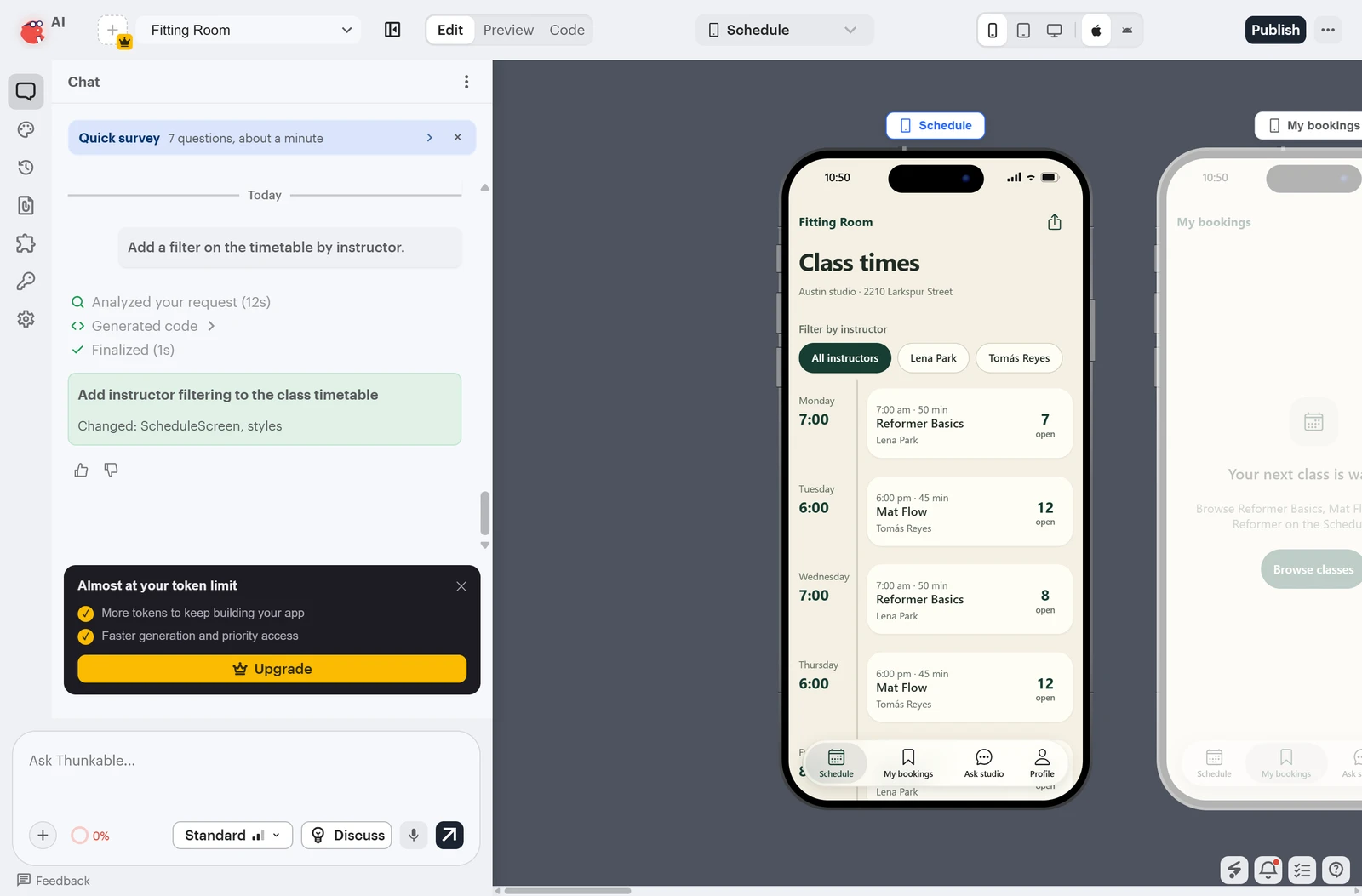
The builder has an Edit, a Preview and a Code tab. The chat sits on the left and the phone preview on the right, with buttons to switch between phone, tablet and desktop shapes and between an iPhone and an Android look.
How I Tested Thunkable
Every number here comes from my own tests. Nothing is estimated or copied, Thunkable never saw the review first, and every app builder gets the same brief. I tested the free version of Thunkable and paid nothing. The free version is limited, so only three of the ten tests could be graded. For the other seven I say what I could not test and why, and I do not guess. That way you can see what the free version shows you, and where it stops.
My tools
Thunkable pros and cons
Pros
- A 13-screen app in about five minutes
- Free plan asked for no card
- Changes by chat worked first time
- All ten brief facts on screen
- Token meter is clear and stops at zero
- Test apps for Android and iPhone from the builder
Cons
- Free plan never gives a live app
- No sign-in: admin screens open to anyone
- Three invented enquiries on screen
- Free tokens covered only five requests
- App was over the free screen limit
- No source download found
Thunkable Pricing
Thunkable has a Free plan, then $19 a month for 20,000 tokens and one live app, $59 a month for 50,000 tokens, and $189 a month for 100,000. Prices read on 27 October 2026, monthly view.
Thunkable plans and prices
| Plan | Price a month | |
|---|---|---|
| Free2,000 AI tokens in all, 5 screens a project, no live app. The plan I used | $0 | 2,000 AI tokens in all, 5 screens a project, no live app. The plan I used |
| Accelerator20,000 tokens a month, 10 screens, 1 private project, 1 live published app | $19 | 20,000 tokens a month, 10 screens, 1 private project, 1 live published app |
| Builder50,000 tokens a month, 100 screens, 1 live app, iPhone store publishing, in-app purchases | $59 | 50,000 tokens a month, 100 screens, 1 live app, iPhone store publishing, in-app purchases |
| Advanced100,000 tokens a month, unlimited live apps, responsive web apps, custom domains | $189 | 100,000 tokens a month, unlimited live apps, responsive web apps, custom domains |
Thunkable Cost: What My Free Plan Really Cost
In total I paid nothing, and you would pay nothing for the same test. The free plan gave me 2,000 AI tokens in all. The build and each change used 400, so five requests used them all.
What my test cost
| What I paid for | Cost |
|---|---|
| Free plan, one month | $0 |
| Tokens used of 2,000 | 2,000 |
| Requests the tokens covered | 5 |
| Total I paid | $0 |
The same test needs about thirteen requests. Thunkable stops at zero and offers its plans, and I saw no overage or automatic top-up. What a live app costs to run, I could not see.
Thunkable Build Speed: One Brief to 13 Screens
I pasted the brief into Thunkable and it asked no questions. About five minutes later it had built 13 screens: the timetable, the class page, the pass page, a profile, the admin screens and more.
The builder shows its own stages: plan, sketch the main screen, design, and then write the code. Writing the code took the longest, a little over three and a half minutes.
The app first ran only in the builder. Thunkable said sign-in and shared data need a cloud database through your own Supabase account, and I chose to keep local storage. A live app at a public address never existed on the free version, so build speed is not graded.
Thunkable Accuracy: Did It Build What I Asked?
All ten facts in the brief are on the screens: the name, the owner, the address, phone, email, the three classes with their days, times and instructors, and the two prices. Ten of the fifteen checks that could run passed, which is a 3. The passes include the places left on each class, the admin adding, editing and deleting a class, and the Ask the studio form.
Thunkable also invented something. The admin screen shows three enquiries from people I never made up, with dates. The brief said to invent nothing. Sign-up, log-out and log-in, password reset and separate admin and instructor accounts do not exist, so those four checks failed. Nine more could not run, because a booking needs a class credit and the payment that gives one is not connected.
This was checked in the builder preview, not on a live app, so the grade is provisional.
Thunkable Editing: Twelve Changes Tested
I ran four of the twelve changes: the green and cream colours, an About page, a smaller capacity for Power Reformer and an instructor filter. Each took between 15 and 55 seconds, and none broke an earlier change. Three worked at the first try. The About page was added as a screen, but I found no way to open it from the app.
Twelve changes, one request each
| What happened | Changes |
|---|---|
| Worked the first time | 3 |
| Added but not reachable | 1 |
| Not run, free tokens gone | 8 |
After the fifth request the tokens were gone and a page offered the paid plans. The other eight changes, such as a bug fix, a second email and a waiting list, were not run. This test is not graded.
Thunkable Publishing: What the Free Plan Cannot Do
There is no publishing on the free plan, so there is no link to open or share, and nothing to time. All three publish choices carry a crown, and the one for the web says to upgrade to Builder or Advanced.
The publish checklist read 5 of 23 items ready, and it said the plan does not include publishing to the app stores. The web option says to upgrade to Builder or Advanced, while the membership page lists responsive web apps under Advanced only.
Going live
| What I measured | Result |
|---|---|
| A live app on Free | Not possible |
| Screens in my app, and the Free limit | 14 and 5 |
| Plan my app needed | $59 a month |
The next plan up, $19 a month, lists one live app, but it allows 10 screens and my app had 14. Page speed, layout and uptime need a public address, so none could be measured on the free version. Publishing is not graded.
Thunkable Security: Logins and Private Data
There is no sign-in to test. The app has no sign-up, log-in or reset screen, and the Profile screen has an Instructor view button and an Admin view button that anyone can press.
Thunkable says accounts need a cloud database, and that means connecting your own Supabase account. When I opened Supabase, its sign-up page asked for a human check and a new account. That was outside this test, so I did not create one and could not run my two access attacks. This test is not graded.
Thunkable Database: Does the Data Survive?
Without a cloud database the app keeps its data on the device. My Ask the studio message, an added class and a changed capacity all survived a reload and four later changes, but bookings could not be made and the CSV button gave no file.
The six data checks need a database, so this test is not graded.
Payments and Emails in Thunkable
I did not run payments or emails. They need keys that are yours to supply, so the six checks that depend on them are left out, and this test is not graded.
The app has a pass page with a Pay $95 button. It answered that checkout is not connected and that no payment was taken. I created no Stripe account.
Can You Take Your App Out of Thunkable?
Exporting means downloading your app's code so it can run somewhere else. On the free plan I found no download of the code. The Code tab shows it and lets you edit it, and the Download menu makes an installable test app instead.
I did not run the code anywhere else and did not read the terms, so I cannot say who owns the app. The grade is a provisional 2.
Thunkable Support and How to Cancel
I emailed three questions to Thunkable Support on 27 October 2026: how to stop people signing up as admin, how to export data and code, and how to cancel. No reply had arrived when I wrote this, so support is not graded.
I paid nothing, so I could not test cancelling, and you have nothing to cancel on a free account. The membership page says you can change or cancel your plan any time, and the only control on a free account is Delete account.
The page says: 'Permanently delete your account and all of your data. This cannot be undone.' I did not press it.
Thunkable Reviews: What Other Users Say
Trustpilot showed Thunkable at 2.2 out of 5 from nine reviews when I read it on 28 October 2026. Eight were one star, and one was five stars from February 2020. G2 would not load for me.
The first page held eight reviews, dated February 2020 to May 2026. The complaints were a refund refused because credits had been used and an AI that repeats the same errors. One reviewer says a $499 charge was not authorised. Others mention an account that could not be deleted, buggy in-app purchases and the cost of removing branding. Trustpilot does not check these claims, and Thunkable replied to two of them. I did not test any of these points, so you should read the reviews before you decide.
Final verdict: is Thunkable worth it?
If this were my studio, I would not judge Thunkable on its free plan alone, and I would not pay $59 a month on this evidence either. The free plan produced no live app, so I cannot tell you whether a published Thunkable app works.
The free plan suits you if you want to see a phone app take shape and click through it. It suits you less if you need to know that a booking app is safe: the sign-in, the payments, the emails and publishing all sit behind a paid plan or a Supabase account, and I could not test them.
The three graded tests average 2.7 out of 5, and I rate Thunkable 2.7, provisional. Brief accuracy scores 3, the code export 2 and the price 3. The rating can move once a paid plan is tested.
See the Thunkable test results and how I rate.
Best for: People who want to try a phone app for free, and are ready to pay before it goes live.
My grade: 2.7/5. The ten grades say where it is strong and where it is not.
Video review · 5:47
Watch me test Thunkable
The whole test in five minutes: one brief to 13 screens, what the free plan could and could not test, and what it cost. Captions and the full transcript are one click away.
Transcript
Hey, I'm Miles, and this is RankDude, where I test AI tools hands on and publish every number, so you can decide before you pay. Today it's Thunkable, an AI app builder for phone apps. I used the free plan only, and paid nothing, and gave it the same brief every builder gets: a Pilates booking app called Fitting Room. The short version is that on the free plan, Thunkable built a thirteen screen app in about five minutes and ran it in the builder. But the free plan gives no live app, the app has no sign-in, and it made up three enquiries that I never wrote. Only three tests could be graded. My rating is two point seven out of five, and it is provisional.
So, what is Thunkable? You describe a phone app in chat, and the AI builds the screens and shows you the code. You can try the app in a preview inside the builder. The free plan builds and previews the app, but it doesn't publish it. It also gives only two thousand tokens in all, and five screens for each project. That's the plan I tested, so this review shows you what the free plan gives you, and exactly where it stops. Every builder gets the same brief, word for word. Thunkable asked no questions.
About five minutes after I pressed generate, it had built thirteen screens: a timetable, a class page, a pass page, a profile, and the admin screens. The app first ran only inside the builder. Thunkable said that sign-in and shared data need a cloud database, through your own Supabase account. I chose to keep local storage, and then the preview ran. A live app at a public address never existed, so build speed is not graded. Here's what the app got right. All ten facts in my brief are on the screens.
The name, the owner, the address, the phone, the email, the three classes with their times and instructors, and both prices. I could run fifteen of my thirty checks, and ten passed. That is a three. But Thunkable also invented something. The admin screen shows three enquiries from people I never made up, with dates. My brief said to invent nothing. Nine more checks couldn't run, because a booking needs a class credit, and the payment that gives one is not connected. Then the twelve changes. I ran four of them as chat requests: dark
green and cream colours, an About page, a smaller capacity for Power Reformer, and an instructor filter. Three worked the first time, and each took under a minute. The About page was added as a screen, but I couldn't open it from the app. Every request cost four hundred tokens, a fifth of the free allowance. After the fifth request the tokens were gone, and a page offered the paid plans. The other eight changes were not run, so this test is not graded. A lot of the tests need more than the free plan gives, so they are not graded.
There is no sign-in, so I couldn't run my two access attacks. The profile screen has an admin button that anyone can press. Thunkable says accounts need your own Supabase database, and I didn't set one up. Payments and emails need keys that are yours, so I left them out. The pass page says Stripe is not connected, and I created no Stripe account. Now publishing. There is no publishing on the free plan. All three publish choices
carry a crown, and the one for the web says to upgrade to Builder or Advanced. The publish checklist reads five of twenty three ready. My app also had fourteen screens, and the free plan allows five. Thunkable stopped publishing with a message that my project has too many screens for the plan. The next plan up allows ten, so it wouldn't hold the app either. One test I could grade is the code export. Exporting means downloading your code, so
it can run somewhere else. On the free plan I found no download of the code. The Code tab shows it, and lets you edit it, and the download menu makes test apps for Android and iPhone instead. I didn't run the code anywhere else, and I didn't read the terms. On the free plan that scores a two, and it's provisional. I emailed three questions to Thunkable support:
how to stop people signing up as admin, how to export data and code, and how to cancel. No reply had arrived when I made this video, so support is not graded. I paid nothing, so I couldn't test cancelling. What did it cost? Nothing. The free plan gave me two thousand tokens.
The build and each change used four hundred, so five requests used them all, and I was never asked for a card. The same test needs about thirteen requests. Thunkable stops at zero, and I saw no overage or automatic top-up. Pricing. There's a free plan. Then nineteen dollars a month buys twenty
thousand tokens and one live app, but only ten screens. Builder costs fifty nine dollars a month for fifty thousand tokens, and that's the plan my app needed. Advanced is a hundred and eighty nine dollars a month. Pricing scores a three. The price is clear, but the free tokens ended long before the test did, and I can't say what a live app costs to run. So, my verdict. If this were my studio, I wouldn't judge Thunkable on its free plan
alone, and I wouldn't pay on this evidence either. The free plan suits you if you want to see a phone app take shape. It doesn't suit you if you need to know that a booking app is safe. The three graded tests average two point seven out of five, so I rate Thunkable two point seven out of five, provisional. It can move once a paid plan is tested. Every measurement is in the Thunkable test results, linked below.
Chapters · 12
Frequently asked questions
How much does Thunkable cost, and is there a free plan?
Yes. Free gives 2,000 AI tokens in all, 3 public projects and 5 screens a project. Paid plans start at $19 a month, then $59 and $189. I paid $0.
Is Thunkable legit and safe?
Mostly untested. The builder worked and I was never asked for a card. The app it built had no sign-in, so its admin screens were open to anyone. Trustpilot shows 2.2 from nine reviews.
Who owns the app I build on Thunkable?
Not tested. I did not read the terms, and I found no source download on the free plan.
Can I download my Thunkable code?
Not on Free. The Code tab shows and edits the code, and the Download menu makes test apps for Android and iPhone, 2 a month.
Does Thunkable make mobile apps?
Yes. It builds apps for iPhone and Android, shown in a preview and on your phone through a QR code. Publishing to the stores and the web needs a paid plan.
How do I cancel Thunkable?
Not tested. I paid nothing. The membership page says you can change or cancel any time, and a free account only shows a Delete account button.

Miles FosterOwner and tester, RankDude
Disclosure. I tested on the free demo account anyone can open on Thunkable’s site. I signed up myself and paid Thunkable nothing. Thunkable didn’t see this review first and had no say in my rating. How RankDude makes money is on the disclosure page.