
FlutterFlow Review: AI App Builder, Pricing & My Test Results
By Miles Foster, Owner and tester, RankDude. Tested , published , updated with live prices, uptime, speed and security data.

Prefer to listen or watch? A 4-minute walkthrough, or the 7-minute video. Sound on.
I gave FlutterFlow the same brief every app builder gets: a booking app for a made-up Pilates studio. I typed it into the AI box, published what came out, ran 24 checks on the live app, attacked it twice, downloaded the code and sent one support question. I paid for one month of the Basic plan.
Every measurement is in the FlutterFlow test results.
What I paid for, and what I built on FlutterFlow
Live and monitoredI built one app, from one brief, on a paid Basic plan. It is unchanged, apart from two small fixes by hand so that it would publish:
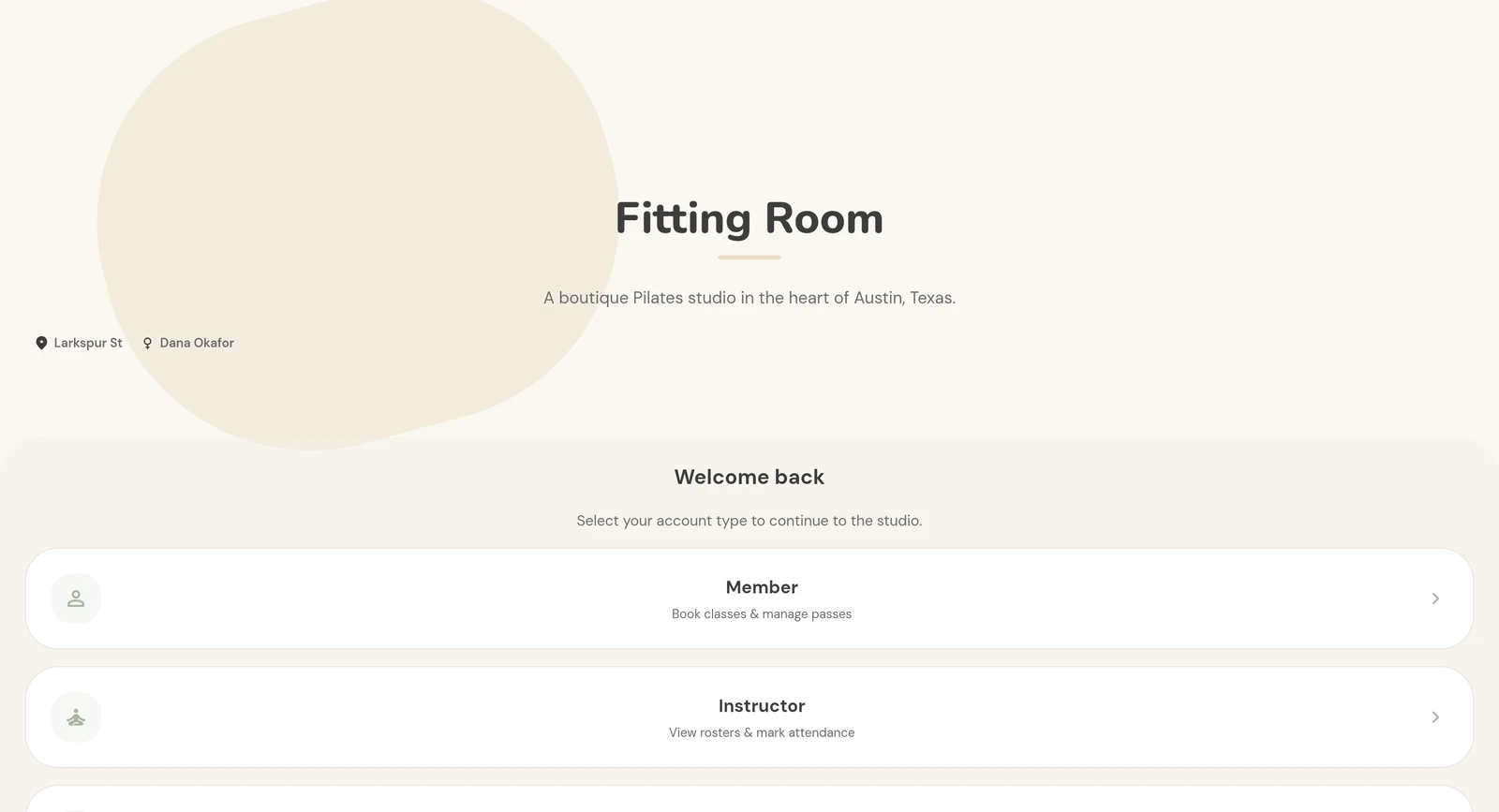
FlutterFlow test app
Pilates studio screens, built on the Basic plan, on its flutterflow.app address., built on the Basic, on FlutterFlow's address.
Up now· live 12 minutes after my brief; no log-in, no database
Open the FlutterFlow test app ↗It runs on FlutterFlow's servers, whatever the address. See the proof
My FlutterFlow AI App Builder Test Results
| Category | Grade | In short |
|---|---|---|
| Prompt to working appScreens in two minutes, no working app | 1/5Poor | |
| Brief accuracyAlmost every check failed | 1/5Poor | |
| Publish, speed, mobileOnline in minutes, very slow on a phone | 2/5Below average | |
| Code exportCode downloads, front end only | 3/5Average | |
| Support and cancellingA full answer in three minutes | 4/5Good | |
| Cost to finishClear price, but the app needs a backend | 3/5Average | |
| Overall | 2.3/5Below average |
What Is FlutterFlow?
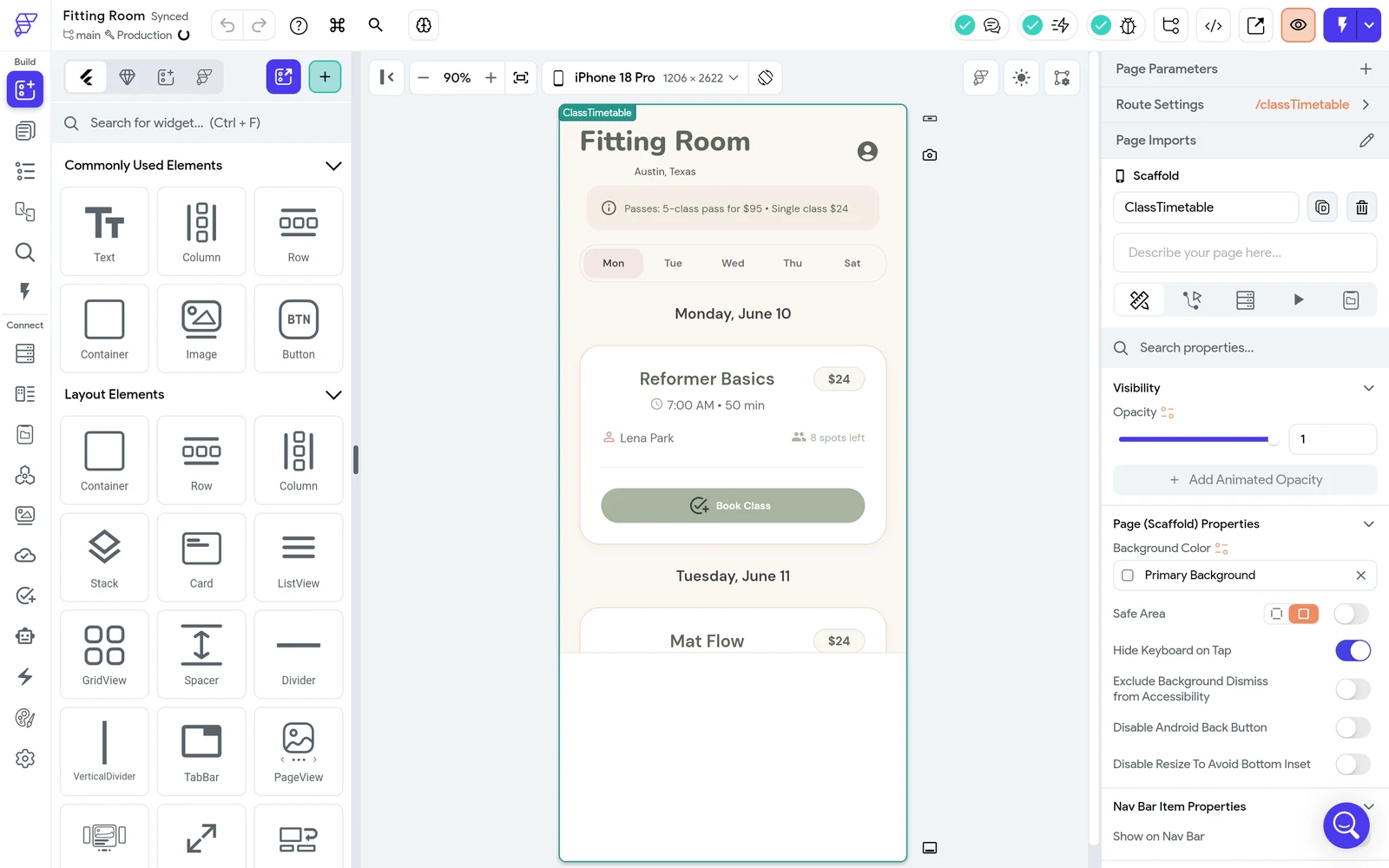
FlutterFlow is a visual builder for apps made with Flutter, Google's toolkit for apps that run on phones and the web. You drag widgets onto a canvas and set actions by hand. A newer AI box on its Projects page, called Instant Generation, makes a first set of screens from a description.
The plans are Free, Basic at $39 a month, Growth at $80 and Business at $150. Free allows 5 AI requests for life, and Basic allows 50 a month. I paid for Basic, because it is the cheapest plan that downloads the code and connects a custom domain.
How I Tested FlutterFlow
Every number here comes from my own tests and my own monitors. Nothing is estimated or copied, FlutterFlow never saw the review first, and every app builder gets the same brief, checks and attacks. This review is based on six graded tests. I left four out. Payments and emails need your own keys, sign-in and the database need a Firebase or Supabase backend that only you can connect, and the web editor has no way to run my twelve changes as prompts.
My tools
FlutterFlow pros and cons
Pros
- Nine screens in two minutes
- Live on a free address fast
- Code downloads on Basic
- Full visual editor to build in
- Invoice shows the discount and tax
- Support answered in three minutes
Cons
- No log-in or sign-up
- No database in the app
- Every button did nothing
- Made-up sample data on screen
- No chat to change an app
- Slow on a phone
FlutterFlow Pricing
FlutterFlow has a Free plan, then $39 Basic, $80 Growth and $150 Business, each with more AI requests. Prices read on 26 October 2026, monthly view. Billed yearly they are lower. My invoice took 20% off the list price as a regional discount.
FlutterFlow plans and prices
Live data· last check 26 October 2026| Plan | Price a month | |
|---|---|---|
| Free2 projects, 5 AI requests for life, web publishing | $0 | 2 projects, 5 AI requests for life, web publishing |
| BasicCode download, custom domain, 50 AI requests a month. The plan I paid for | $39 | Code download, custom domain, 50 AI requests a month. The plan I paid for |
| GrowthGitHub, real-time collaboration for two, 200 AI requests a month | $80 | GitHub, real-time collaboration for two, 200 AI requests a month |
| BusinessUp to five users, five open branches, 500 AI requests a month | $150 | Up to five users, five open branches, 500 AI requests a month |
FlutterFlow Cost: What My Test App Really Cost
Here is the number you will ask about first. In total I paid $33.97: one month of Basic, with a regional discount and tax on the invoice. The AI requests came with the plan. I made two.
What my app cost
| What I paid for | Cost |
|---|---|
| Basic, list price | $39 |
| Regional 20% discount | -$7.80 |
| Tax on the invoice | $2.77 |
| Total I paid | $33.97 |
The part I could not price is the backend. A working version of this app needs Firebase or Supabase for sign-in and data, which you set up and which have their own charges. I did not connect either.
FlutterFlow Build Speed: One Brief to Nine Screens
I pasted the brief into the Instant Generation box and the first screens were in the editor about two minutes later. The app was live 12 minutes after I started.
The gap between two and 12 minutes was two fixes by hand. The AI left the web platform switched off and left one Navigate action with no page, and Publish refuses to run while the project has an error.
A 1, because the app was live but never got near the passing line.
FlutterFlow Accuracy: Did It Build What I Asked?
Not really. 2 of 24 checks passed. Six more, the payments and the two emails, need keys that are mine to supply, so I left them out. The timetable shows the three classes with the right days, times and instructors, and that is where it stops.
Book Class does nothing. Cancel Booking, Mark Present, Add Class, the edit and delete icons, Export all as CSV and Send Message do nothing either, and the day tabs do not switch. The classes are not even counted: every class says 8, 12 or 6 spots left, whatever happens.
The AI also filled the screens with sample data I never asked for: four members with names, 142 bookings, 38 this month, 84% capacity and three inquiries from example.com addresses. The brief said not to invent anything.
FlutterFlow Editing: Twelve Changes Tested
I could not run the twelve changes, so this test is not graded. FlutterFlow's web editor has no chat that changes an app you already have. Its command search offers to add a page or a component from a description. The AI Agent panel needs the Windows desktop app and your own Claude or Codex login.
Twelve changes, one prompt each
| What happened | Changes |
|---|---|
| Could run as a prompt | 1 |
| Changes that worked | 0 |
| No prompt available in the web editor | 11 |
The one change a new page can answer is the About page. It took about 45 seconds and ignored the project. It wrote an address in New York, a phone number and an email that are not in the brief, called Fitting Room a digital tailoring assistant and added a version number. It is not linked from any screen.
FlutterFlow Publishing and Page Speed
Publishing took two minutes once the project had no errors. I pressed Publish and the app answered on a free flutterflow.app address 2 minutes 12 seconds later. The Basic plan includes one custom domain, which I did not connect.
Going live
| What I measured | Result |
|---|---|
| Publishing on FlutterFlow's address | 2 min 12 s |
| Address it went live on | flutterflow.app |
| Google phone speed score | 47 of 100 |
| Time to main content | About 18 s |
| Weight of the page | 3.2 MB |
Google's phone speed test, out of 100
- Home page, median of three47
- Score where a 3 starts50
The weak spot is speed: the main content took about 18 seconds on a simulated phone. Every page I opened also ended in a blank white block under the content. I did not count layout faults or try a real phone.
Every day I also run the FlutterFlow speed test and the FlutterFlow security checks.
FlutterFlow Uptime: 30 Days of Checks
A review tells you what happened on one day. This tells you what happens every day after. My own monitor opens the app every five minutes for 30 days, from 26 October to 25 November 2026, and records whether it answered and how fast.
FlutterFlow hosts the app. I cancelled the plan when the testing ended; the plan stays active until 26 November 2026, and the app still answered after the cancel. What happens to the free address after that date is something the record will show.
Every check so far is on the FlutterFlow uptime record.
FlutterFlow uptime test
Live data· last check 27 Oct 2026, 10:39 UTC100%
Online
341 ms
Answer time
0
Outages
FlutterFlow Security: Logins and Private Data
There is no log-in. The first screen asks Member, Instructor or Admin, and each button just opens that role's screens. Sign-up, log-in and password reset do not exist, so I could not create any of the four test accounts.
The admin screens open for any visitor who types their address, with no session. The app makes no data request at all, so my two attacks had nothing to attack: there are no private bookings to protect, because every visitor sees the same made-up ones.
In the editor, Authentication is switched off and the Firebase page offers to create or connect a project, which needs a Google sign-in that is yours. With a backend connected this could change, and I did not test that.
This test is not graded: connecting a Firebase or Supabase backend needs an account that is yours, so it is left out, like payments and emails.
FlutterFlow Database: Does the Data Survive?
There is no data to survive. None of my six data checks could be proved. The editor's Firestore page says No Collections Created, the Ask the studio form saved nothing and the CSV button did nothing.
FlutterFlow does not host the database for these apps. The data lives in Firebase or Supabase, which you connect. The AI did not connect either, and the sample names in the downloaded code are typed in as text.
This test is not graded: connecting a Firebase or Supabase backend needs an account that is yours, so it is left out, like payments and emails.
FlutterFlow Payments and Emails
I did not run payments or emails, because Stripe and an email service need keys that are yours to supply. The six checks that depend on them are left out, and this test is not graded.
The AI did add a Choose your pass screen with a 5-class pass at $95, a single class at $24 and a line that says Purchase with Stripe. I did not press it.
FlutterFlow Code Export and Ownership
Exporting means downloading your app so it can run somewhere else. On FlutterFlow that works on the Basic plan: Download Code gave me a 425 KB file with 178 files in about eight seconds. Connect GitHub and Open in VS Code are marked as Growth features.
It is a plain Flutter project, and the list of packages names no Firebase, Supabase or FlutterFlow service, because none was connected. What it holds is the screens with their sample names typed in, so a developer would still have to build the whole backend. I read the files and did not build them, because Flutter is not installed on my machine.
I did not read the terms, so I cannot say who owns the app you build. Check this before you pay if your app must leave one day.
FlutterFlow Support and Cancellation
I emailed one question to FlutterFlow Support, and a full answer came 3 minutes later, even though I sent it outside US business hours. It said Firebase is simpler to start with and Supabase gives more control, and it described an isAdmin field to send admins to their own screens. On export it said the data is exported from the database provider, and gave no steps. It did not say how to stop people choosing the admin role at sign-up.
On Basic, the help widget only searches articles, and chat with a person starts at the Growth plan. Cancelling took four clicks: the bin icon on the plan row, Yes, a short survey, then Cancel Subscription. The plan then read Active until 26 November 2026, and the billing page showed no further charge.
FlutterFlow Reviews: What Other Users Say
I have not yet read what other users say about FlutterFlow, so this draft has no review scores. Read them before you decide.
Final verdict: is FlutterFlow worth it?
If this were my studio, I would not use FlutterFlow's AI to make the app. It made screens that look right and work in no way: no working button, made-up data, and an error that blocked publishing.
It suits people who want a quick design to look at, and who are ready to connect Firebase or Supabase and build the logic by hand in the visual editor. It suits you less if you want the AI to deliver a working app from a brief. I could not try payments without your own keys, I could not connect a backend of my own, and I could not run the twelve changes.
The six graded tests average 2.3 out of 5, and I rate FlutterFlow 2.3. Support is the highest grade, at 4, and two tests score 1.
See the FlutterFlow test results and how I rate.
Best for: People who want a fast design of an app to look at, and will connect a backend and build the logic themselves in a full visual editor.
My grade: 2.3/5. The ten grades say where it is strong and where it is not.
Video review · 6:49
Watch me test FlutterFlow
The whole test in a few minutes: one brief to nine screens, 24 checks, why nothing works and what it cost. Captions and the full transcript are one click away.
Transcript
Hey, I'm Miles, and this is RankDude, where I test AI tools hands on and publish every number, so you can decide before you pay. Today it's FlutterFlow, a visual app builder with an AI box that makes a first app from a description. I paid for the Basic plan, and gave it one brief for a Pilates booking app called Fitting Room. The short version is that FlutterFlow's AI built nine good-looking screens in about two minutes, and I had them live twelve minutes after the brief. But they are a design, not a working app. Every button I pressed did nothing, the numbers on screen are made up, and only two of twenty-four checks passed. Support, though, answered in three minutes. My rating is two point three out of five, from six graded tests.
So, what is FlutterFlow? It's a visual builder for apps made with Flutter, Google's toolkit for phone and web apps. You drag widgets onto a canvas and set actions by hand. The newer AI box on the Projects page is called Instant Generation. You describe the app, and it makes the screens. The plans are Free, then Basic at thirty-nine dollars a month, Growth at eighty, and Business at one hundred fifty. Free allows five AI requests for life. I paid for Basic, because it is the cheapest plan that downloads the code.
Every builder I review gets the same brief, word for word. Fitting Room is a booking and membership app for a small Pilates studio, with a timetable, members who book, instructors, an admin, and a ninety-five dollar five-class pass. The first screens were in the editor about two minutes after I pressed send. But Publish refused to run. The AI had left one action with no page, and the web platform was switched off. After two fixes by hand, the app was live twelve minutes after I started. But it never came near the passing line, so the build scores one.
Now accuracy. Only two of twenty-four checks passed. Six more checks, the payments and the two emails, need keys that are mine to supply, so I left them out. The timetable shows the three classes with the right days, times and instructors. Then it stops. Book Class does nothing. Cancel booking, mark present, add class, export and send message do nothing either. The AI also filled the screens with sample data I never asked for. Four members with names, a hundred forty-two bookings, and three inquiries from example dot com addresses. The brief said not to invent anything. Accuracy scores one.
Log-in, and the two attacks. There is no log-in. The first screen asks, Member, Instructor or Admin, and each button just opens that role's screens. I could not create any of the four test accounts. The admin screens open for any visitor who types the address, with no session at all. The app makes no data request, so my two attacks had nothing to attack. A real log-in needs a Firebase or Supabase account that is yours, so I did not grade this test.
Next, the data. There is none. The editor's Firestore page says no collections created. The Ask the studio form saved nothing, and the export button did nothing. FlutterFlow does not host the database for these apps. The data lives in Firebase or Supabase, which you connect yourself, and the AI connected neither. None of the six data checks could be proved without a backend, so I did not grade this test.
Payments and emails. I did not run them, because Stripe and an email service need keys that are yours to supply. The AI did add a Choose your pass screen with the ninety-five dollar pass. I did not press it. This test is not graded.
Then the twelve changes. I could not run them. FlutterFlow's web editor has no chat that changes an app you already have. It can add a new page from a description, so I tried the About page. It took about forty-five seconds, and it ignored the project. It wrote an address in New York, a phone number and an email that are not in the brief, and called Fitting Room a digital tailoring assistant. This test is not graded.
Publishing. Once the errors were fixed, I pressed Publish, and the app was live on a flutter flow dot app address two minutes twelve seconds later. I did not connect my own domain. The weak spot is speed. On a simulated phone the home page scored forty-seven out of a hundred, and the main content took about eighteen seconds to appear. That earns a two.
Can you take the app with you? On the Basic plan, yes. Download Code gave me a Flutter project with a hundred seventy-eight files, in about eight seconds. But it holds only the screens, with the sample names typed in, so a developer would still build the whole backend. I read the files and did not build them. This test scores three.
Support and cancelling. I emailed one question to FlutterFlow support, outside US business hours, and a full answer came three minutes later. It said Firebase is the simpler start for a small app, and Supabase gives more control. It described an admin field to send admins to their own screens. On export, it said the data comes out of the database provider, and gave no steps. It did not say how to stop people choosing admin at sign-up. Cancelling took four clicks, on the account page. The plan stays active until the twenty-sixth of November, and the billing page shows no further charge. Support scores four.
What did it cost? I paid thirty-three dollars ninety-seven for one month of Basic. The invoice shows the thirty-nine dollar list price, a regional twenty percent discount, and two dollars seventy-seven in tax. The part I could not price is the backend the app needs, from Firebase or Supabase.
Pricing. Free allows two projects and five AI requests for life. Basic is thirty-nine dollars a month with fifty AI requests, Growth is eighty, and Business is one hundred fifty. Billed yearly, they are lower. The price is clear, but the app I paid for does not run without a backend whose cost I could not price. So pricing scores three.
So, my verdict. FlutterFlow's AI made screens that look right and work in no way. No button works, and the data on screen is made up. My rating is two point three out of five, the average of six tests. Support is the highest grade, at four, and two tests score one. It suits people who want a quick design to look at, and who are ready to connect a backend and build the logic by hand. It suits you less if you want the AI to deliver a working app from a brief. Every measurement, every screenshot and every price is in the written review and the test results, linked below.
Chapters · 14
Frequently asked questions
How much does FlutterFlow cost, and is there a free plan?
Yes. The Free plan allows 2 projects and 5 AI requests for life. Basic is $39 a month, Growth $80 and Business $150. I paid $33.97 for one month of Basic: the invoice took 20% off as a regional discount and added $2.77 tax.
Is FlutterFlow legit and safe?
Real, not safe. The editor works and the app published. But the app has no log-in, and any visitor can open the admin screens. I did not read the terms.
Who owns the app I build on FlutterFlow?
Not known. I did not read the terms, and I will not guess.
Can I download my FlutterFlow code?
Yes, on Basic. Download Code gave me a Flutter project with 178 files in about eight seconds. GitHub and VS Code connections are Growth features. I read the code and did not build it.
Does FlutterFlow have a mobile app?
Not tested. The app I built is a web app that opens in a browser. FlutterFlow's plans mention an APK download and App Store deployment, which I did not try.
How do I cancel FlutterFlow?
Account page. Press the bin icon on the plan row, confirm, answer the short survey and press Cancel Subscription. The plan stays active until the end of the month you paid for. I did that when the testing was done, and the live app still answered afterwards.

Miles FosterOwner and tester, RankDude
Disclosure. I tested on a FlutterFlow plan RankDude paid for at the public price. FlutterFlow didn’t see this review first and had no say in my rating. How RankDude makes money is on the disclosure page.