
MakeBestMusic Review: AI Music Generator, Pricing & My Test Results
My rating
A capable song maker behind a subscription wall. Judge it on a paid plan.
Best for: hearing a song before you pay. Not for getting a file on the free plan.

Tested and written by Miles Foster
Based on 5 graded tests and my verdict. How I rate
I tested MakeBestMusic hands-on on its free plan, giving its AI music generator the fixed pop prompt, timing the result, trying to download a song, and reading the terms and the prices. MakeBestMusic ranks #10 of the ten on my best AI music generators page.
Every measurement is in the MakeBestMusic test results.
My MakeBestMusic AI Music Generator Test Results
| Category | Grade | In short |
|---|---|---|
| Editing, Stems & RegenerationTwo takes and a history, the rest costs credits | 1/5Poor | |
| Format, Download & ExportNo download on the free plan | 1/5Poor | |
| Commercial-Use Rights & LicensingPromised for all plans, certificate is paid | 3/5Average | |
| Generation SpeedAbout a minute and a half for two songs | 3/5Average | |
| Free-Tier Limits & PricingTight free plan, fair paid plans | 3/5Average | |
| My verdict | +0.0 | |
| Overall | 2.2/5Below average |
What Is MakeBestMusic?
MakeBestMusic is an AI song generator. You describe a song, or paste your own lyrics, and it makes full songs with a voice. The same account holds a voice cover maker, a stem splitter, a mastering tool, a MIDI studio and a music video maker.
It offers five models and three modes: Simple, where you type one line and it writes the lyrics, Custom, and Inspo.
How I Tested MakeBestMusic
Every music generator gets the same twelve prompts, so you can compare them, each naming a genre, a mood, a tempo and instruments. The free plan gave me 6 credits.
One press took 3, and a second would have used all of them, past my 85 percent stop line. So I ran the first prompt, the pop song with a female voice, and graded five of the ten tests.
My tools
Last checked 12 Nov 2026MakeBestMusic pros and cons
Pros
- Two songs of nearly four minutes from one press
- Lyrics written for you in Simple mode
- Many tools in one account
- No card for the free plan
- Fair prices on the paid plans
- Workspace keeps your songs
Cons
- No download on the free plan
- 6 credits, one generation
- Commercial licence is a paid feature
- No credit price on the Create button
- Stems and mastering cost extra credits
- Ownership terms are vague
MakeBestMusic Pricing
- Free-Tier Limits & Pricing
- 3/5Average
Downloads start at $14.90 a month billed yearly, or $19.90 month to month, for 200 credits. Standard is $29.90 a month yearly and Professional $129.80. Prices read on 12 November 2026.
MakeBestMusic plans and prices
Live data· last check 12 November 2026| Plan | Price a month | |
|---|---|---|
| Free6 credits, no download | $0 | 6 credits, no download |
| Basic200 credits a month, MP3 and WAV, commercial licence | $19.90 | 200 credits a month, MP3 and WAV, commercial licence |
| Standard600 credits a month | $39.90 | 600 credits a month |
| ProfessionalUnlimited credits | $169.90 | Unlimited credits |
- Monthly billing costs more: 19.9, 39.9 and 169.9 per month
- Diamond Packs for music videos are extra non-expiring tokens sold separately, 36.9 to 299 each
- Enterprise plans not listed; contact us for questions
At 3 credits for two songs, Basic buys about 133 songs, roughly $0.11 each billed yearly. The free plan is one generation and no file, and I did not test renewal or cancellation. I grade the pricing average.
MakeBestMusic Generation Speed
- Generation Speed
- 3/5Average
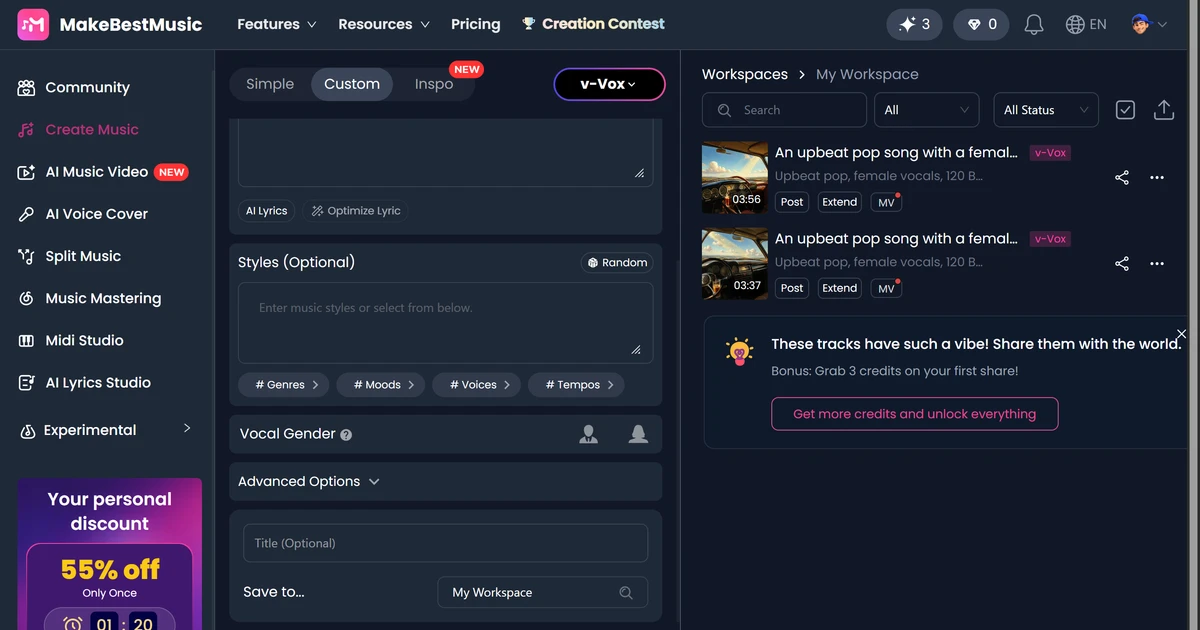
One press of Create gave two songs of 3:56 and 3:37. The credit counter dropped from 6 to 3 at once, placeholders with the title showed at 23 seconds, and the finished songs showed by 90 seconds.
The Create button said "Create For Free" and gave no credit price, so I only learned the cost of 3 credits from the counter. I grade speed average, as it is one generation.
MakeBestMusic Controls
The Custom page has many controls: genre, mood, voice and tempo chips, a vocal gender choice, a box for styles to exclude, and "Weirdness" and "Style Influence" sliders. Persona, reference audio and a beat box sit above the lyrics. Simple mode wrote the lyrics for me from my prompt.
I had no credits to run these, so I give no grade.
MakeBestMusic Editing and Stems
- Editing, Stems & Regeneration
- 1/5Poor
MakeBestMusic offers a lot, and charges for it. Each press gave two songs, and the workspace keeps them. The Edit menu holds "ReCreate" and "Reference", while "Inpaint", "Change Voice" and "Make Persona" carry a crown.
Extend opened a panel I did not run, and stems cost 5 credits when I had 3 left. Two of ten points worked, a grade of poor.
MakeBestMusic Downloads and Files
- Format, Download & Export
- 1/5Poor
The free plan gave me no file. I pressed "Download MP3" and a window titled "Unlock All Features" opened, with the message "Exclusive benefit for subscribers".
The pricing page lists MP3 and WAV downloads from Basic upward. I could not open a file, so audio quality is not graded. No export worked, a grade of poor.
MakeBestMusic Usage Rights
- Commercial-Use Rights & Licensing
- 3/5Average
The pricing page promises that "Every MakeBestMusic plan grants full commercial rights". But the "Commercial License" menu item carries a crown, and the FAQ says the certificate can be downloaded during a subscription.
The terms say "Ownership of AI-generated content is determined by your subscription plan", without saying what each plan gives. I grade it average.
Final verdict: is MakeBestMusic worth it?
MakeBestMusic is worth a look if you want to hear a full AI song before paying. It made two songs of nearly four minutes in about a minute and a half and wrote the lyrics itself, with no card.
It is not the tool to use on the free plan if you need a file. The free plan has 6 credits, blocks the MP3 download and keeps the commercial licence for subscribers.
The five tests I could run average 2.2 out of 5. I rate it 2.2, because the free plan let me run only five of ten tests, so there is nothing to add. A paid plan would change the picture, but I did not test one.
See the MakeBestMusic test results and how I rate.
Best for: People who want to hear an AI song before paying, and will subscribe before they need a file.
Video review · 3:46
Watch me test MakeBestMusic
The whole test in 4 minutes: the short version, what is makebestmusic?, how i tested makebestmusic, makebestmusic generation speed, makebestmusic controls, makebestmusic editing and stems, makebestmusic downloads and files, makebestmusic usage rights, makebestmusic pricing, the verdict. Captions and the full transcript are one click away, and the video has a page of its own.
Transcript
Hi, I'm Miles. I tested MakeBestMusic, an AI music generator, on its free plan. Here's the short version. It made two full songs of almost four minutes in about ninety seconds. But the free plan gives six credits, which is one generation, and it does not let you download anything. My rating is two point two out of five, from the five tests I could run.
So what is MakeBestMusic? It's an A I song generator. You describe a song, or paste your own lyrics, and it makes full songs with a voice. The same account also has a stem splitter, a mastering tool and a music video maker.
The free plan started me with six credits. One press took three, and a second would have used them all, past my eighty five percent stop line. So I ran my first fixed prompt, a pop song with a female voice, and left five tests out rather than guess.
One press gave two songs, three fifty six and three thirty seven. The credit counter dropped from six to three straight away, and the finished songs showed within ninety seconds. This recording shortens the long wait. The button never showed a credit price.
The Custom page has genre, mood, voice and tempo chips, a vocal gender choice, and sliders for weirdness and style influence. I had no credits left to run them, so I give no grade here.
Each press gave two songs, and the workspace keeps them. The Edit menu has re create and reference, but inpaint, change voice and make persona carry a crown. Stems cost five credits and I had three. Two of ten points worked, so this is a one.
Here is the catch. I pressed Download M P three, and a window opened saying exclusive benefit for subscribers. No file came out, so audio quality is not graded. That is a one.
The pricing page says every plan grants full commercial rights, but the commercial license menu item carries a crown. The terms say ownership is determined by your subscription plan, without saying what each plan gives. I grade it a three.
Paid plans start at fourteen dollars ninety a month billed yearly, for two hundred credits. That is about eleven cents a song. The free plan is one generation and no file. Month to month it is nineteen dollars ninety. I grade it a three.
So, two point two out of five. MakeBestMusic makes full length songs quickly and with no card, but on the free plan you cannot take a file away. Judge it on a paid plan. Every measurement is in the test results.
Chapters · 12
Frequently asked questions
How much does MakeBestMusic cost, and is there a free plan?
Yes. The free plan needs no card and gave me 6 credits, one generation. Basic is $19.90 a month, or $14.90 a month paid yearly. Standard is $29.90 a month yearly.
Is MakeBestMusic legit and safe?
Yes, in my test. I signed in with Google, entered no card and was never charged. The site publishes terms, a refund policy and a support address.
Who owns the music, and can I use it on YouTube or Spotify?
It depends. The pricing page says every plan grants commercial rights, and the commercial licence certificate is downloadable during a paid subscription. The terms say ownership is determined by your plan without listing what each gives.
Which files and stems do I get from MakeBestMusic?
None. Download MP3 opened a subscription window. Paid plans list MP3 and WAV, and stems cost 5 credits on the Split Music page.
How do I cancel MakeBestMusic or get a refund?
Not tested. The terms say renewal is automatic until you cancel in your account settings or by email, and that purchases are final and non-refundable except where the law requires.

Miles FosterOwner and tester, RankDudeMiles Foster is a pen name: the owner of RankDude, a private person, runs every test himself.
Disclosure. I tested on the free demo account anyone can open on MakeBestMusic’s site. I signed up myself and paid MakeBestMusic nothing. MakeBestMusic didn’t see this review first and had no say in my rating. How RankDude makes money is on the disclosure page.