
UX Pilot Review: AI Design Tool, Pricing & My Test Results
My rating
A fast chat that gets web pages right. Exports need a paid plan.
Best for: web pages and app flows you will pay to export. Not for exact social sizes or free exports.

Tested and written by Miles Foster
Based on 7 graded tests and my verdict. How I rate
I tested UX Pilot hands-on on its free plan, the way I test every AI design tool: three fixed briefs typed into its chat, 20 required elements checked in each, seven edits and the terms. UX Pilot ranks #4 of the ten on my best AI design tools page.
Every measurement is in the UX Pilot test results.
My UX Pilot AI Design Tool Test Results
| Category | Grade | In short |
|---|---|---|
| Brief to First DraftA draft in about a minute | 5/5Excellent | |
| Brief AdherenceRight words, wrong sizes, extras added | 2/5Below average | |
| First Draft QualityLow contrast in two of three drafts | 3/5Average | |
| Editing FreedomSix of seven edits tried worked | 4/5Good | |
| Export & HandoffOnly a PDF, with a badge | 2/5Below average | |
| Rights & Commercial UsePersonal use only on free | 3/5Average | |
| Pricing & ValueCommercial rights need a paid plan | 3/5Average | |
| My verdict | +0.6 | |
| Overall | 3.7/5Good |
What Is UX Pilot?
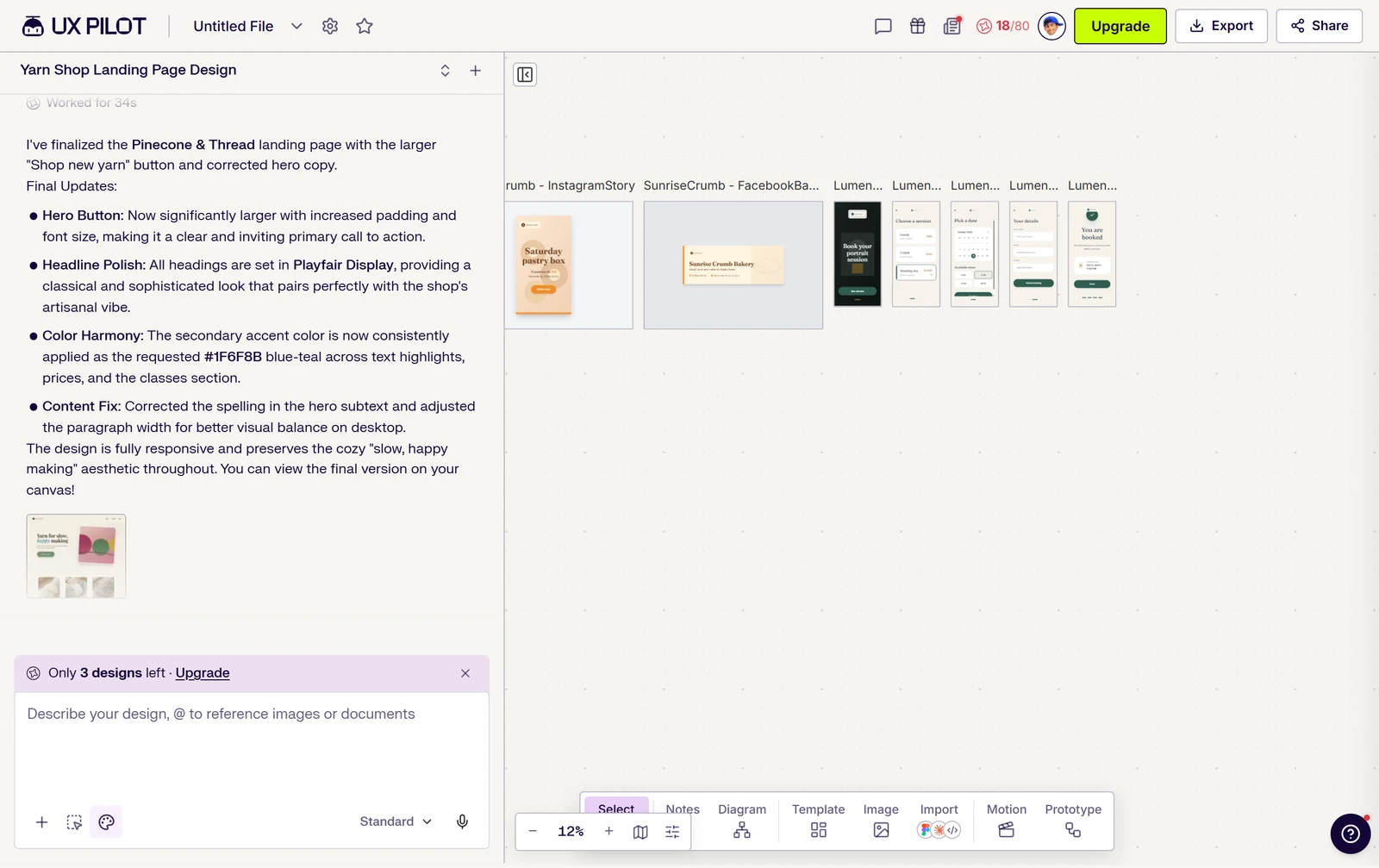
UX Pilot is an AI design tool that runs in the browser. You describe a screen or a flow in a chat, and it builds editable web and mobile designs on a canvas.
The free plan gives 80 credits a day and one project. Pro starts at $19 a month paid yearly.
How I Tested UX Pilot
Every AI design tool gets the same briefs: a bakery's social set, a booking app and a one-page shop site, each with 20 required elements. I ran all three on UX Pilot's free plan. Seven of the nine tests were graded; brand kit and collaboration were left out.
My tools
Last checked 12 Nov 2026- Price tracker$19 to $31 a month
- Design brief set55 of 60 elements right
- Draft timer76 s median brief to draft
- Layer inspector8 design faults
- Edit runner6 of 7 edits tried that worked
- Export checker3 of 10 export points
How each tool works: Design brief set, Draft timer, Layer inspector, Edit runner, Export checker.
UX Pilot pros and cons
Pros
- A draft in about a minute
- Landing page matched all 20 elements
- Font and colour changed everywhere by one instruction
- No training on your designs, in writing
- A preview link and width box for every screen
- PDF of all screens in one file
- Pro from $19 a month paid yearly
Cons
- Wrong sizes for the social set and app
- Nine invented items, including a claim
- Free plan is personal use only
- Free exports only a PDF, with a badge
- One project and 80 credits a day on free
- Low contrast in the bakery and app drafts
UX Pilot Pricing
The cheapest plan with commercial rights is Pro at $19 a month paid yearly, or $29 a month paid monthly. Teams is $31 a user a month paid yearly.
UX Pilot plans and prices
Live data· last check 12 November 2026| Plan | Price a month | |
|---|---|---|
| Free80 credits a day, 13 screens a day, one project, PDF export only | $0 | 80 credits a day, 13 screens a day, one project, PDF export only |
| ProMonthly: 750 credits, commercial rights, export to Figma and code | $19 | Monthly: 750 credits, commercial rights, export to Figma and code |
| TeamsMonthly, per user: 900 credits, shared credit pool, seats and roles | $31 | Monthly, per user: 900 credits, shared credit pool, seats and roles |
- Teams price is per user per month, with a seat selector from 2 to 15
- Enterprise is custom pricing (contact us), skipped
- Top-up credit packs can be bought anytime, price not listed
I did not buy a plan, so renewal prices were not seen.
UX Pilot Free Plan Limits
UX Pilot's free plan gives you 80 credits a day with no rollover, 13 screens a day and one project. Your first design is free; my booking app cost 28 credits and the landing page 18.
The account hit the one-project limit when I tried to start a second project, so all three briefs ran in the same one.
UX Pilot Brief to First Draft
UX Pilot built each brief in under 2.5 minutes: 73 seconds for the bakery set, 76 for the landing page and 143 for the booking app. The median is 76 seconds.
You get editable text and shapes on the canvas, not a picture.
UX Pilot Brief Adherence
UX Pilot got 55 of 60 required elements right and added 9 things I did not ask for. The landing page scored 20 of 20, the bakery set 18 and the booking app 17.
The post and story cards are not the sizes I asked for, and the app screens are 375 pixels wide, not 390, so you would have to resize them. One invented line says the yarn is "Locally sourced & carefully packed".
UX Pilot First Draft Quality
UX Pilot's three first drafts had 8 faults: 4 on the bakery set and 4 on the booking app. The landing page had none I could measure, and it folds into a menu at 360 and 768 pixels wide.
The gold prices are 2.4 to 1 against white, under the 4.5 to 1 that small text needs, so you would struggle to read them in daylight. The orange $18 on the story is 1.9 to 1.
UX Pilot Editing
Six of seven edits I tried worked: a font and a colour changed everywhere by one written instruction, a text box resized, a word typed in place, a new page width and one element regenerated. Dragging the hero button never dropped.
The font change took 49 seconds and 10 credits; the colour change took 18 seconds and 2 credits. You can see the rest of the list in the test results, where I say which five edits I did not run.
UX Pilot Exports and Handoff
UX Pilot's free plan opens 3 of 10 export points. You can export a PDF with its fonts named (Fraunces and Inter), and all nine screens came down in one file; Figma, HTML, React code and ZIP are locked.
Every PDF page carries a "Made with UX Pilot" strip at the foot, and you cannot download a PNG.
UX Pilot Usage Rights
UX Pilot's free plan is for personal use only: "Free plan users may only use generated designs for personal, non-commercial purposes." Paid plans get a licence for commercial use, not ownership.
On training, the terms say "We do not train our AI models using your generated designs or any confidential information." There is no indemnity for generated content.
Final verdict: is UX Pilot worth it?
UX Pilot is worth trying if you want a fast first draft of a web page or an app flow. The landing page matched every element in 76 seconds, and a font and a colour changed everywhere from one sentence.
It is not the tool if you need exact sizes for social posts, copy you can use without checking for invented lines, or any export without paying. The free plan is for personal use only.
The seven tests I could grade average 3.1 out of 5. I rate UX Pilot 3.7 because the free plan let me run seven of the nine tests, the drafts came in about a minute and a font and a colour changed everywhere from one instruction.
See the UX Pilot test results and how I rate.
Best for: People who want a fast first draft of a web page or app flow and will pay for Pro to take the files out.
Video review · 2:45
Watch me test UX Pilot
The whole test in a few minutes, from screen recordings of the tests. Captions and the full transcript are one click away, and the video has a page of its own.
Transcript
Hi, I'm Miles. I tested UX Pilot hands on, on its free plan, and here's the short version. Its chat built all three of my briefs in under two and a half minutes, and the landing page matched all twenty required elements. But the bakery set and the booking app came out in the wrong sizes, it invented extra content, and the free plan exports only a PDF with a UX Pilot strip on it. My rating is three point seven out of five, from seven tests.
So what is UX Pilot? It's an AI design tool that runs in your browser. You describe a screen or a flow in a chat, and it builds editable web and mobile designs on a canvas.
The free plan gives you eighty credits a day and one project. The first design is free. My booking app cost twenty eight credits and the landing page eighteen, and by the end I had used sixty two of the eighty.
Now the speed. The bakery set took seventy three seconds, the landing page seventy six, and the booking app about two minutes twenty. The median is seventy six seconds, and what you get is editable text and shapes, not a picture.
Then accuracy, across sixty required elements. The landing page got all twenty. The bakery set got eighteen and the booking app seventeen, so fifty five of sixty. The pieces came out in the wrong sizes, and my studio photo was not the background. UX Pilot also invented nine things, including a line that says the yarn is locally sourced.
I counted eight faults in the drafts. The orange price on the story is one point nine to one against its background, and the gold prices in the app are two point four to one, both far under what small text needs. The landing page had no fault I could measure.
Next, the edits. I tried seven of the twelve, and six worked: a font and a colour changed everywhere from one sentence, a text box resized, a word typed in place, a new page width, and a button regenerated. Dragging a button did not drop, and five edits I did not run.
Exports were thin. On the free plan you get a PDF with its fonts named, and all nine screens came down in one file. But Figma, code and zip are locked, and every page of that PDF carries a made with UX Pilot strip. That's three of ten export points.
On rights, the free plan is for personal use only. Paid plans get a licence for commercial use, not ownership. The terms say UX Pilot does not train its AI on your designs, and there is no indemnity.
On price, Pro is the cheapest plan with commercial rights. It's nineteen dollars a month when paid yearly, which is two hundred and twenty eight dollars a year, or twenty nine dollars paid monthly.
So, is UX Pilot worth it? Try it if you want a fast first draft of a web page or an app flow, and you're happy to pay for Pro to take the files out. It's not the tool for exact social sizes or free exports. The seven tests average three point one, and I rate it three point seven.
Chapters · 12
Frequently asked questions
How much does UX Pilot cost, and is there a free plan?
Yes, free. It gives 80 credits a day, one project and PDF export. Pro is $29 a month, or $19 paid yearly; Teams is $39 a user a month, or $31 paid yearly.
Is UX Pilot legit and safe?
Yes, it is. I signed in with Google, entered no card and had no problem. The terms say UX Pilot does not train its AI on your generated designs.
Who owns what I make with UX Pilot, and can I use it commercially?
Paid plans only. Free plan designs are for personal, non-commercial use. If you pay for Pro or another plan, you get a licence to use designs commercially, and UX Pilot keeps the rights in its service.
Which files can UX Pilot export?
PDF only. On free you get a PDF, and all nine screens came down in one file with a "Made with UX Pilot" strip. Figma, HTML, React code and ZIP are locked, so I did not test them.
What did I not test?
Two tests. Brand kit and collaboration were left out, and five of the twelve edits were not run: image swap, add a section, align, undo and lock.

Miles FosterOwner and tester, RankDudeMiles Foster is a pen name: the owner of RankDude, a private person, runs every test himself.
Disclosure. I tested on the free demo account anyone can open on UX Pilot’s site. I signed up myself and paid UX Pilot nothing. UX Pilot didn’t see this review first and had no say in my rating. How RankDude makes money is on the disclosure page.