
Pokecut Review: AI Image Generator, Pricing & My Test Results
My rating
A quick generator with an editing canvas. Free credits end after three images.
Best for: a quick picture with correct wording. Not for exact counts or ownership you need in writing.

Tested and written by Miles Foster
Based on 7 graded tests and my verdict. How I rate
I tested Pokecut hands-on on its free plan, giving its AI image generator three of my fixed prompts. I timed each picture, counted every detail, downloaded all three and read the terms. Pokecut ranks #10 of the ten on my best AI image generators page.
Every measurement is in the Pokecut test results.
My Pokecut AI Image Generator Test Results
| Category | Grade | In short |
|---|---|---|
| Prompt AdherenceChef and shop right, kitchen scene miscounted | 4/5Good | |
| Photorealism & AnatomyHands and skin pass in both pictures | 4/5Good | |
| Text in ImagesEvery word on the sign was right | 4/5Good | |
| Resolution & UpscalingBig square files, no upscale was run | 3/5Average | |
| Speed per ImageAbout half a minute for each picture | 3/5Average | |
| Usage Rights, Watermarks & PrivacyCommercial use said yes, ownership not stated | 3/5Average | |
| Pricing & ValueFew free credits, a low cheapest plan | 3/5Average | |
| My verdict | +0.4 | |
| Overall | 3.8/5Good |
What Is Pokecut?
Pokecut is a browser photo editor from Pixl Concerto Technology Limited. You type a prompt into a box and a picture appears on a canvas, where you can erase, replace, enhance or change the background.
You pay in credits. The free account showed 20 credits after sign-in, and paid plans start at $3.33 a month when you pay yearly.
How I Tested Pokecut
Every image generator gets the same 40 written prompts, and I keep the first image of each. Pokecut's free credits paid for three of them, so I graded seven of the ten tests and left style range, consistency and editing out.
My tools
Last checked 12 Nov 2026Pokecut pros and cons
Pros
- Every word on the sign right
- Real-looking hands and skin
- No watermark on the download
- Eight frame shapes under Auto
- Square pictures up to 2,656 pixels
- Many editing tools on one canvas
- Free sign-in needed no card
Cons
- Free credits pay for three pictures
- A busy scene was miscounted
- About 30 seconds a picture
- Terms do not say who owns images
- No content credentials in the files
- Canvas attaches the last picture itself
Pokecut Pricing
- Pricing & Value
- 3/5Average
The cheapest plan, SE, costs $3.33 a month when you pay yearly ($39.99 a year), with 300 credits a month. The monthly view shows $1 for the first month and no later price. The free account costs nothing and I entered no card.
Pro is $12.99 a month, or $5.83 paid yearly, with 800 credits. Ultra is $18.99, or $7.50 paid yearly, with 1,500. An Auto picture costs 5 credits, about $0.056 on SE paid yearly.
Pokecut plans and prices
Live data· last check 12 November 2026| Plan | Price a month | |
|---|---|---|
| Free20 credits at sign-in, Auto model 5 credits a picture | $0 | 20 credits at sign-in, Auto model 5 credits a picture |
| SE300 credits a month, $1 first month | $3.33 | 300 credits a month, $1 first month |
| Pro800 credits, unlimited standard tools | $5.83 | 800 credits, unlimited standard tools |
| Ultra1,500 credits, unlimited standard tools | $7.50 | 1,500 credits, unlimited standard tools |
- Refunds only within one day of payment, and you pay any platform fees on refunds
- Premium credits do not carry over; purchased credits do not expire
- Website plans and credits are not yet usable in the app
I did not buy a plan, so the per-picture cost assumes a paid Auto picture costs the same credits as a free one. Credit packs run from 300 to 5,000 credits, at $0.033 down to $0.016 a credit, and the Help Center offers a refund within 1 day of payment.
Pokecut Prompt Adherence
- Prompt Adherence
- 4/5Good
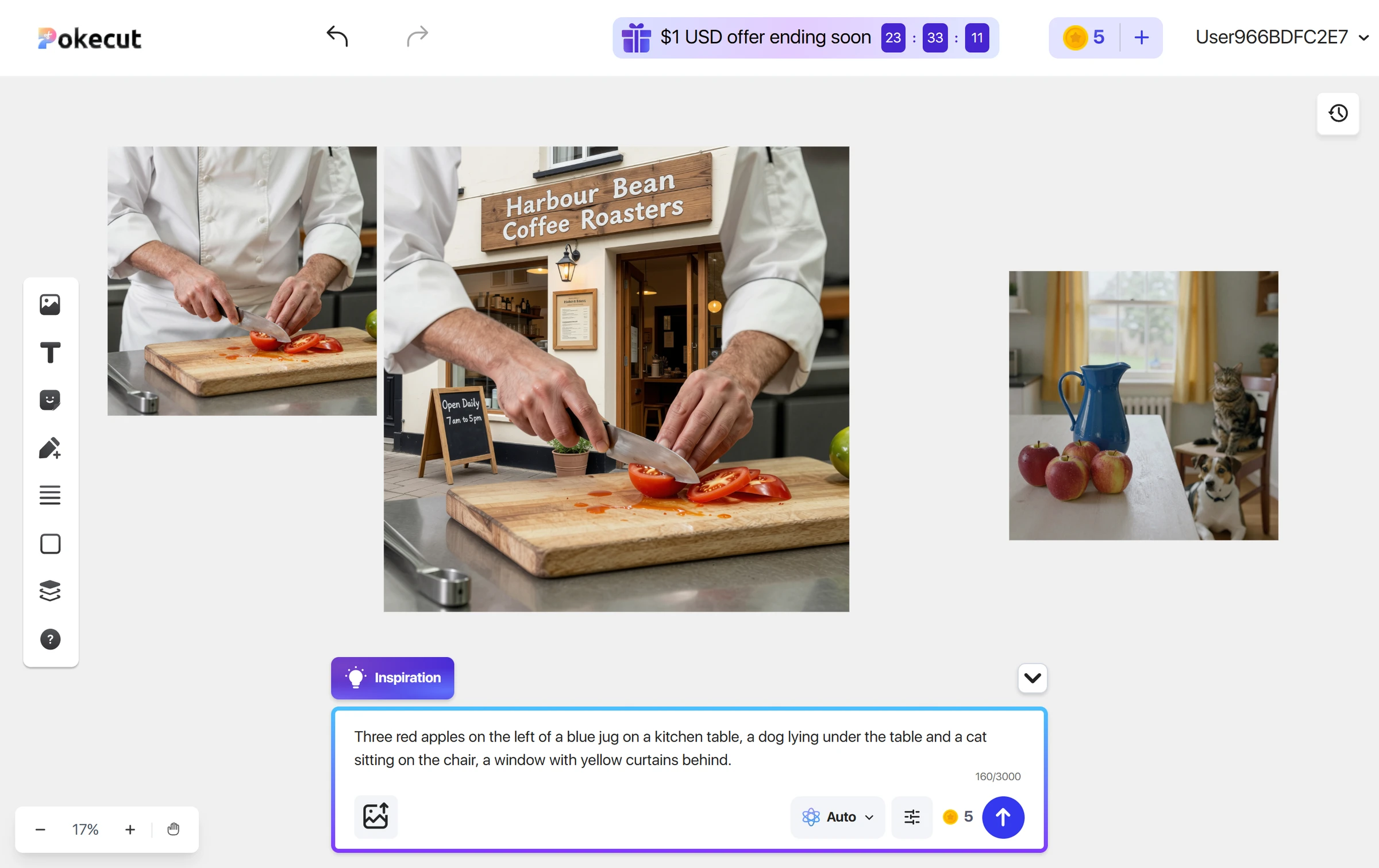
Pokecut got 16 of 18 asked-for details right across the three prompts I could run. The chef and the coffee shop were right in every detail. The kitchen scene slipped: it drew four apples where I asked for three, and the dog lies beside the table, not under it.
The jug is blue, the apples are red, the cat sits on the chair and the curtains are yellow. When you ask for an exact count, check the picture.
Pokecut Photorealism
- Photorealism & Anatomy
- 4/5Good
Pokecut made 2 of 2 pictures that pass as photographs. The chef's hands have five fingers each, the knife grip is right and the skin shows pores and hair.
The apples in the kitchen picture carry water drops, and the cat and the dog have correct faces and paws. I found no hand or face fault, but two pictures are too few for a top mark.
Pokecut Text in Images
- Text in Images
- 4/5Good
Pokecut spelled all 11 words right on my shop test. The sign reads "Harbour Bean Coffee Roasters" and the chalkboard reads "Open Daily 7am to 5pm", with the times written without spaces.
The same picture shows the chef's hands holding a knife in front of the shop. The canvas had attached my first image as a reference on its own, and I removed it before the next prompt. One sign cannot show that wording works every time.
Pokecut Image Size and Resolution
- Resolution & Upscaling
- 3/5Average
Pokecut saved square pictures 1,536 pixels or 2,656 pixels wide, as JPEG files. The Download button gave each file at once, with no watermark.
Under Auto the panel offers eight frame shapes, from 1:1 to 9:21 (my first capture cut off the right side, so I retook it in a wider window). The app says Auto "understands your prompt and automatically picks the most suitable model" and does not say which one it used. I did not run an upscale, so I cannot say how a larger size looks.
Pokecut Speed per Image
- Speed per Image
- 3/5Average
Pokecut took a median of 30 seconds for each picture across three generations. The chef took about 32 seconds, the shop about 30 and the kitchen scene about 26.
A progress ring and the words "Less than 1 min" show while it works. Nothing failed and I saw no queue.
Pokecut Free Plan Limits
Pokecut's free account showed 20 credits, and the Auto model costs 5 a picture, so I made three pictures and stopped with 5 credits left.
Other models in the picker cost 10 to 35 credits a picture, and the plans list Nano Banana Pro and ChatGPT Image 2 as paid unlocks. I ran only Auto.
The canvas attaches your last picture to the prompt box as a reference. If you leave it there, your next prompt builds on that picture instead of drawing a new one. The panel says the output will match the attached picture's size, yet my second picture came out larger than the first.
Pokecut Usage Rights
- Usage Rights, Watermarks & Privacy
- 3/5Average
Pokecut's Help Center allows commercial use of the images, with no plan named, but the terms do not say who owns them.
The Terms of Service say Pokecut owns the app and its content, and give it a licence to use what you upload to run the app. The Privacy Policy says uploaded pictures are not used for anything but your own edits, and it names public or purchased data sets as the training source.
My three downloads had no watermark and no content credentials label. I could not check a watermark on paid downloads or whether images are private by default: the policy gives 15 days in one place and 30 in another for how long generated images stay on the servers.
Final verdict: is Pokecut worth it?
Pokecut is worth trying if you want a quick photograph or a sign with correct wording, and a canvas with editing tools around it. It drew a clean photograph, got every word right on my shop test and gave me files without a watermark.
It is not the tool for exact counts or for work where you need to know who owns the image, because the terms stay silent on ownership. The free credits end after three pictures, so you will pay for anything beyond a first try.
The seven tests I could run average 3.4 out of 5. I rate it 3.8 because the free plan let me run seven of the ten tests.
See the Pokecut test results and how I rate.
Best for: People who want a quick picture and editing tools on one canvas, to try before they pay.
Video review · 5:09
Watch me test Pokecut
The whole test with the screen recordings: prompts, timing, wording, rights and prices. Captions and the full transcript are one click away, and the video has a page of its own.
Transcript
Hi, I'm Miles. I tested Pokecut, an A I image generator, on its free plan. Here's the short version. It got sixteen of eighteen details right, and it spelled every word on a shop sign correctly. But the free credits paid for only three pictures, and the terms don't say who owns what you make. My rating is three point eight out of five, from the seven tests I could run.
So what is Pokecut? It's a browser photo editor and image generator. You type a prompt, a picture appears on a canvas, and you can erase, replace or enhance it. You pay in credits. My free account showed twenty, and the Auto model costs five a picture.
Every generator gets the same written prompts, but my credits paid for three. The chef and the coffee shop were right in every detail. The kitchen scene slipped. It drew four apples, not three, and the dog lies beside the table instead of under it.
For photos, both pictures passed. The chef's hands have five fingers each, the knife grip is right, and the skin has real pores. The apples even carry water drops. Two pictures is a small sample, so I don't give a top mark.
Words are the strong spot. The shop sign reads, Harbour Bean Coffee Roasters, and every word is right. The chalkboard says, Open Daily, seven a m to five p m. One catch. The picture also shows the chef's hands, because the canvas attached my first image as a reference by itself.
Pictures are square, fifteen hundred and thirty-six pixels wide, or twenty-six hundred and fifty-six for the picture I made with a reference attached. The Download button gave each file at once, with no watermark. I did not run an upscale, so I can't say how a bigger size looks.
Speed is middling. The median was about thirty seconds a picture. The chef took thirty-two, the shop thirty, and the kitchen scene twenty-six. Nothing failed, and there was no queue.
The free plan is small. Twenty credits, and Auto costs five, so I made three pictures and stopped with five left. Other models cost ten to thirty-five credits. One thing to watch. The canvas keeps your last picture attached, so the next prompt changes it instead of drawing a new one.
On rights, the Help Center says you can use the images commercially. But the terms don't say who owns them. They say Pokecut owns the app, and they give it a licence to use what you upload. The privacy policy says uploads aren't used for anything but your own edits.
The cheapest plan is S E, three dollars thirty-three a month when you pay yearly, with three hundred credits. Pro and Ultra give eight hundred and fifteen hundred credits. A picture costs about five point six cents on S E. I didn't buy a plan to check.
My verdict: Pokecut is worth trying for a quick picture with correct wording. But don't rely on it for exact counts, or when you need ownership in writing. The seven tests average three point four, and I rate it three point eight out of five. The full results are on the test results page.
Chapters · 13
Frequently asked questions
How much does Pokecut cost, and is there a free plan?
Yes, for a first try. The free account showed 20 credits and the Auto model costs 5 a picture, so it pays for four. The cheapest paid plan, SE, is $3.33 a month paid yearly, with 300 credits a month.
Is Pokecut legit and safe?
Yes, in my test. I signed in with Google, entered no card and was never charged. The terms name the company, Pixl Concerto Technology Limited of Hong Kong, and the Privacy Policy says your uploads are not used for anything but your own edits.
Who owns the images I make with Pokecut?
Not stated. The terms say Pokecut owns the app and its content, and they give Pokecut a licence to use what you upload to run the app. They are silent on the images you make.
Can I use Pokecut images commercially?
Yes, according to the Help Center, which says you can use images from the AI Image Generator for commercial purposes and names no plan. It adds that design resources not provided by Pokecut are not covered. The terms do not repeat it.
What did you not test?
Three tests. I did not run style range, consistency or editing, and I did not run an upscale. Only the Auto model was tried, and I made three of the 40 prompts.

Miles FosterOwner and tester, RankDudeMiles Foster is a pen name: the owner of RankDude, a private person, runs every test himself.
Disclosure. I tested on the free demo account anyone can open on Pokecut’s site. I signed up myself and paid Pokecut nothing. Pokecut didn’t see this review first and had no say in my rating. How RankDude makes money is on the disclosure page.