
Pixlr Review: AI Image Generator, Pricing & My Test Results
My rating
A quick, accurate generator that allows business use. Check any words in images.
Best for: quick pictures for a small business on a low budget. Not for text-heavy images you will not check.

Tested and written by Miles Foster
Based on 7 graded tests and my verdict. How I rate
I tested Pixlr hands-on on its free plan, giving its AI image generator 7 of my 40 fixed prompts, then timing each image, upscaling one, downloading it and reading the terms. Pixlr ranks #5 of the ten on my best AI image generators page.
Every measurement is in the Pixlr test results.
My Pixlr AI Image Generator Test Results
| Category | Grade | In short |
|---|---|---|
| Prompt AdherenceNearly every detail right, even the busy scene | 5/5Excellent | |
| Photorealism & AnatomyPeople and bottle pass, a trainer logo is garbled | 4/5Good | |
| Text in ImagesWords right, but invented text added | 3/5Average | |
| Resolution & Upscaling4,096 pixels, but a soft upscale | 3/5Average | |
| Speed per ImageUnder eight seconds for each picture | 5/5Excellent | |
| Usage Rights, Watermarks & PrivacyCommercial use allowed, free results public | 2/5Below average | |
| Pricing & ValueTen free images, then a cheap plan | 4/5Good | |
| My verdict | +0.3 | |
| Overall | 4.0/5Good |
What Is Pixlr?
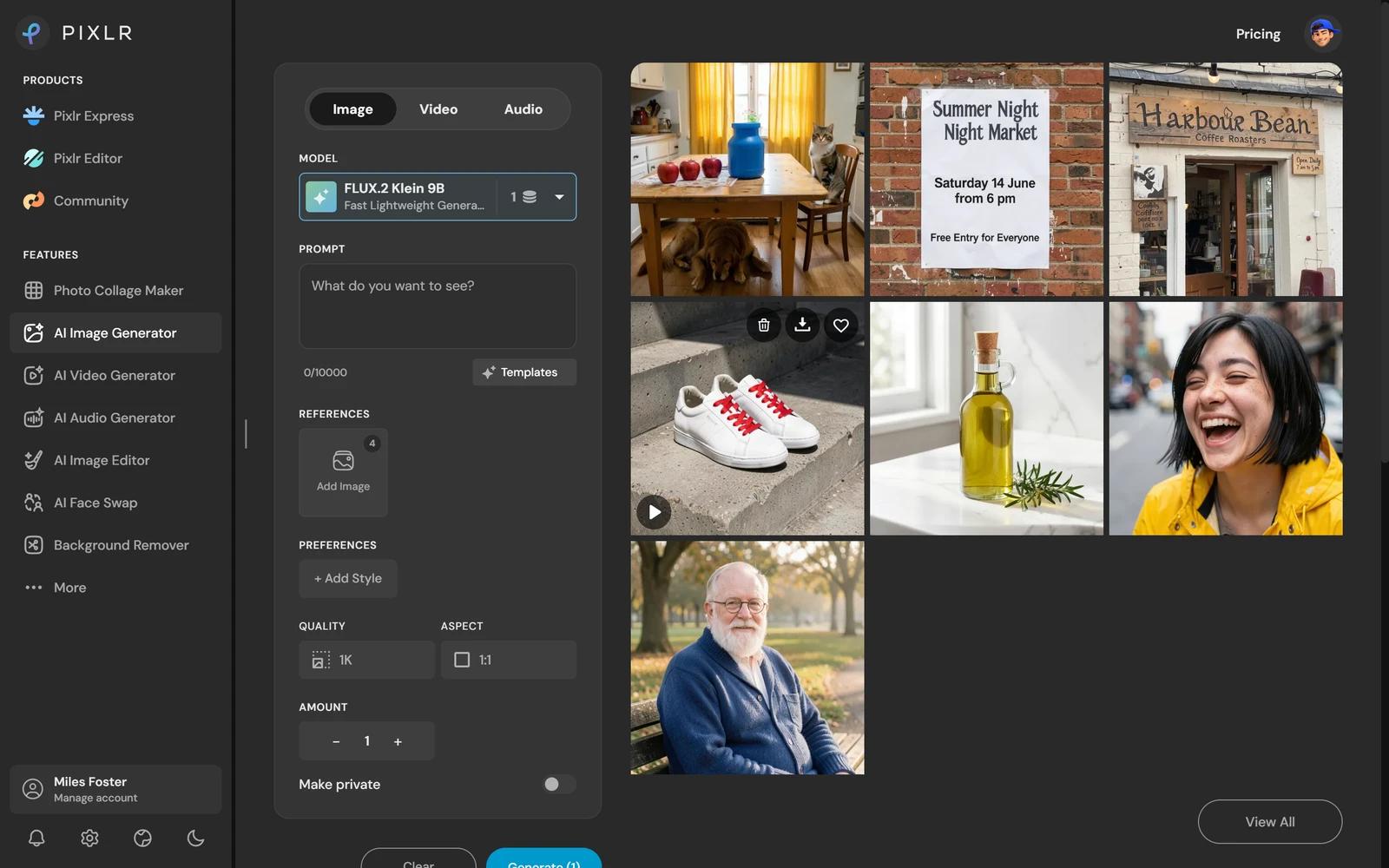
Pixlr is a browser photo editor with an AI image generator inside it. You type a prompt, pick a model and press Generate, and you get a picture in seconds. It also has video and audio generators, an image editor, face swap and a background remover.
You pay in credits. The free plan showed 10, and the model I used, FLUX.2 Klein 9B, costs 1 credit for a 1K image. Paid plans start at $2.49 a month.
How I Tested Pixlr
Every image generator gets the same 40 written prompts, and I keep the first image of each. On the free plan I ran 7 of them and seven of the ten tests, and left three tests out. I stopped when the free credits were nearly gone.
My tools
Last checked 12 Nov 2026Pixlr pros and cons
Pros
- An image in under 8 seconds
- 42 of 43 details right
- Perfect busy kitchen scene
- Every set word spelled right
- Commercial use allowed on free
- No watermark on the download
- Plans from $2.49
Cons
- Invented text in both wording images
- Soft 4x upscale
- Free results are public
- Only 10 free credits
- No training opt-out found
- Trustpilot 2.0 from 186 reviews
Pixlr Pricing
- Pricing & Value
- 4/5Good
The cheapest plan is $2.49 a month. Plus gives 80 credits, about 80 fast images, or $0.031 an image. Premium is $9.99 for 1,000 credits and Ultra starts at $24.99.
Pixlr plans and prices
Live data· last check 12 November 2026| Plan | Price a month | |
|---|---|---|
| Free10 credits, FLUX.2 Klein 9B, results public by default | $0 | 10 credits, FLUX.2 Klein 9B, results public by default |
| Plus80 credits a month, ad-free | $2.49 | 80 credits a month, ad-free |
| Premium1,000 credits a month, all models, private mode | $9.99 | 1,000 credits a month, all models, private mode |
| UltraUp to 10,000 credits a month, private content, priority queue | $24.99 | Up to 10,000 credits a month, private content, priority queue |
- Monthly/Yearly toggle shows '+ SAVE 20%' on yearly; the default view and billing term of listed prices are not stated
- Ultra fast image generations are unlimited but subject to fair use
- AI Credit Pack top-up is offered; its price is not shown
I did not buy a plan, so the per-image cost assumes a fast image costs 1 credit on Plus. A pro image costs about 5. Trustpilot showed 2.0 out of 5 from 186 reviews on the same day, with complaints about charges, auto-renewals and disappearing credits.
Pixlr Prompt Adherence
- Prompt Adherence
- 5/5Excellent
Pixlr got 42 of 43 asked-for details right across my 7 prompts. Even the busy kitchen scene was perfect: three red apples left of a blue jug, a dog under the table, a cat on the chair and yellow curtains behind.
The one miss was wording: the night market poster headline repeats a word. Only one busy scene was run, so check the counts in your own pictures.
Pixlr Photorealism
- Photorealism & Anatomy
- 4/5Good
Pixlr made three of four images that pass as photographs. The man on a bench, the laughing woman and the olive oil bottle had good skin, eyes, teeth, hands and glass.
The white trainers failed on one detail: the left shoe carries a garbled embossed mark where a logo would be. I ran four images once, not 24 twice.
Pixlr Text in Images
- Text in Images
- 3/5Average
Pixlr spelled every word I set: 24 of 24 on a coffee shop sign and board and a night market poster. But neither picture was clean.
The coffee shop picture added a second board with made-up words, "Cosfaty Coffieern peet ao a jaKe.", and the poster headline reads "Summer Night Night Market". Invented text counts as a fault, so no image was fully correct.
Pixlr Image Size and Upscaler
- Resolution & Upscaling
- 3/5Average
Pixlr makes images 1,024 pixels square, about 1 megapixel. The Download button gave me the same file as the one stored, a JPEG.
Super scale took 5.7 seconds and gave 4,096 pixels, saved as a 530 KB JPEG. The result is smoother but adds no new detail, and the reflections in the glass stay soft. I upscaled one image, not six.
Pixlr Speed per Image
- Speed per Image
- 5/5Excellent
Pixlr took a median of 7.5 seconds for each image across 6 timed generations. The fastest took 3.2 seconds and the slowest 7.7.
The clock stops at the 512 pixel preview in the grid; the 1,024 pixel file followed a few seconds later. Nothing failed and there was no queue on the free plan.
Pixlr Free Plan Limits
Pixlr's free plan showed 10 credits, and one 1K image costs 1. I made 7 images and one upscale, then the counter read 3.
The pages I read do not say when free credits reset. A 2K image costs 2 credits. Even at 1 credit each, 10 credits cannot pay for the 10 style, 12 consistency and 12 edit prompts, so those tests were left out.
Pixlr Usage Rights
- Usage Rights, Watermarks & Privacy
- 2/5Below average
Pixlr's licence says "You may use AI Content for personal and commercial purposes", and names no plan, so the free plan is included. If you do not pay for private mode, your results are public.
You give Pixlr a "non-exclusive, sublicensable, worldwide, perpetual, royalty-free and irrevocable right" to reproduce and display your prompts and results. Private mode needs Premium, and I found no training opt-out. The download had no watermark and no content credentials.
Final verdict: is Pixlr worth it?
Pixlr is worth trying if you want quick, accurate pictures and a cheap plan. It drew every image in under eight seconds, counted nearly everything I asked for and gave me a clean file without a watermark.
If you use wording in an image, check it: both of mine carried invented text. The 4x upscale is soft, free results are public and the 10 free credits do not last long.
The seven tests I could run average 3.7 out of 5. I rate it 4.0 because the free plan allows commercial use and let me run seven of the ten tests.
See the Pixlr test results and how I rate.
Best for: People who want quick, cheap images for business use and will check any wording, starting at $2.49 a month.
Video review · 3:44
Watch me test Pixlr
The whole test with the screen recordings: prompts, timing, wording, upscale, rights and prices. Captions and the full transcript are one click away, and the video has a page of its own.
Transcript
Hi, I'm Miles. I tested Pixlr's A I image generator on the free plan. Short version: it drew each picture in under eight seconds and got forty-two of forty-three details right. But both wording images had invented text. My rating is four out of five.
Pixlr is a browser photo editor with an A I image generator inside it. You pay in credits. The free plan showed ten, and one image costs one.
On prompt adherence, Pixlr was excellent. Even the busy kitchen scene was perfect: three red apples, a dog under the table, a cat on the chair.
For photos, three of four passed. The man on the bench, the laughing woman and the olive oil bottle look real. But the white trainers carry a garbled mark where a logo should be.
Text is mixed. Every word I asked for was spelled right, twenty-four of twenty-four. But the coffee shop picture added a second sign with made-up words, and the poster headline repeats the word night. So neither image was clean.
Images come out at one thousand and twenty-four pixels square. Super scale took one to four thousand and ninety-six pixels in under six seconds. But at full size it is just smoother. The reflections in the glass stay soft, so I grade it average.
Speed is excellent. The median was seven and a half seconds, and the fastest was just over three.
The free plan is small. Ten credits, one per image. After seven images and an upscale the counter read three, so I could not run styles, consistency or editing.
On rights, commercial use is allowed, even on free, and the download had no watermark. But results are public by default, and Pixlr takes a perpetual right to display them.
Plus costs two dollars forty-nine a month for eighty credits, about three cents an image. Trustpilot shows two point oh from a hundred and eighty-six reviews, mostly about charges.
My verdict: worth trying for quick, accurate pictures on a small budget. Check any wording. The seven tests average three point seven, and I rate it four out of five. Full results are on the test results page.
Chapters · 13
Frequently asked questions
How much does Pixlr cost, and is there a free plan?
Yes. The free plan showed 10 credits, enough for 10 images at 1 credit. Plus is $2.49 a month for 80 credits.
Is Pixlr legit and safe?
Yes, in my test. I signed in with Google, entered no card and was never charged. Other users on Trustpilot complain mostly about charges and credits.
Can I use Pixlr images commercially?
Yes. The licence says you may use AI content for personal and commercial purposes. You grant Pixlr a perpetual right to display it, and results are public unless you use private mode.
Who owns the images I make with Pixlr?
Not stated. The licence says you may use the output for personal and commercial purposes, and gives Pixlr a perpetual right to display it too. It does not say who owns it.
Does Pixlr add a watermark?
Not on free. The download had no visible watermark. I did not test a paid download.
What did you not test?
Three tests. Style range, consistency and editing were left out: the free credits ran out.

Miles FosterOwner and tester, RankDudeMiles Foster is a pen name: the owner of RankDude, a private person, runs every test himself.
Disclosure. I tested on the free demo account anyone can open on Pixlr’s site. I signed up myself and paid Pixlr nothing. Pixlr didn’t see this review first and had no say in my rating. How RankDude makes money is on the disclosure page.