
OpenMusic AI Review: AI Music Generator, Pricing & My Test Results
My rating
A capable generator with a very tight free plan. Check the licence first.
Best for: trying full songs with lyrics. Not for business music until you pay and read the terms.

Tested and written by Miles Foster
Based on 5 graded tests and my verdict. How I rate
I tested OpenMusic AI hands-on on its free plan, giving its AI music generator a fixed prompt on its V2.5 model, timing the songs, measuring one, opening its editing pages and reading the terms and the prices. OpenMusic AI ranks #2 of the ten on my best AI music generators page.
Every measurement is in the OpenMusic AI test results.
My OpenMusic AI Music Generator Test Results
| Category | Grade | In short |
|---|---|---|
| Audio Quality & FidelityA clean stream with no clipping | 4/5Good | |
| Editing, Stems & RegenerationExtend and replace, but each costs credits | 2/5Below average | |
| Commercial-Use Rights & LicensingYou own the output, free use unclear | 3/5Average | |
| Generation SpeedFull songs in about a minute | 4/5Good | |
| Free-Tier Limits & PricingCheap paid plan, tight free plan | 3/5Average | |
| My verdict | +0.2 | |
| Overall | 3.4/5Average |
What Is OpenMusic AI?
OpenMusic AI is an AI music platform from OpenMusic Inc. You describe a song, or paste your own lyrics, and it makes full songs in about a minute. The same account holds a lyrics writer, a cover maker, a stem splitter, a mastering tool and a music video maker.
It has three models, V1 Plus, V2.5 and V2. It is aimed at people who want songs for YouTube, TikTok or Spotify without a studio.
How I Tested OpenMusic AI
Every music generator gets the same twelve prompts, so you can compare them, each naming a genre, a mood, a tempo and instruments. The free plan started me with 2.5 credits, and the daily reward added 2. One generation costs 2, so I ran one of the twelve prompts. I graded five of the ten tests and left five out.
My tools
Last checked 12 Nov 2026OpenMusic AI pros and cons
Pros
- Full songs over three minutes in about a minute
- Writes its own lyrics from a short prompt
- Extend and Replace Section on the free account
- Three models to choose from
- Daily reward adds free credits
- Cheap paid plan with a commercial licence
Cons
- Free credits cover one generation a month
- A download costs 2 credits on free
- Free commercial use is unclear
- Refund periods differ between pages
- Extend and stems cost credits too
OpenMusic AI Pricing
- Free-Tier Limits & Pricing
- 3/5Average
A song you may use in business starts at $10.49 a month billed yearly, or $14.99 month to month. Starter gives 200 credits a month and 1000 downloads. Hobby is $20.99 a month yearly or $29.99 monthly, with unlimited downloads. Prices read on 12 November 2026.
OpenMusic AI plans and prices
Live data· last check 12 November 2026| Plan | Price a month | |
|---|---|---|
| Free2.5 credits a month, a download costs 2 credits | $0 | 2.5 credits a month, a download costs 2 credits |
| Starter200 credits a month, commercial licence, 1000 downloads | $14.99 | 200 credits a month, commercial licence, 1000 downloads |
| Hobby500 credits a month, unlimited downloads | $29.99 | 500 credits a month, unlimited downloads |
| Professional1,200 credits a month, unlimited downloads | $49.99 | 1,200 credits a month, unlimited downloads |
| Studio3,400 credits a month, unlimited downloads | $129.99 | 3,400 credits a month, unlimited downloads |
- Unused credits clear on each renewal date; no carryover
- Extra credits cannot be bought mid-cycle; upgrade is required
- A Pay Once tab appears but shows no prices
The free plan is tight: 2.5 credits a month, and one generation costs 2. A daily reward adds 2 credits. The pricing questions promise a full refund within 3 days if you used fewer than 20 credits, and the terms say 7 days. I did not buy a plan. I grade the value average.
OpenMusic AI Audio Quality
- Audio Quality & Fidelity
- 4/5Good
The one song I measured came out clean. It was a 184 kbps stereo MP3, 182 seconds long, with a true peak of −2.6 dB and no clipped samples. It ends on a fade and starts almost at once.
I measured the stream the player loads, because the Download button costs 2 credits on the free plan. One song of twelve is not the whole set, so the grade stops at good.
OpenMusic AI Generation Speed
- Generation Speed
- 4/5Good
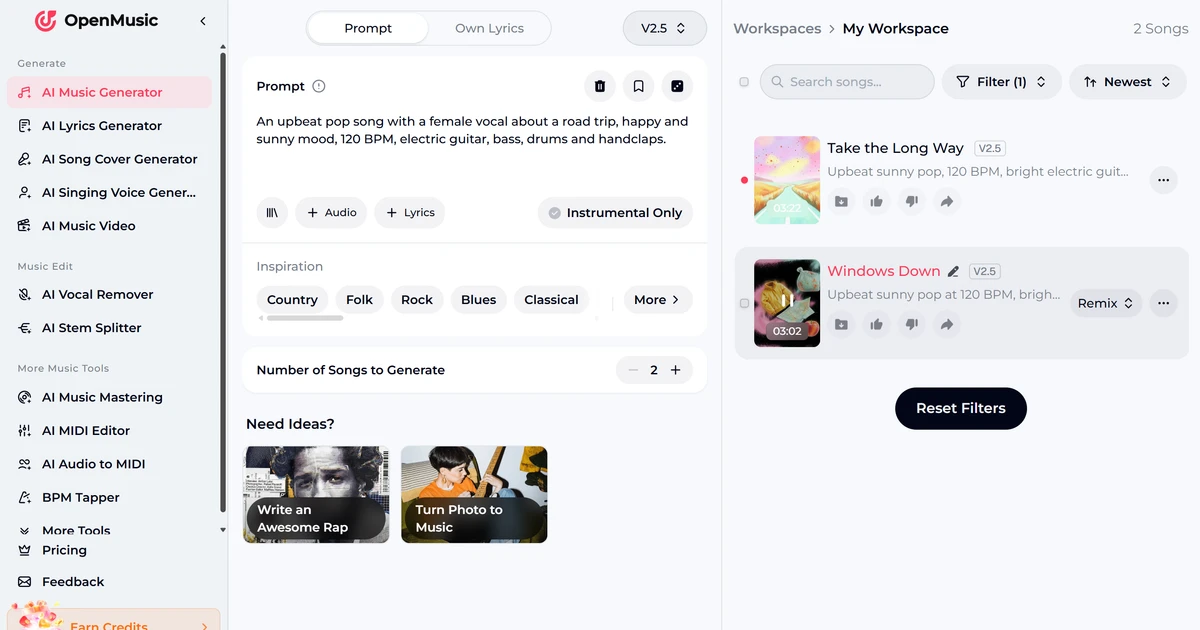
OpenMusic AI gave me two full songs from one press. The first was playable after 43 seconds and the second after 67, and they ran 3:02 and 3:22.
I gave it no lyrics, and it wrote its own and a longer description of the song. This is one timing, not a median of twelve. I grade speed good.
OpenMusic AI Editing and Stems
- Editing, Stems & Regeneration
- 2/5Below average
OpenMusic AI has real editing tools, and every one I opened costs credits. The Remix menu on a song offers Cover, Extend, Replace Section and Mashup. Replace Section shows the song's waveform with a stretch to replace and the lyrics below.
Extend and Replace Section are priced at 2 credits, so I opened them and did not run them. Four of ten points counted, which is a grade of below average. The stem splitter lists 4, 6 and 12 stems, and I did not run it.
OpenMusic AI Downloads and Files
The track menu lists three formats, MP3, WAV and FLAC, a batch download, a commercial licence and the cover image as PNG. On the free plan the download dialog says "Use 2 credits to download now, or upgrade to an annual plan for unlimited downloads."
Paying 2 credits would have passed my stop, so no file was downloaded. I give no grade for files.
OpenMusic AI Usage Rights
- Commercial-Use Rights & Licensing
- 3/5Average
The terms say you own the output. They say "You own the rights to the output you generate." and that you may "publish, distribute, monetize, or modify your music freely."
The pricing page does not agree for the free plan. It crosses out "Commercial License Included" for Free and says "All monthly and annual paid plans include commercial rights." I grade it average, and you should read both pages before using a free song in business.
Final verdict: is OpenMusic AI worth it?
OpenMusic AI is worth trying if you want a full song with lyrics from one sentence. It made two songs of over three minutes in about a minute, and its Replace Section page lets you rework one stretch.
It is not the tool for business music while you stay on the free plan. The credits cover one generation a month, a download costs 2 more, and the pricing page keeps commercial use for paid plans while the terms say you own the output.
The five tests I could run average 3.2 out of 5. I rate it 3.4 because the full songs and the editing pages are better than the grades show.
See the OpenMusic AI test results and how I rate.
Best for: People who want full-length songs with lyrics to try an idea, and will pay for a plan before using the music in business.
Video review · 4:35
Watch me test OpenMusic AI
The whole test with the screen recordings: one generation, the Remix menu, the download dialog, the terms and the prices. Captions and the full transcript are one click away, and the video has a page of its own.
Transcript
Hi, I'm Miles. I tested OpenMusic AI, an AI music generator, on its free plan. Here's the short version. It made two full songs of over three minutes in about a minute, and it wrote the lyrics itself. The catch is that the free credits cover one generation, a download costs two more credits, and the pricing page keeps commercial use for paid plans. My rating is three point four out of five, from the five tests I could run.
So what is OpenMusic AI? It's a music platform from a company called OpenMusic Inc. You describe a song, or paste your own lyrics, and it makes full songs for you. It has three models, and the same account holds a lyrics writer, a cover maker, a stem splitter and a mastering tool.
The free plan started me with two and a half credits, and a daily reward added two more. One generation costs two credits, so I ran one of my twelve fixed prompts, timed it, and measured one song. I left five tests out rather than guess.
The one song I measured was a clean M P three stream, a hundred and eighty four kilobits a second, in stereo. Its peak stayed under the limit, nothing was clipped, and it ends on a fade. I measured the player's stream, because the download button costs credits on the free plan.
Speed was good. The first song was playable after forty three seconds, and the second after sixty seven. They ran just over three minutes each, and I gave it no lyrics, so it wrote its own. That is one timing, not a median of twelve.
Editing is real, but every tool costs credits. The remix menu offers cover, extend, replace section and mashup. Replace section shows the waveform of your song, and you pick the stretch to redo. Each one costs two credits, so I opened them and didn't run them. That gives a below average grade.
The track menu lists M P three, wave and flack downloads, a batch download and a commercial licence. On the free plan, the dialog asks for two credits to download. That would have passed my stop, so I downloaded nothing, and I give no grade for files.
On rights, the terms are generous. They say you own the rights to the output you generate. But the pricing page crosses out the commercial licence for the free plan, and says commercial rights come with paid plans. Those two pages disagree, so read both before using a free song in business.
Pricing starts with Starter at about ten dollars a month if you pay yearly, or fifteen if you pay monthly. The free plan is tight, with two and a half credits a month, and a daily reward adds two. The refund rules differ between the pricing page and the terms. I did not buy a plan.
So is OpenMusic AI worth it? Yes, to try, if you want a full song with lyrics from one sentence. But don't put free songs into business work. The five tests average three point two, and I rate it three point four, because the full songs and the editing pages are better than the grades show.
Chapters · 12
Frequently asked questions
How much does OpenMusic AI cost, and is there a free plan?
Yes. The free plan needs no card and gave me 2.5 credits. Starter is $14.99 a month, or $10.49 a month paid yearly. Hobby is $29.99 a month, or $20.99 a month paid yearly.
Is OpenMusic AI legit and safe?
Yes, in my test. I signed in with Google, entered no card and was never charged. The terms name OpenMusic Inc. and a support address, and the site shows its terms and refund policy.
Who owns the music, and can I use it on YouTube or Spotify?
You do, say the terms: "You own the rights to the output you generate." The pricing page says commercial rights come with paid plans, so a free song is a risk for business use. The terms do not mention streaming services.
Which files and stems do I get from OpenMusic AI?
Three formats. MP3, WAV or FLAC: the track menu lists all three, and on the free plan a download costs 2 credits. The stem splitter lists 4, 6 and 12 stems at 2 credits, and I did not run it.
How do I cancel OpenMusic AI or get a refund?
From your dashboard. The terms say you may cancel at any time and it takes effect at the end of the billing cycle. The pricing questions offer a full refund within 3 days if you used fewer than 20 credits. I did not buy a plan, so I did not test it.

Miles FosterOwner and tester, RankDudeMiles Foster is a pen name: the owner of RankDude, a private person, runs every test himself.
Disclosure. I tested on the free demo account anyone can open on OpenMusic AI’s site. I signed up myself and paid OpenMusic AI nothing. OpenMusic AI didn’t see this review first and had no say in my rating. How RankDude makes money is on the disclosure page.