
NotebookLM Review: AI Study Tool, Pricing & My Test Results
My rating
Answers from your own sources, with citations. The free chat locks after 50.
Best for: students studying from their own PDFs, slides and notes. Not for: a tutor that teaches steps, or asking with no document.

Tested and written by Miles Foster
Based on 8 graded tests and my verdict. How I rate
I tested NotebookLM hands-on on its free plan, the way I test every AI study tool. I asked my fixed questions against a study pack (49 of the 60 before the free chat locked). I made flashcards and a quiz from a fact sheet, summarised a lecture and tried ten ways of adding material, then the free limits and the checkout. NotebookLM ranks #1 of the ten on my best AI study tools page.
Every measurement is in the NotebookLM test results.
My NotebookLM AI Study Tool Test Results
| Category | Grade | In short |
|---|---|---|
| Answer & Explanation AccuracyEvery answer matched my document | 5/5Excellent | |
| Flashcards & Quizzes From a SourceCards and quiz were all usable | 5/5Excellent | |
| Summarising a Lecture or PDFMost points kept, one wrong year | 4/5Good | |
| Uploaded Document & Notes HandlingTakes nearly every kind of study material | 4/5Good | |
| Subject CoverageNo weak subject | 5/5Excellent | |
| Citations & TrustworthinessEach citation opens the right passage | 4/5Good | |
| Free-Tier LimitsFree, but the chat runs out | 4/5Good | |
| Pricing & ValuePaid route needs a year's commitment | 3/5Average | |
| My verdict | +0.6 | |
| Overall | 4.9/5Excellent |
What Is NotebookLM?
NotebookLM is Google's AI study notebook. You add your own sources, such as PDFs, slides, audio or a YouTube link, and it answers questions about them with citations, summarises them and makes flashcards and quizzes.
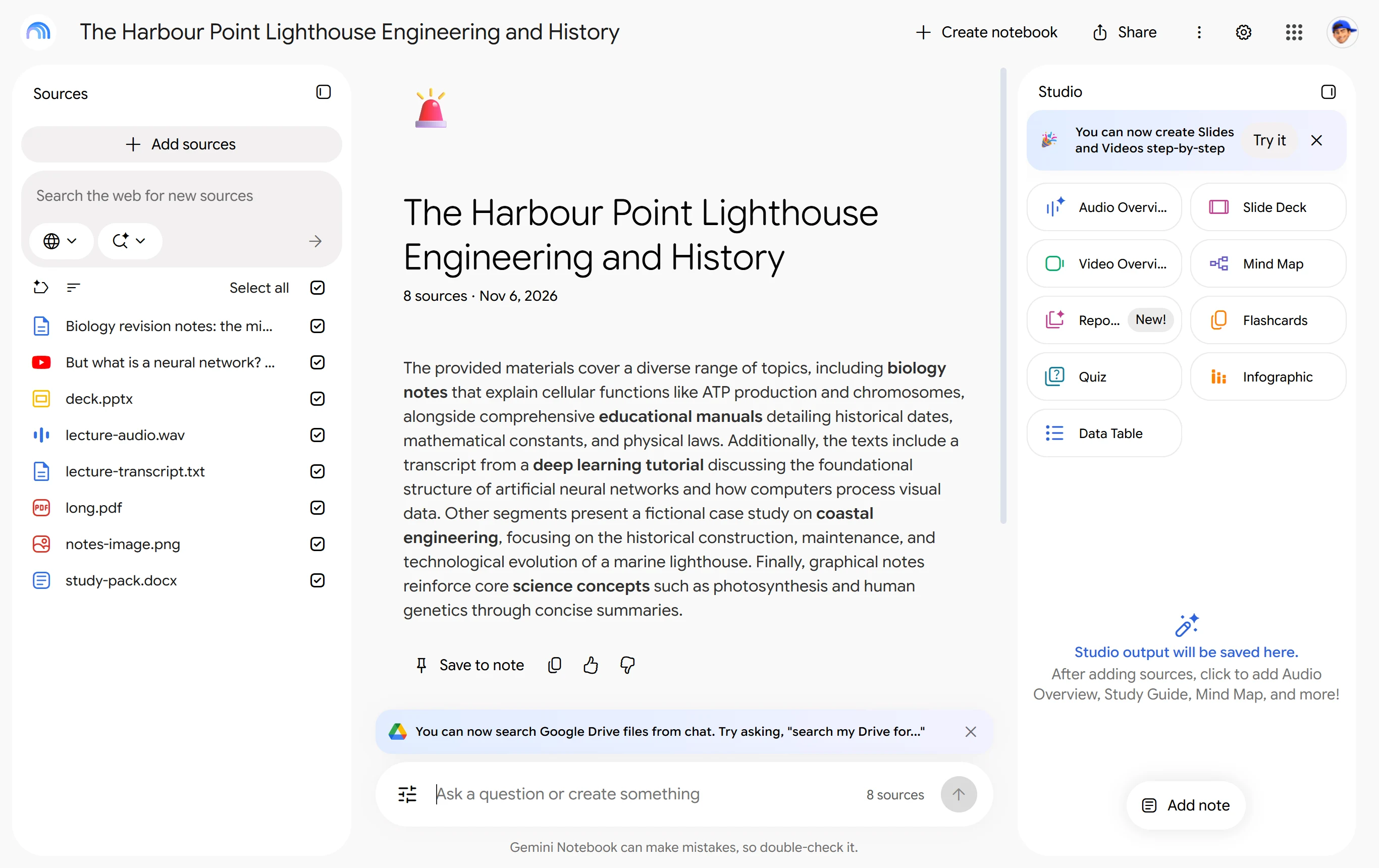
On the test day notebooklm.google.com opened as "Gemini Notebook" at notebook.google.com, so the pictures show that name. The free plan needs a Google account and no card.
How I Tested NotebookLM
Every AI study tool gets the same material: 60 questions with answers worked out first, a 12-page study pack, a ten-fact fact sheet and an invented lecture. NotebookLM answers only from the sources you add, so I asked the questions against my own pack. Eight of the ten tests were graded.
My tools
Last checked 12 Nov 2026NotebookLM pros and cons
Pros
- Every answer matched my document
- Citations open the exact passage
- Flashcards and quiz all usable
- Takes nine kinds of material
- Free plan needs no card
- Studio tools worked with chat locked
Cons
- Chat locked after 50 chats
- One summary invented a build year
- Paid route needs a one-year commitment
- No export for cards or quizzes
- Audio transcript misheard one word
NotebookLM Pricing
The free plan costs $0. The only paid route the app showed me was Google Workspace Business Standard at $14 a user a month, on an annual plan billed monthly, with a one-year commitment.
NotebookLM plans and prices
Live data· last check 12 November 2026| Plan | Price a month | |
|---|---|---|
| Free100 notebooks, 50 sources each, chat capped | $0 | 100 notebooks, 50 sources each, chat capped |
| Business StandardAnnual plan billed monthly; higher limits and more sources | $14 | Annual plan billed monthly; higher limits and more sources |
- Enterprise plans are contact-sales only and not priced here.
- Intro prices apply to first 20 users for 12 months, then standard pricing.
- Page says all plans billed monthly, conflicting with the annual option; add-ons sold separately.
Google AI Plus, Pro and Ultra also include higher limits, but the app showed no price for them, so I give none.
NotebookLM Free Plan Limits
NotebookLM's free plan gave me 50 chats before the box locked. The box then read "You have reached your daily chat limit, come back later."
Flashcards, a quiz and a data table still generated with chat locked, and no card was asked for. Google's help page lists 100 notebooks and 50 sources each on the free plan.
NotebookLM Answer Accuracy
NotebookLM got all 49 questions right that I could ask, with nothing invented. Each answer was one sentence with a numbered citation.
A median answer took 13 seconds. These questions all sit in my own pack, so this shows it reads a document well, not what it knows without one.
NotebookLM Flashcards and Quizzes
NotebookLM's flashcards and quiz were all usable. I marked the first 20 items and every one was correct and drawn from my fact sheet.
It made 19 cards in 27 seconds and 11 quiz questions in 52 seconds, and the tool's own answer key was right every time. A few cards repeat each other.
NotebookLM Summaries
NotebookLM's summary of my lecture kept seven of ten key points and added one error. It says the tower was built in 1851, the year the harbour board voted to build it.
When I opened the notebook again, the summary had rewritten itself and still kept seven points, with the same year wrong. I did not score the PDF summary.
NotebookLM Documents and Uploads
NotebookLM took nine of ten ways of adding material: pasted text, PDF, DOCX, a PowerPoint deck, an image of notes, audio, a YouTube link, a 42-page PDF and many sources in one notebook.
It read my photographed notes correctly. It heard "Fresnel" as "Frael" in a spoken recording. Only the Data Table has an export, to Sheets, and flashcards and quizzes have none.
NotebookLM Citations
NotebookLM's citations were real in every case I opened. Click the number and you see the source page, opened with the supporting sentence highlighted.
I opened three of the 49. The ten questions that the pack does not answer, which would show whether it admits a gap, were locked out by the chat limit.
Final verdict: is NotebookLM worth it?
NotebookLM is worth using if you study from your own notes, slides and PDFs. It answered all 49 questions right with a citation you can open, and every flashcard and quiz item I marked was usable.
It is not the tool if you want a tutor that teaches a method step by step, or to ask general questions with no document: I did not test either. The free chat also locks after about 50 chats.
The eight tests I could grade average 4.3 out of 5. I rate NotebookLM 4.9 because the free plan let me run eight of the ten tests, with no card.
See the NotebookLM test results and how I rate.
Best for: Students who study from their own notes, slides and PDFs and want answers they can check back to the page.
Video review · 2:49
Watch me test NotebookLM
The whole test in a few minutes, from screen recordings of the tests. Captions and the full transcript are one click away, and the video has a page of its own.
Transcript
Hi, I'm Miles. I tested NotebookLM hands on, on its free plan, and here's the short version. I asked it forty nine questions against my own study pack, and it got every one right, each with a citation. The flashcards and the quiz were all usable too. The catch: the free chat locked after fifty chats, a summary invented a build year, and the paid route is a Workspace plan with a one year commitment. My rating is four point nine out of five, from eight tests.
So what is NotebookLM? It's Google's study notebook. You add your own sources, like PDFs, slides, audio or a YouTube link, and it answers questions about them with citations, and makes summaries, flashcards and quizzes. On the test day it opened under the name Gemini Notebook.
The free plan needs a Google account and no card. I asked questions until the chat box locked, which happened after fifty chats, with a message that said you have reached your daily chat limit. The flashcards and quiz tools still worked after that.
Now accuracy. I asked the fixed questions one by one against a twelve page study pack, and took the first answer each time. All forty nine answers were right, nothing was invented, and a typical answer took thirteen seconds. Because the questions sit in my own pack, this shows it reads a document well.
From a ten fact fact sheet it made nineteen flashcards in twenty seven seconds and eleven quiz questions in fifty two. Every one was correct and drawn from the sheet, and the quiz's own answer key was right every time, with a reason for each wrong option.
Summaries were weaker. For my lecture it kept seven of ten key points, and it said the tower was built in eighteen fifty one, when that was only the year the harbour board voted to build it. When I opened the notebook again the summary had rewritten itself, with the same wrong year.
On uploads, nine of ten ways of adding material worked: pasted text, PDF, Word, a PowerPoint deck, a photo of notes, audio, a YouTube link, a forty two page PDF, and many sources in one notebook. Only the data table exports, to Sheets. Flashcards and quizzes have no export.
Citations are its strength. Click the number on an answer and the source page opens with the supporting sentence highlighted. The ten questions my pack can't answer, which would show whether it admits a gap, were locked out by the chat limit.
On price, the free plan is free. The only paid route the app showed me was Google Workspace Business Standard, fourteen dollars a user a month, on an annual plan billed monthly, with a one year commitment box to tick. I didn't buy it.
So, is NotebookLM worth it? Yes, if you study from your own notes, slides and PDFs. The eight tests average four point three, and I rate it four point nine, because the free plan let me run eight of the ten tests with no card. The two tests I left out, explanations and the phone, could not be run.
Chapters · 11
Frequently asked questions
How much does NotebookLM cost, and is there a free plan?
Yes, free. The free plan has 100 notebooks and 50 sources each, and needs no card. The paid route I saw was Workspace Business Standard at $14 a user a month on a one-year commitment.
Is NotebookLM legit and safe?
It worked. I signed in with Google and entered no card. The welcome notice says your personal data is never used to train the model.
Does NotebookLM make flashcards and quizzes?
Yes. It made 19 cards and 11 quiz questions from my fact sheet, all correct. Neither can be exported.
Does NotebookLM have a mobile app?
Not tested. I used the desktop site only. Google's help page lists a Gemini Notebook mobile app.
What did I not test?
Two tests. I left out step-by-step explanations and the phone test. The chat limit also stopped 10 of the 60 questions and the questions the pack cannot answer.

Miles FosterOwner and tester, RankDudeMiles Foster is a pen name: the owner of RankDude, a private person, runs every test himself.
Disclosure. I tested on the free demo account anyone can open on NotebookLM’s site. I signed up myself and paid NotebookLM nothing. NotebookLM didn’t see this review first and had no say in my rating. How RankDude makes money is on the disclosure page.