
Namecheap Logo Maker Review: Free AI Logo Generator & My Test Results
My rating
A free logo maker with real SVG files. Downloading needs a sign-in.
Best for: a free first logo with vector files. Not for a logo you need a written right to use or register.

Tested and written by Miles Foster
Based on 4 graded tests and my verdict. How I rate
I tested Namecheap Logo Maker hands-on, the way I test every AI logo generator: one coffee roaster brief typed into its wizard, ten edits on the logo, the files in the download and the small sizes. Namecheap Logo Maker ranks #5 of the ten on my best AI logo generators page.
Every measurement is in the Namecheap Logo Maker test results.
My Namecheap Logo Maker Test Results
| Category | Grade | In short |
|---|---|---|
| Legibility at Small SizesThe name reads at 64 pixels, not smaller | 3/5Average | |
| Editing ControlFonts and colours change, spacing and size do not | 2/5Below average | |
| File FormatsReal vector files, but no transparent PNG | 4/5Good | |
| Pricing & ValueFree, with no watermark on the files | 5/5Excellent | |
| My verdict | +0.0 | |
| Overall | 3.5/5Good |
What Is Namecheap Logo Maker?
Namecheap Logo Maker is a free logo tool from Namecheap, the company that sells domain names and web hosting. You type your business name, answer short questions about fonts, colour, a slogan and icons, and it builds a page of logos for you to edit and download.
The editor also has Business Card and Website tabs, so you can see the logo on a mock business card. The vendor's page says the maker never adds watermarks and that downloads hold PNG and SVG files.
How I Tested Namecheap Logo Maker
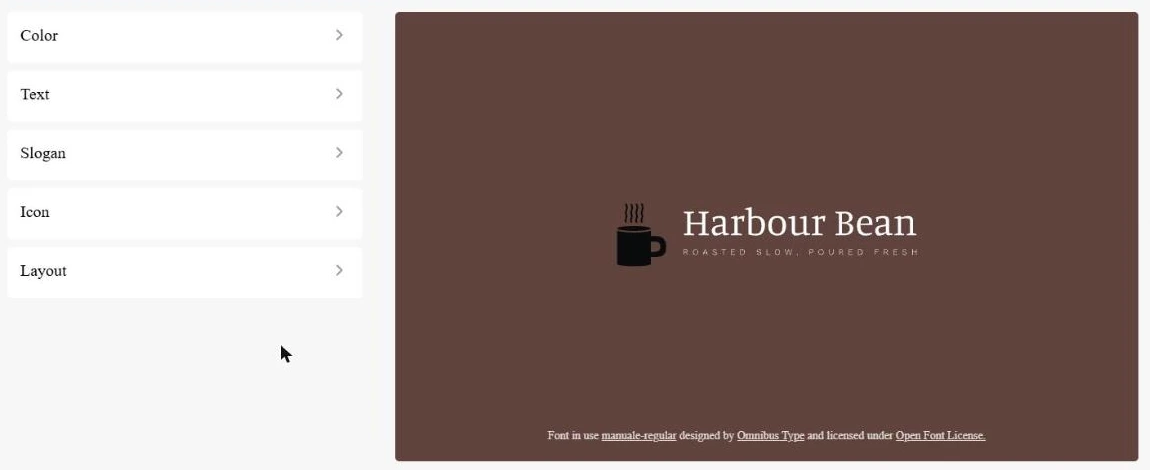
Every logo generator gets three briefs: a speciality coffee roaster, a family law firm and a children's coding school, and I ran the coffee roaster, Harbour Bean, through the wizard. It asks for no personality words or colours to avoid, so I gave it the name, a business type, a brown colour and the slogan "Roasted slow, poured fresh". I could grade four of the ten tests and left six out.
My tools
Namecheap Logo Maker pros and cons
Pros
- Free, with no watermark
- About ten logos in minutes
- Seven SVG vector files in the zip
- Hex field for each colour
- Black and white versions included
- No usage limit seen
Cons
- Download needs sign-in and consent
- PNG has a baked-in background
- No PDF or CMYK file
- Name unreadable at 16 pixels
- No spacing, size or icon-shape edits
- Logos differ little from each other
- Nothing stated about commercial use
Namecheap Logo Maker Pricing
- Pricing & Value
- 5/5Excellent
Namecheap Logo Maker costs nothing: the logo and every file in the zip were free, with no paywall and no watermark. The only upsell was a domain, harbourbean.com at US$12.08, renewing at US$15.98 a year, shown beside the download button.
Namecheap Logo Maker plans and prices
| Plan | Price a month | |
|---|---|---|
| Logo and filesPNG and seven SVG files, no watermark; a free Namecheap account is needed to download | $0 | PNG and seven SVG files, no watermark; a free Namecheap account is needed to download |
| Domain offer (optional)harbourbean.com for the first year, renewing at US$15.98 a year | US$12.08 | harbourbean.com for the first year, renewing at US$15.98 a year |
You pay nothing for the logo, and I bought nothing. I saw no plan, credit counter or usage limit. I grade the value excellent.
Namecheap Logo Maker Logo Quality
Namecheap Logo Maker gave me about ten logos for Harbour Bean, and the name is spelled right on all of them. Three or four carry an icon and the slogan, and the rest are the name alone or on another background colour.
They share one font family and one layout and differ mostly in colour, so there are few truly different ideas. You can judge them yourself in the picture. I judged them by eye only, so I could not grade design quality, originality or variety.
Namecheap Logo Maker Free Plan and Sign-In
Namecheap Logo Maker is free to use, and the logos and editor worked without an account. I found no counter and no limit notice, but the download needs a Namecheap sign-in.
After I signed in, a page said "Business Card Maker would like to" know my basic profile info and "Get Offline Access", with Allow and Cancel buttons. The offline access line reads "Access to your applications and resources, even when you are offline." I clicked Allow, and the zip downloaded with no further click.
Namecheap Logo Maker Editing
- Editing Control
- 2/5Below average
I made the ten fixed edits on the Harbour Bean logo and five worked: the typeface, a colour by hex code, the slogan, the icon and a one-colour version. Each of the font, slogan, background and icon colours has its own hex field.
Letter spacing, icon size, icon shape and free movement of the icon were not there, because the Layout panel offers preset layouts only. I did not try undo. I grade it below average.
Namecheap Logo Maker Logos at Small Sizes
- Legibility at Small Sizes
- 3/5Average
The name reads at 64 pixels. At 32 it is barely legible and the slogan is gone, and the black mug on the dark brown background is a dark blob. At 16 nothing can be read.
The mug in the PNG is black, while the download's info file lists the icon as a lighter brown, which adds to the weak contrast. I judged one logo, not three. I grade it average.
Namecheap Logo Maker File Formats
- File Formats
- 4/5Good
The free zip holds seven SVG files drawn from real paths, and a 1,000 pixel PNG with the brown background baked in. It has no PDF, no CMYK file, no JPG and no watermark.
The SVG files come as colour, monochrome, black, white and icon-only versions, so you can use the logo on light or dark backgrounds. The zip also holds a cover image and a profile image. I grade it good.
Namecheap Logo Maker Usage Rights
Namecheap Logo Maker does not say who owns the logo or whether you may use it in business. I read the logo maker page and the Apps Marketplace terms, and neither covers a logo made with it, so you should check Namecheap's terms before you use the logo in business.
The editor does show the font licence, the Open Font License, under the logo. I could not grade this test, because I found no terms for logos and did not read Namecheap's other terms.
Namecheap Logo Maker Speed and Ease of Use
Namecheap Logo Maker took me about 3-4 minutes to get from the first screen to the editor, across ten short screens. Six of them are single-click picks of a font style, so there is little for you to type.
The download then needed a sign-in and the permission screen. I did not time the whole run from the first click to the zip on disk, so I could not grade it.
Final verdict: is Namecheap Logo Maker worth it?
Namecheap Logo Maker is worth a try if you want a free logo with real vector files and no watermark, and you will sign in to a Namecheap account to download it. The wizard is quick, and the zip held seven SVG files.
It is not the tool if you need a transparent PNG, a PDF or CMYK file, tight control over spacing and size, or a written statement that you own the logo. The name is unreadable at 16 pixels, and Namecheap says nothing about rights over a logo on the pages I read.
The four tests I could run average 3.5 out of 5. The free plan let me run 4 of 10 tests, so I added nothing, and the rating stays 3.5.
See the Namecheap Logo Maker test results and how I rate.
Best for: People who want a free logo with real vector files and no watermark, and do not mind signing in to download or having a plain, fixed layout.
Video review · 3:18
Watch me test Namecheap Logo Maker
The whole test in a few minutes: the briefs, the logos, the edits, files, rights and prices. Captions and the full transcript are one click away, and the video has a page of its own.
Transcript
Hi, I'm Miles. I tested Namecheap Logo Maker, the free logo tool from Namecheap, as an AI logo generator. Here's the short version. It is free, and it gave me about ten logos from ten short screens without signing in. The zip held seven SVG vector files and no watermark. But the download needs a Namecheap sign in and a permission screen, the PNG has no transparent background, and the name cannot be read at sixteen pixels. My rating is three and a half out of five, from the four tests I could run.
So what is Namecheap Logo Maker? It is a free logo tool from Namecheap, the company that sells domain names and hosting. You type your business name, answer short questions about fonts, colour, a slogan and icons, and it builds a page of logos to edit and download.
I ran one brief, a coffee roaster called Harbour Bean. The wizard gave me about ten logos, and the name is spelled right on all of them. Three or four carry an icon and the slogan. They share one font and one layout, and differ mostly in colour. I judged them by eye only, so I did not grade design quality.
It is free to use, and I found no limit. But the download needs a Namecheap sign in, then a permission screen where Business Card Maker asks for your basic profile info and offline access. I clicked Allow, and the zip downloaded by itself.
Now the ten fixed edits. Five worked: the typeface, a colour by hex code, the slogan, the icon and a one colour version. Letter spacing, icon size, icon shape and free movement of the icon were not there, because the layouts are presets. I did not try undo.
I shrank the logo to sixteen, thirty two and sixty four pixels. The name reads at sixty four. At thirty two it is barely legible, and the black mug on dark brown is a blob. At sixteen nothing can be read.
The zip holds seven SVG files drawn from real paths, and a PNG one thousand pixels square with the brown background baked in. There is no PDF, no CMYK file and no watermark.
Here is a gap. Namecheap does not say who owns the logo or whether you may use it in business. I read the logo maker page and the Apps Marketplace terms, and neither covers it. So I could not grade this test.
It is quick. The ten short screens took me about three to four minutes, and six of them are single click picks of a font style. I did not time the whole run to a file, so I did not grade it.
It costs nothing. The logo and every file were free. The only upsell was a domain, shown beside the download button. I bought nothing.
My verdict. Namecheap Logo Maker is worth a try if you want a free logo with real vector files and no watermark, and you will sign in to download it. It is not the tool if you need a transparent PNG, a PDF, tight control over spacing, or a written right to use the logo. The four tests average three and a half, and the free plan let me run four of the ten tests, so I added nothing. I rate it three and a half.
Chapters · 13
Frequently asked questions
How much does Namecheap Logo Maker cost, and is there a free plan?
It is free. The logo and every file in the zip cost nothing, and I saw no plan or usage limit. The only upsell was a domain, shown beside the download button.
Is Namecheap Logo Maker legit and safe?
Yes, in my test. It is a tool from Namecheap, a domain and hosting company. I bought nothing and entered no card, but the download asks for a permission screen with offline access, so read it before you click Allow.
Who owns the logo I make with Namecheap Logo Maker?
Not stated. I found nothing about ownership, commercial use or trademarks on the logo maker page or in the Apps Marketplace terms.
Which files do you get from Namecheap Logo Maker?
PNG and SVG. You get one PNG and seven SVG files. The PNG is 1,000 pixels square with a background and no transparency. I saw no PDF, CMYK file or watermark.
How do I cancel Namecheap Logo Maker?
Nothing to cancel. I used the free logo maker and bought nothing, so there was no plan or subscription to end.

Miles FosterOwner and tester, RankDudeMiles Foster is a pen name: the owner of RankDude, a private person, runs every test himself.
Disclosure. I tested on the free demo account anyone can open on Namecheap Logo Maker’s site. I signed up myself and paid Namecheap Logo Maker nothing. Namecheap Logo Maker didn’t see this review first and had no say in my rating. How RankDude makes money is on the disclosure page.