
MiniMax Music Review: AI Music Generator, Pricing & My Test Results
My rating
A generous free plan, but slow and bare. Free tracks are personal use only.
Best for: trying many full tracks for free. Not for tracks you will publish or sell, until you pay.

Tested and written by Miles Foster
Based on 6 graded tests and my verdict. How I rate
I tested MiniMax Music hands-on on its free plan, giving its AI music generator all twelve fixed prompts on the Music-3.0 model, timing each result, downloading every track, and reading the licence and the prices. MiniMax Music ranks #5 of the ten on my best AI music generators page.
Every measurement is in the MiniMax Music test results.
My MiniMax Music AI Music Generator Test Results
| Category | Grade | In short |
|---|---|---|
| Audio Quality & FidelityClean 256 kbps files, two clip a little | 4/5Good | |
| Editing, Stems & RegenerationReuse and three at once, no stems | 1/5Poor | |
| Format, Download & ExportA free MP3 and a share link only | 1/5Poor | |
| Commercial-Use Rights & LicensingFree is personal use, pages disagree | 3/5Average | |
| Generation SpeedAbout four minutes for every track | 2/5Below average | |
| Free-Tier Limits & PricingGenerous free plan, cheap paid plans | 5/5Excellent | |
| My verdict | +0.5 | |
| Overall | 3.2/5Average |
What Is MiniMax Music?
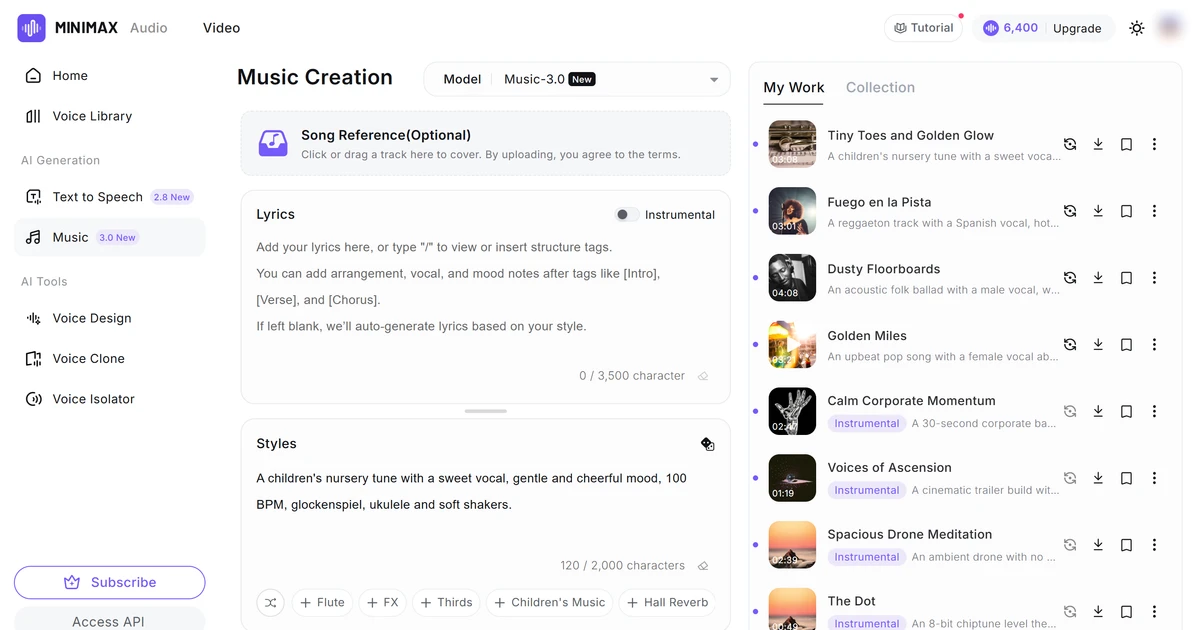
MiniMax Music is the AI music maker inside MiniMax Audio, run by Nanonoble Pte. Ltd. You describe a song in the Styles box, add lyrics if you have them, and the Music-3.0 model, which the page describes as having "studio-grade vocals", writes a full track.
The same account holds text to speech, voice cloning, voice design and a voice isolator. It is for anyone who wants songs or background music and wants to start without paying.
How I Tested MiniMax Music
Every music generator gets the same twelve prompts, so you can compare them, each naming a genre, a mood, a tempo and instruments. The free plan started me with 10,000 credits and every track cost 300, so I ran all twelve and spent 3,600, then 900 more on a three-track press. I graded six of the ten tests and left four out, because they need a person listening to each track.
My tools
Last checked 12 Nov 2026MiniMax Music pros and cons
Pros
- Twelve full tracks free, no card needed
- Every download is free
- Clean 256 kbps MP3 files
- Tracks up to 4 minutes 8 seconds
- Share link and Reuse on every track
- Paid plans from $4.50 a month
Cons
- About four minutes for each track
- Free music is personal use only
- Pages disagree on the free period
- MP3 only, no WAV or stems
- No extend, trim or lyric edit
- No setting for length, key or tempo
MiniMax Music Pricing
- Free-Tier Limits & Pricing
- 5/5Excellent
A track you may use in business starts at $4.50 a month billed yearly, or $5 month to month. Starter gives 100,000 credits, about 330 songs. Creator is $13 a month yearly, Standard $25 and Pro $80. Prices read on 12 November 2026.
MiniMax Music plans and prices
Live data· last check 12 November 2026| Plan | Price a month | |
|---|---|---|
| Free10,000 credits, about 33 songs, free MP3 downloads, standard speed | $0 | 10,000 credits, about 33 songs, free MP3 downloads, standard speed |
| Starter100,000 credits, about 330 songs, commercial use for new songs | $5 | 100,000 credits, about 330 songs, commercial use for new songs |
| Creator330,000 credits, about 1,100 songs, 30 voice slots | $15 | 330,000 credits, about 1,100 songs, 30 voice slots |
| Standard750,000 credits, about 2,500 songs, 50 voice slots | $30 | 750,000 credits, about 2,500 songs, 50 voice slots |
| Pro3 million credits, about 10,000 songs, 250 voice slots | $99 | 3 million credits, about 10,000 songs, 250 voice slots |
- Cancelling mid-period gives no refund of fees already paid
- Monthly billing costs more per month than yearly
- Enterprise plans are not listed; contact sales for those
The free plan is very usable: 10,000 credits paid for about 33 tracks and every download is free. I did not buy a plan, so renewal and cancellation were not tested. I grade the value excellent.
MiniMax Music Audio Quality
- Audio Quality & Fidelity
- 4/5Good
All twelve files measured clean, with two exceptions. Every download was a 256 kbps stereo MP3. Ten files clipped on less than half of one percent of their samples, while the lo-fi beat clipped on 2.8 percent and the ambient drone on 1.4 percent.
Those two are my weakest tracks. Eight of twelve peaks went just over the digital limit, and three tracks stop without a fade. I measured the files and did not listen to them, so the grade stops at good.
MiniMax Music Generation Speed
- Generation Speed
- 2/5Below average
Every track took minutes. The fastest, the chiptune theme, took under two minutes and the slowest, the folk ballad, took nearly seven. The median of my twelve generations was four minutes ten seconds, and the Create button is locked while a track is being made.
Each track cost 300 credits and none failed. The 30-second corporate loop I asked for came back at 2 minutes 47 seconds, and three tracks from one prompt ran from 41 seconds to 2 minutes 18. I grade speed below average.
MiniMax Music Controls
The page gives you few controls over a track. There is a lyrics box that takes structure tags, an Instrumental switch, a Quantity box from one to three, a Song Reference upload for covers, and suggestion chips for instruments, voices, tempo and mood.
There is no setting for length, key or tempo, so those go into the Styles text and are only as good as the model's reading of them. Song Reference said "Song Reference is a feature for members only." on the free plan. I give no grade, because the ten-point checklist could not be run.
MiniMax Music Editing and Stems
- Editing, Stems & Regeneration
- 1/5Poor
MiniMax Music lets you re-run and keep tracks, not edit them. Reuse puts a track's prompt and lyrics back in the form, the Quantity box makes up to three at once, and My Work keeps every track. The track menu holds only Reuse, Rename, Share and Delete.
There was no extend, trim, section replace, lyric edit or stems on a track. Three of ten points means a grade of poor.
MiniMax Music Downloads and Files
- Format, Download & Export
- 1/5Poor
The free plan gives you an MP3 and a share link. The download arrow on a track saves a 256 kbps MP3 at once, with no dialog and no credits taken, and I downloaded all twelve.
Share copies a link and says "Link Copied!". I found no WAV, stems, MIDI, bit rate choice or batch download. Two of ten points means a grade of poor.
MiniMax Music Usage Rights
- Commercial-Use Rights & Licensing
- 3/5Average
On the free plan the rules are not clear. The FAQ says "Commercial rights are only available for paid users. Free plans are personal use only." Another answer says music made in a 14-day free trial period may be used commercially, if you hold the rights.
For personal use the FAQ asks you to credit MiniMax. The terms say "We do not claim ownership of User Contributions or User Generated Content", but do not say who owns a track the tool writes. I grade it average.
Final verdict: is MiniMax Music worth it?
MiniMax Music is worth trying if you want plenty of full-length tracks to test ideas. The free plan made all twelve of my prompts, up to 4 minutes 8 seconds long, and every MP3 download was free.
It is not the tool for music you will publish or sell while you stay on the free plan. Free use is personal, credit is asked for, the pages disagree about a 14-day free period, and each track takes about four minutes with no stems, WAV or editing.
The six tests I could run average 2.7 out of 5. I rate it 3.2 because the free plan is generous and a paid plan from a few dollars a month adds commercial use.
See the MiniMax Music test results and how I rate.
Best for: People who want full-length tracks to try ideas for free, and will pay for a plan before using the music in business.
Video review · 4:14
Watch me test MiniMax Music
The whole test with the screen recordings: the timed generations, the controls, the track menu, the downloads, rights and prices. Captions and the full transcript are one click away, and the video has a page of its own.
Transcript
Hi, I'm Miles. I tested MiniMax Music, an AI music generator, on its free plan. Here's the short version. It made a full track for all twelve of my prompts, and every download was free. But each track took about four minutes, and free music is for personal use. My rating is three point two out of five, from the six tests I could run.
So what is MiniMax Music? It's the music maker inside MiniMax Audio. You describe a song, add lyrics if you have them, and the Music three point oh model writes a full track. The same account also has a few other audio tools.
The free plan started me with ten thousand credits, and every track cost three hundred. So I ran all twelve of my fixed prompts, timed each one, and downloaded every file. I left four tests out, because they need a person to listen to each track, and I won't guess.
I measured all twelve files. Every download was a two hundred fifty six kilobit M P three in stereo. Ten were clean. The lo-fi beat and the ambient drone clipped a little, and those are my two weakest tracks. Overall that's good.
Speed is the weak spot. The fastest track, the chiptune theme, took under two minutes. The slowest, the folk ballad, took nearly seven. The median was four minutes ten seconds, and the Create button locks while a track is being made. That is below average.
The page gives you few handles. There's a lyrics box with structure tags, an instrumental switch, a quantity box up to three, and suggestion chips. There's no setting for length, key or tempo. My thirty second corporate loop came back at nearly three minutes, and Song Reference is for members only. So there's no grade here.
Editing is thin. Reuse puts a prompt back in the form, you can make three tracks at once, and your tracks stay in the list. But there's no extend, no trim, no lyric edit and no stems. That's a poor result on the free plan.
Downloads are simple. The arrow saves a free two hundred fifty six kilobit M P three straight away, and Share copies a link. There's no WAV, no stems and no MIDI. That's also poor.
Read this before you publish anything. The F A Q says free plans are personal use only. But another answer says music made in a fourteen day free period can be used commercially. The pages disagree, so I rate this average.
Pricing is the best part. The free plan gave me enough credits for about thirty three tracks, with free downloads and no card. Paid plans start at around four dollars fifty a month if you pay yearly, and they add commercial use.
So is MiniMax Music worth it? Yes, to try, if you want lots of full tracks for free. But don't put free tracks into business work, and expect to wait. The six tests average two point seven, and I rate it three point two, because the free plan is so generous.
Chapters · 13
Frequently asked questions
How much does MiniMax Music cost, and is there a free plan?
Yes. The free plan needs no card and gave me 10,000 credits, enough for 33 tracks at 300 credits each. Starter is $5 a month, or $4.50 a month paid yearly. Creator is $15 a month, Standard $30 and Pro $99.
Is MiniMax Music legit and safe?
Yes, in my test. I signed in with Google, entered no card and was never charged. The terms name Nanonoble Pte. Ltd. as the company and say you give MiniMax a licence to use what you create.
Who owns the music, and can I use it on YouTube or Spotify?
Not spelled out. The terms say MiniMax does not claim ownership of your content. Commercial use needs a paid plan from Starter, though one answer allows it during a 14-day free period. Free music is for personal use, with credit asked for.
Which files and stems do I get from MiniMax Music?
An MP3. Every download was a 256 kbps MP3, free of charge, and the button saves it with no dialog. I found no WAV, stems or MIDI.
How do I cancel MiniMax Music or get a refund?
Not tested. I stayed on the free plan. The paid terms say you can end a paid monthly plan during the billing cycle, with no refund for payments already made.

Miles FosterOwner and tester, RankDudeMiles Foster is a pen name: the owner of RankDude, a private person, runs every test himself.
Disclosure. I tested on the free demo account anyone can open on MiniMax Music’s site. I signed up myself and paid MiniMax Music nothing. MiniMax Music didn’t see this review first and had no say in my rating. How RankDude makes money is on the disclosure page.