
Let's Enhance Review: AI Image Generator, Pricing & My Test Results
My rating
Accurate pictures, slow and marked on the free plan, with open terms.
Best for: detailed pictures you can wait for. Not for fast work or private prompts.

Tested and written by Miles Foster
Based on 7 graded tests and my verdict. How I rate
I tested Let's Enhance hands-on on its free plan, giving its AI image generator 4 of my 40 fixed prompts. I timed each image, downloaded one and read the terms. Let's Enhance ranks #9 of the ten on my best AI image generators page.
Every measurement is in the Let's Enhance test results.
My Let's Enhance AI Image Generator Test Results
| Category | Grade | In short |
|---|---|---|
| Prompt AdherenceEvery detail right in four prompts | 5/5Excellent | |
| Photorealism & AnatomyBoth photos pass, no hands shown | 5/5Excellent | |
| Text in ImagesSign and board right, extra lettering added | 4/5Good | |
| Resolution & UpscalingBig 2,048 pixel files, upscaler not checked | 3/5Average | |
| Speed per ImageAbout half a minute for each picture | 3/5Average | |
| Usage Rights, Watermarks & PrivacyYou own the images, nothing is private | 2/5Below average | |
| Pricing & ValueFive free pictures, about 18 cents after | 2/5Below average | |
| My verdict | +0.4 | |
| Overall | 3.8/5Good |
What Is Let's Enhance?
Let's Enhance is an AI image app from Let's Enhance, Inc. It is best known for enlarging and sharpening pictures you upload, and its Generator tab turns a written prompt into a new picture.
You pay in credits. A generated image costs 2 credits, and a new account gets a bonus of 10. Paid plans start at $9 a month when you pay yearly.
How I Tested Let's Enhance
Every image generator gets the same 40 written prompts, and I keep the first image of each. On the free plan I ran 4 of them and seven of the ten tests, and left three tests out. I stopped with 2 credits left.
My tools
Last checked 12 Nov 2026Let's Enhance pros and cons
Pros
- Every detail right in 4 prompts
- Clean photos of a man and a bottle
- Sign and board spelled right
- 2,048 pixel images
- You own the images, say the terms
- Free plan needed no card
- Also enlarges and edits pictures
Cons
- About 32 seconds an image
- Free images carry a mark
- Only 5 free images
- Extra lettering added to a picture
- Nothing private by default
- About 18 cents an image on the cheapest plan
Let's Enhance Pricing
The cheapest plan is $9 a month for Starter paid yearly, or $12 a month paid monthly, for 100 credits. A generated image takes 2 credits, so it costs about $0.18 paid yearly and $0.24 paid monthly.
Pro is $32 a month and Max $45. Max is the lowest cost an image, at about $0.14 paid yearly. Prices read on 12 November 2026.
Let's Enhance plans and prices
Live data· last check 12 November 2026| Plan | Price a month | |
|---|---|---|
| FreeA bonus of 10 credits, marked downloads | $0 | A bonus of 10 credits, marked downloads |
| Starter100 credits a month, generate AI art, no mark | $12 | 100 credits a month, generate AI art, no mark |
| Pro300 credits a month | $32 | 300 credits a month |
| Max500 credits a month | $45 | 500 credits a month |
- Monthly billing costs $12 to $45 per month versus $9 to $34 billed annually
- Cancelling loses remaining credits at the end of the paid period
- Business plans (1000, 2500, 5000 credits) are mentioned in FAQ but not priced on the page
I did not buy a plan, so the per-image cost assumes a paid image costs the same 2 credits as a free one. Pay as you go credit bundles never expire but cost more a credit.
Let's Enhance Prompt Adherence
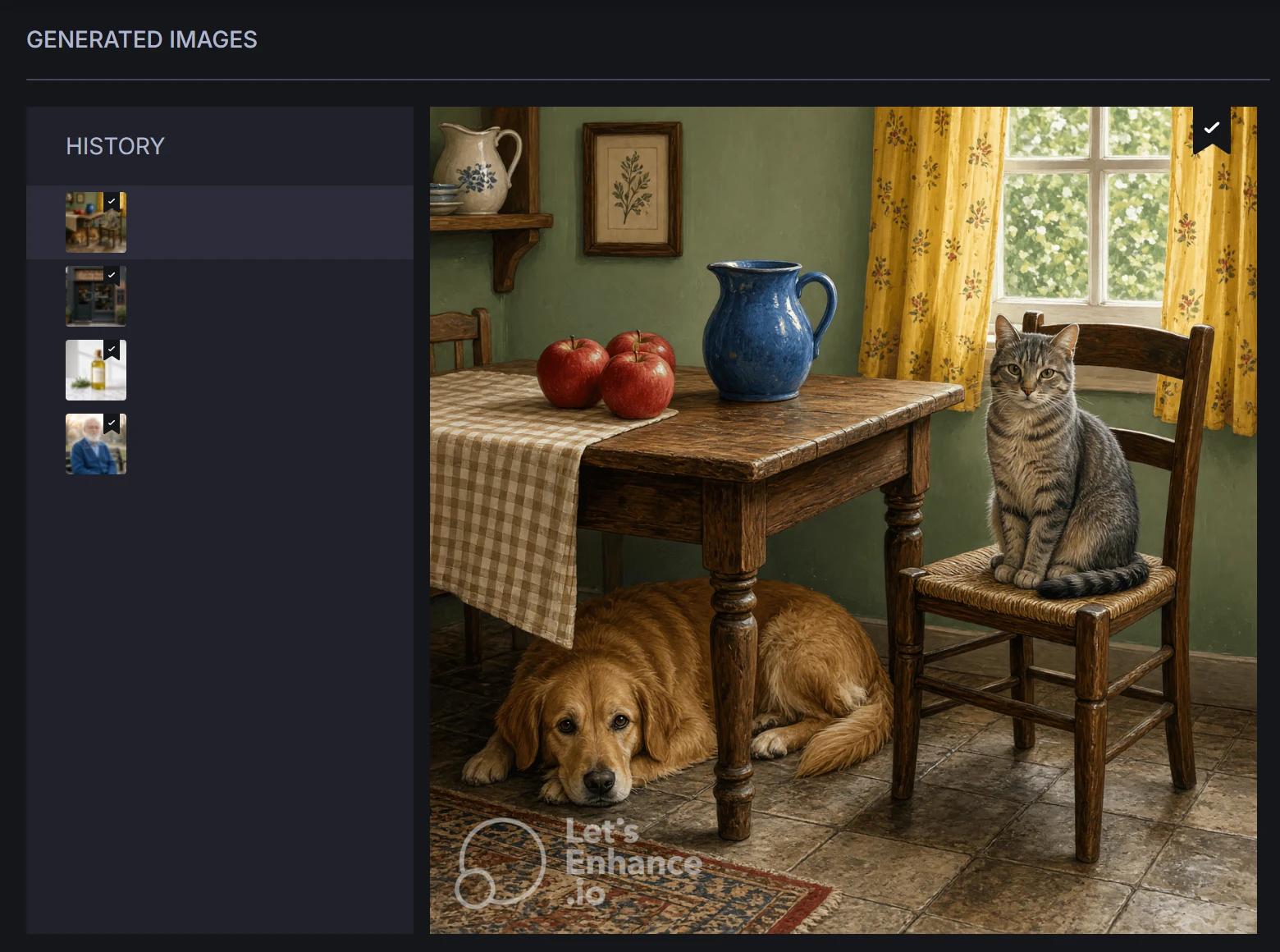
Let's Enhance got 25 of 25 asked-for details right across my 4 prompts. The busy kitchen scene had three red apples left of a blue jug, a dog under the table, a cat on the chair and yellow curtains, all in place.
The man on the bench had the round glasses and the blue wool cardigan I asked for. Four prompts is a small sample, and only one was a busy scene, so a harder prompt may still trip it.
Let's Enhance Photorealism
Let's Enhance made two of two images that pass as photographs: the man on a bench and the olive oil bottle. Skin, eyes, glass, cork and marble all held up at full size.
Neither picture shows hands, so I could not check fingers. The bottle label carries extra words I never asked for, spelled right. I ran two images once, not 24 twice.
Let's Enhance Text in Images
Let's Enhance got 11 of 11 words right on the shop. The sign reads "Harbour Bean Coffee Roasters" and the board reads "Open Daily 7 am to 5 pm", both in the place I asked for.
The picture also carries lettering I never asked for, "COFFEE ROASTED LOCALLY" on the window, so it is not fully correct. This was one of six wording prompts, so I cannot say how it handles small lettering.
Let's Enhance Image Size and Upscaler
Let's Enhance makes images 2,048 pixels square, about 4 megapixels, as PNG. I saw no choice of frame shape on the Generator page, and I did not open its Advanced options. The Download button gave a 10.8 megabyte file with the Let's Enhance mark across the picture.
Enlarging is what the product is built for, in a separate Enhancer tool. I did not run it, because it would have taken the account past the 85 percent line I set for credits, so I cannot tell you how clean it is.
Let's Enhance Speed per Image
Let's Enhance took a median of 31.8 seconds for each image across 4 generations. The fastest took 24.8 seconds and the slowest 32.6.
You watch a dark panel that says it is generating for about half a minute, with no preview, whatever the prompt. Nothing failed and there was no queue message.
Let's Enhance Free Plan Limits
Let's Enhance gives a bonus of 10 credits to a new account. A generated image costs 2 credits, so that is 5 images. I made 4 and stopped with 2 credits left. The plans page lists no free monthly credits.
Free pictures carry the Let's Enhance mark, in the preview and in the downloaded file. The pricing page says a purchase lets you download them again without it; I did not buy a plan to check. That is why the style, character and editing tests did not fit.
Let's Enhance Usage Rights
The terms say you own your prompts and images, and that you may use them for any legal purpose, commercial use included at your own risk. Let's Enhance keeps a wide licence to them too.
The costs are privacy and proof. The same terms let every other user make new images from your prompts, and say a person may read them. They offer no way to opt out of training, and the file carries no content credentials label. The free file also carries a visible mark.
Final verdict: is Let's Enhance worth it?
Let's Enhance is worth trying if you want accurate, detailed pictures and do not mind waiting. It held every detail I asked for in four prompts, produced clean photos and gave me a 2,048 pixel file.
It is not the tool for fast work or for a free account you want to publish from, because each image takes about half a minute and the free file carries the Let's Enhance mark. Prompts may be read by a person, and the terms let other users make new images from them, so do not use it for anything private.
The seven tests I could run average 3.4 out of 5. I rate it 3.8 because the free plan let me run seven of the ten tests.
See the Let's Enhance test results and how I rate.
Best for: People who want accurate, detailed pictures and can wait about half a minute for each one, and who will pay to remove the mark.
Video review · 5:00
Watch me test Let's Enhance
The whole test with the screen recordings: prompts, timing, wording, rights and prices. Captions and the full transcript are one click away, and the video has a page of its own.
Transcript
Hi, I'm Miles. I tested Let's Enhance, an A I image generator, on its free plan. Here's the short version. It got all twenty-five of twenty-five details right, and it spelled the shop sign right. But each image took about thirty-two seconds, free images carry its mark, and the free balance pays for only five images. My rating is three point eight out of five, from the seven tests I could run.
So what is Let's Enhance? It's an A I image app, best known for enlarging and sharpening pictures you upload. Its Generator tab also turns a written prompt into a new picture. You pay in credits, and a new account gets a bonus of ten.
Every generator gets the same written prompts. I could run four of my forty. The busy kitchen scene had three red apples left of a blue jug, a dog under the table, a cat on the chair and yellow curtains. Every one was in the right place. Four prompts is a small sample, so treat it as a good sign, not proof.
For photos, two of two passed. The man on the bench and the olive oil bottle both look real at full size. Neither picture shows hands, so I could not check fingers.
For words, I asked for a coffee shop sign and a board. All eleven words were right, in the right place. But the picture also added lettering I never asked for, on the window. So it is good, not perfect.
Images come out at two thousand and forty-eight pixels square, about four megapixels. There is no choice of shape. The free download carries the Let's Enhance mark across the picture. The enlarging tool is separate, and I didn't run it, because it would have taken me past my credit limit.
Speed is the weak point. Across four images the median was about thirty-two seconds. The fastest took twenty-four point eight, and the slowest thirty-two point six. You watch a dark panel the whole time, and nothing failed.
The free plan is small. A bonus of ten credits, and each image costs two. I made four images and stopped with two credits left. That is why I could not run the style, character and editing tests.
The terms say you own your prompts and images, and that you may use them for any legal purpose. But other users may make new images from your prompts, a person may read them, and there is no way to opt out of training.
The cheapest plan is Starter, nine dollars a month paid yearly, or twelve paid monthly, for a hundred credits. At two credits an image, that is about eighteen cents a picture. I did not buy a plan to check.
My verdict: Let's Enhance is worth trying if you want accurate pictures and can wait. But it is slow, and the free file carries a mark. The seven tests average three point four, and I rate it three point eight out of five. The full results are on the test results page.
Chapters · 13
Frequently asked questions
How much does Let's Enhance cost, and is there a free plan?
Yes. A new account gets a bonus of 10 credits, which is 5 images; I made 4. Starter, the cheapest plan, is $9 a month paid yearly, or $12 paid monthly.
Is Let's Enhance legit and safe?
Yes, in my test. I signed in with Google, entered no card and was never charged. The terms name the company, Let's Enhance, Inc. Your prompts are not private, though.
Who owns the images I make with Let's Enhance?
You do, say the terms, to the extent the law allows. Let's Enhance keeps a wide licence to your prompts and images, and other users may make new images from your prompts.
Can I use Let's Enhance images commercially?
Yes, at your own risk. The terms allow any legal purpose, commercial use included, with no split by plan. Free downloads carry a mark, and the pricing page says a purchase removes it; I did not buy a plan to test that.
What did you not test?
Three tests. Style range, consistency and editing were left out: the free credits ran out. The Enhancer, the upscaler, was not run. Photos, text and the busy scene used 4 images, not the full 40 prompts.

Miles FosterOwner and tester, RankDudeMiles Foster is a pen name: the owner of RankDude, a private person, runs every test himself.
Disclosure. I tested on the free demo account anyone can open on Let's Enhance’s site. I signed up myself and paid Let's Enhance nothing. Let's Enhance didn’t see this review first and had no say in my rating. How RankDude makes money is on the disclosure page.