
AIVA Review: AI Music Generator, Pricing & My Test Results
My rating
A capable composer with a restrictive free licence. Pay before you publish.
Best for: making and editing music for yourself, or for a project once you pay. Not for monetised work on the free plan.

Tested and written by Miles Foster
Based on 7 graded tests and my verdict. How I rate
I tested AIVA hands-on on its free plan, giving its AI music generator four of my fixed prompts, then building a track in its composer, editing the tempo, downloading files and reading the licence and the prices. AIVA ranks #6 of the ten on my best AI music generators page.
Every measurement is in the AIVA test results.
My AIVA AI Music Generator Test Results
| Category | Grade | In short |
|---|---|---|
| Audio Quality & FidelityClean MP3, loud, small peaks over | 4/5Good | |
| Length & Customisation ControlKey, length, tempo shown to work | 1/5Poor | |
| Editing, Stems & RegenerationA real editor, stems are paid | 1/5Poor | |
| Format, Download & ExportMP3 and MIDI free, WAV paid | 1/5Poor | |
| Commercial-Use Rights & LicensingFree is personal use with credit | 3/5Average | |
| Generation SpeedFast for short songs, slower for long | 4/5Good | |
| Free-Tier Limits & PricingUsable free plan, fairly cheap paid plan | 4/5Good | |
| My verdict | +0.4 | |
| Overall | 3.0/5Average |
What Is AIVA?
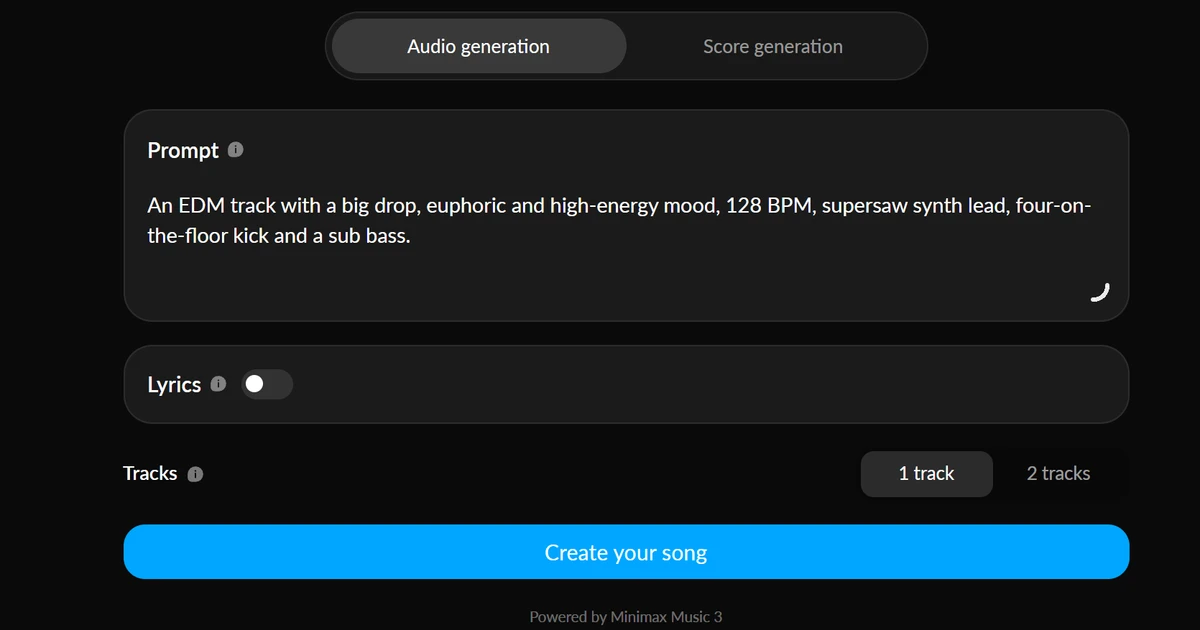
AIVA is an AI music site at aiva.ai that has two parts. The Create page turns a text prompt, with optional lyrics, into a finished song, on a model it names as "Minimax Music 3". The older composer, reached from "Score generation", builds a track from one of "more than 250 different styles" and opens it in an editor where every note sits on a layer.
The same account holds a styles designer, an influence upload, a MIDI import and a radio page. AIVA calls the older part "a legacy version of AIVA that's designed for score generation".
How I Tested AIVA
Every music generator gets the same twelve prompts, so you can compare them, each naming a genre, a mood, a tempo and instruments. The free plan allows 5 songs a day, and I stopped at 4, which is 80 percent. They were pop with a female vocal, lo-fi, an orchestral chase and EDM. I then made one composer track with the key set and changed its tempo in the editor.
I graded seven of the ten tests and left three out. Prompt adherence, vocals and structure need a listening panel and a tempo reader that were not part of this run.
My tools
Last checked 12 Nov 2026AIVA pros and cons
Pros
- Free MP3 and MIDI downloads
- A note-level editor
- Key, length and tempo that took effect
- No card for the free plan
- A paid plan from €11 a month
Cons
- Free use is personal only, with a credit line
- WAV and stems are paid
- Two sites with different limits
- The billing page and the licence article disagree
- Checklist points I could not prove
AIVA Pricing
- Free-Tier Limits & Pricing
- 4/5Good
A paid plan starts at €11 a month billed yearly, or €15 month to month, for Standard, before VAT. It gives 40 songs a day. Pro is €33 a month yearly or €49 monthly, with 80 songs a day. Prices read on 12 November 2026, in euros.
AIVA plans and prices
Live data· last check 12 November 2026| Plan | Price a month | |
|---|---|---|
| Free5 songs a day, personal use, credit to AIVA | €0 | 5 songs a day, personal use, credit to AIVA |
| Standard40 songs a day, monetised on four sites only | €15 | 40 songs a day, monetised on four sites only |
| Pro80 songs a day, you own the copyright | €49 | 80 songs a day, you own the copyright |
- Prices are shown in euros before VAT
- Student and enterprise plans are listed separately
The free plan is usable: 5 songs a day, downloads, no card. I did not buy a plan, so renewal and cancellation were not tested. I grade the value good.
AIVA Audio Quality
- Audio Quality & Fidelity
- 4/5Good
All four songs downloaded as 256 kbps MP3 files at 48000 Hz in stereo. Their loudness landed between -14.0 and -16.8 LUFS, close to streaming level, and none had a silent gap over a second.
Three of the four peak slightly above full scale: +0.5, +0.5 and +0.4 dBFS. That can cause a faint crackle after conversion, so lower the level a little before you mix. I measured the files and did not play them on a panel, and I grade the quality good.
AIVA Generation Speed
- Generation Speed
- 4/5Good
The 0:25 lo-fi beat was finished in 19.5 seconds. The 3:38 pop song with a female vocal took 92.2 seconds. The median of those two timed runs is 55.9 seconds.
The chase and the EDM song showed their names at 12.4 and 10.3 seconds and were listed with lengths by my next look. The free plan makes one song at a time: pressing Create again 22 seconds into the chase gave "Free plans can generate only 1 track at a time." I grade speed good.
AIVA Controls
- Length & Customisation Control
- 1/5Poor
The composer has the controls; the Create page has a prompt box. In the composer I set the key to C minor and the length to "0'30 - 1'00", and the track came out as C Minor at 0:48. I then changed the tempo from 80 to 100 and it shortened to 0:38.
That is three points of ten that I could see work. Instruments, mood and the rest are typed as words on the Create page, and I did not check them by ear, so I credit only what I proved. That is a grade of poor, and a longer run could raise it.
AIVA Editing and Stems
- Editing, Stems & Regeneration
- 1/5Poor
AIVA has a note-level editor. It shows an Intro, A and Outro bar, the chords and four layers: Melody, Chords, Bass and Percussion. I pressed M on the melody and it turned red as muted.
You can press Create again for a new take and My Songs keeps the history. Stems are greyed out on the free plan, and I did not run extend, trim or a section swap. Three of ten points means a grade of poor, and a fuller run of this editor could change it.
AIVA Downloads and Files
- Format, Download & Export
- 1/5Poor
The free plan gives you MP3 and MIDI. The Create page saved a 256 kbps MP3 in one click. The composer's download box lists MP3, Orchestrated MIDI, Reduced MIDI and Chords, and I saved an Orchestrated MIDI file.
"Render Uncompressed WAV (16 bit, 44.1kHz)" and "Render Stems (16 bit WAV)" are greyed out on free. The composer allows 3 downloads a month and shows how many are left; I used 1. Three of ten points is a grade of poor.
AIVA Usage Rights
- Commercial-Use Rights & Licensing
- 3/5Average
On the free plan you may use AIVA's songs for personal use with a credit line. The help centre says "You may use the tracks that are created under a Free plan for non-commercial purposes" and "You MUST give credit to AIVA when using the track."
Standard allows monetised use "only on YouTube, Twitch, Tik Tok and Instagram", and the copyright stays with AIVA. Pro gives you the copyright, if you work alone or in a business with under $300k revenue or fewer than 3 employees. The billing page's Standard card says "Copyright owned by YOU", which the article does not, and the article is dated 2021. I grade it average.
Final verdict: is AIVA worth it?
AIVA is worth a look if you want music you can edit. It made songs in about a minute, let me set the key, length and tempo, and gave me MP3 and MIDI files on the free plan.
It is not the tool for monetised work while you stay on the free plan, and the files a producer wants need a paid plan.
The seven tests I could run average 2.6 out of 5. I rate it 3.0 because the composer, its styles library and the note-level editor are more than my three-point checklists show.
See the AIVA test results and how I rate.
Best for: People who want editable music and will pay before they publish it.
Video review · 5:32
Watch me test AIVA
The whole test in 6 minutes: the short version, what is aiva?, how i tested aiva, aiva audio quality, aiva generation speed, aiva controls, aiva editing and stems, aiva downloads and files, aiva usage rights, aiva pricing, the verdict. Captions and the full transcript are one click away, and the video has a page of its own.
Transcript
Hi, I'm Miles. I tested AIVA, an AI music generator, on its free plan. Here's the short version. It turned a prompt into a finished song in about a minute. But free songs are personal use only, with a credit line, and the WAV and stem downloads are paid. My rating is three point zero out of five, from seven tests.
So what is AIVA? It's an AI music site in two parts. The Create page turns a text prompt into a finished song. The older composer builds a track from one of over two hundred and fifty styles, and opens it in an editor where every note sits on a layer.
The free plan allows five songs a day, and I stopped at four. Pop, lo-fi, an orchestral chase and E D M. Then I made one composer track and changed its tempo. I left three tests out rather than guess.
I downloaded all four songs and measured them. They are two hundred and fifty six kilobit M P three files, loud, and a few peak slightly above full scale. I measured the files and did not judge them by ear. I grade it good.
Speed is decent. The twenty five second lo-fi beat took nineteen and a half seconds. The three and a half minute pop song took ninety two. The free plan makes one song at a time.
The controls live in the composer. I set the key to C minor and the length to thirty seconds to a minute, and the track came out at forty eight seconds in C minor. Then I changed the tempo from eighty to a hundred. I could prove three points, so I grade it poor, and a longer run could raise it.
The editor is the strongest thing here. It shows sections, chords and four layers, and I muted the melody. But stems are greyed out on the free plan, and I only used part of it. That is a poor result, and a fuller run could change it.
The free plan gives you M P three and M I D I. The composer's download box also lists WAV and stems, but both are greyed out until you pay. The composer allows three downloads a month.
Read this before you publish. On the free plan the music is personal use, AIVA owns it, and you must credit AIVA. Standard allows monetised use on four sites only. Pro gives you the copyright. And the billing page disagrees with the licence article about Standard.
The free plan is usable. Five songs a day, downloads, no card. Standard is eleven euros a month if you pay yearly, fifteen monthly, before tax. Pro is thirty three yearly, forty nine monthly.
So is AIVA worth it? Yes, if you want music you can edit. It made songs in about a minute and gave me M P three and M I D I files for free. But don't publish for money on the free plan. The seven tests average two point six, and I rate it three point zero, because the composer and editor hold more than my checklists could prove.
Chapters · 13
Frequently asked questions
How much does AIVA cost, and is there a free plan?
Yes. The free plan needs no card and allows 5 songs a day. Standard is €15 a month, or €11 a month billed yearly. Pro is €49 a month, or €33 a month billed yearly. Prices exclude VAT.
Is AIVA legit and safe?
Yes, in my test. I signed in with Google, entered no card and was never charged. The site publishes its End User License Agreement and a help centre.
Who owns the music, and can I use it on YouTube or Spotify?
AIVA owns it on free. Free songs are personal use with a credit line. Standard allows monetised use on YouTube, Twitch, TikTok and Instagram only, and Pro gives you the copyright. I did not test streaming releases.
Which files and stems do I get from AIVA?
MP3 and MIDI on free. The Create page saves a 256 kbps MP3. WAV and stems are greyed out on the free plan and are listed as paid downloads.
How do I cancel AIVA or get a refund?
Not tested. I stayed on the free plan. The help centre lists an article called "How can I downgrade/cancel my subscription?".

Miles FosterOwner and tester, RankDudeMiles Foster is a pen name: the owner of RankDude, a private person, runs every test himself.
Disclosure. I tested on the free demo account anyone can open on AIVA’s site. I signed up myself and paid AIVA nothing. AIVA didn’t see this review first and had no say in my rating. How RankDude makes money is on the disclosure page.