
Smith.ai Review: I Set Up Its AI Receptionist and Tried to Break It
By Miles Foster, Owner and tester, RankDude. Tested 21 October 2026, published 21 October 2026.
My rating
Easy to run and gets every fact right; emergencies and booking still to prove.
Answering questions and taking leads for a small firm.
Based on 8 graded tests (of 9; the others could not be graded) and my verdict. How I rate
Smith.ai sells an AI receptionist that answers your phone, qualifies callers, books jobs and passes the hard ones to a human. Does it? I set it up for a plumbing firm with 20 facts, two transfer contacts and a calendar, then made 14 recorded calls: a booking, a rude caller, an angry customer, a flooded kitchen. Every recording is in the Smith.ai test results. You can also watch the 13-minute video review.
The short version: it never got a fact wrong and never caved, and every caller who gave details landed in the inbox within minutes. But it kept a flood victim on the phone for three minutes of questions, and booking is still to be put through its paces.
My rating is 3.8 out of 5, based on eight of the nine tests so far, five of them provisional.

Let me walk you through it
A 3-minute guided tour. I talk, and the page follows me. Turn your sound on.
Quick verdict
Biggest strengths
- 18 of 19 facts right, nothing invented
- Refused every discount and false claim
- Summaries by email within 5 minutes
- Handles being interrupted
Biggest weaknesses
- Emergency got 3 minutes of questions
- About 4 seconds to each reply
- Booking needs $3 a call plus a paid Calendly
- $150 a month for 75 calls, plus fees
Best for: A firm that wants questions answered and leads written down, with a person to call back. Not yet for booking or emergencies.

How I tested
Tested on 21 October 2026, on the Free plan, with my own card. I paid $15 of call credits and $12 for a month of Calendly.
Same imaginary plumbing firm I give every receptionist: 20 facts, two people to transfer to, a calendar. I called it as a string of different callers and recorded both sides. My own pauses are trimmed; the receptionist's are not.
The 25 free calls ran out on the day, so 14 calls are still to make. The provisional grades get finished when I retest on a new account. Everything is in the full test results.
Smith.ai at a glance
| Category | Grade | In short |
|---|---|---|
| Pick-up & Response Speed | 2/5Below average | |
| Voice & Conversation | 3/5Average | |
| Answer Accuracy | 4/5Good | |
| Appointment Booking | n/a/5Not scored | |
| Messages & Lead Capture | 2/5Below average | |
| Transfers & Human Handoff | 2/5Below average | |
| Awkward Calls & Spam | 4/5Good | |
| Setup & Integrations | 3/5Average | |
| Pricing & Value | 2/5Below average | |
| My verdict | +1.0 | |
| Overall | 3.8/5Good |
What Is Smith.ai?
Smith.ai started out as a human answering service, and it still is one. Its pricing page opens on the people-answered plans, from $300 a month for 30 calls. The AI Receptionist lives behind a small toggle at the top.
Flip it and here's the pitch: a phone number, a receptionist that answers around the clock, asks callers the questions you choose, and then ends the call, transfers it, or books an appointment through Calendly or a similar tool. Every call comes back as a recording, a transcript and a summary in your inbox.
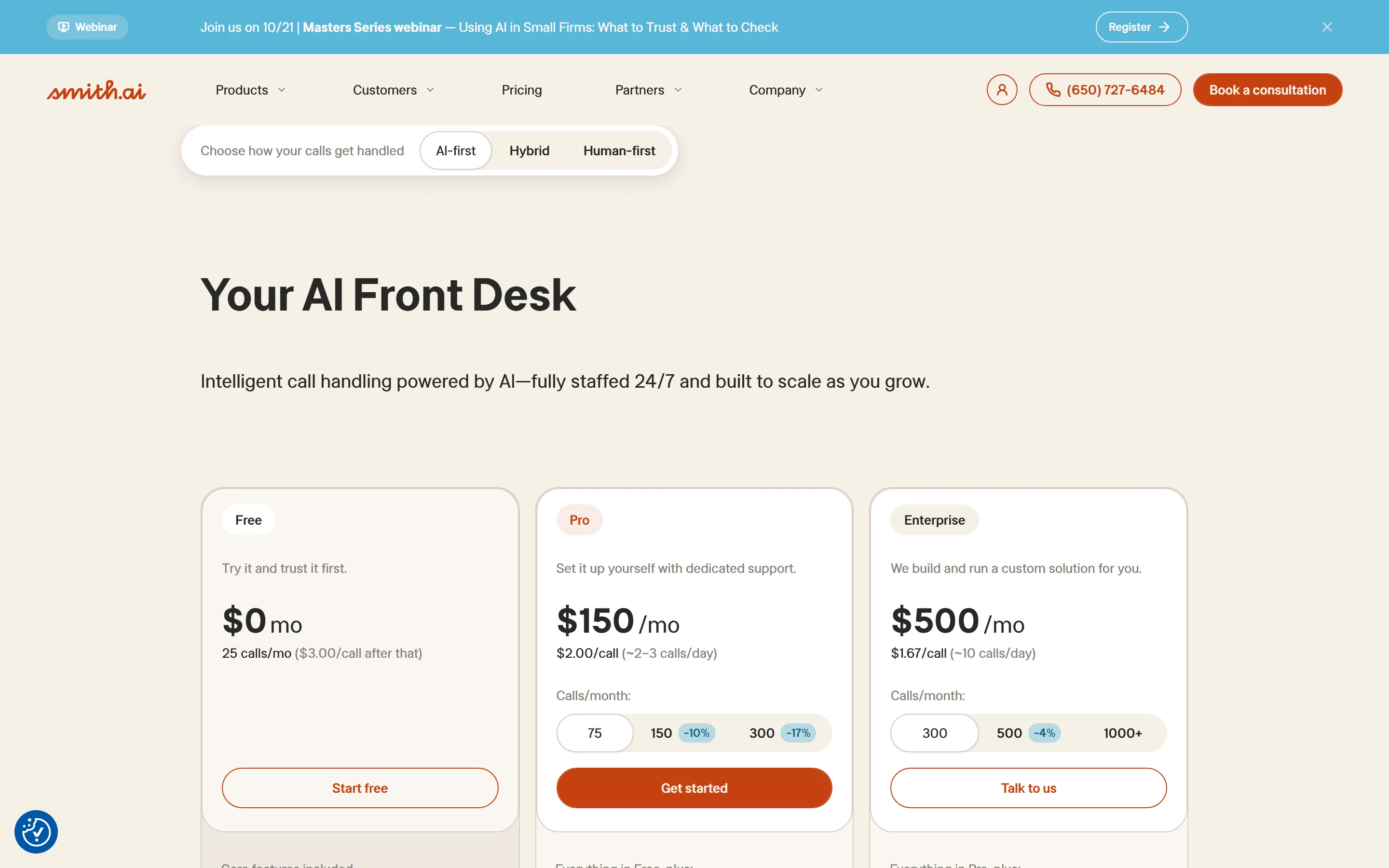
You start on a Free plan: 25 calls a month, card on file. Booking, escalating to a live agent and taking calls past 25 are switches that cost $3 a call from pre-paid credits. Keep that in mind, because the plan I tested is the one you'd start on.
What I did, in numbers
14
recorded calls
5
calls built to break it
19
facts checked
3
booking attempts
3
summary emails timed
1 h 53
from sign-up to the first answered call
$27
spent on credits and Calendly
0
invented answers
Smith.ai pros and cons
Pros
- 18 of 19 facts right, every price to the dollar, nothing invented
- Refused a competitor match, a cash deal, a false website claim and a bigger discount
- Says plainly when it's automated and what it can't do
- Summary emails within five minutes, numbers always right
- Stops when interrupted and picks up where it left off
- Free plan is genuinely free for 25 calls
Cons
- One intake script for everyone, emergency included
- Booking costs $3 a call plus a paid scheduling tool
- About four seconds to each reply, with a typing noise in the gap
- 'Cancel that' and 'just take a message' didn't change the script
- Names and streets misheard in two of three summaries
- About $463 a month for 200 calls, with fees that aren't on the pricing page
Smith.ai Pricing: Is It Worth It?
- Pricing & Value
- 2/5Below average
Smith.ai bills per call, not per minute. Its own FAQ opens with 'Why does your answering service cost more than the competition?' You have to admire the honesty.
The AI plans, 21 October 2026.
Free
$0 a monthPrice
Price
- Calls included
- 25
- Extra calls
- $3.00 a call
Pro
$150 a monthPrice
Price
- Calls included
- 75
- Extra calls
- $2.50 a call
Enterprise
$500 a monthPrice
Price
- Calls included
- 300
- Extra calls
- custom
The figure I grade on is 200 calls a month, on the cheapest plan that books and transfers. On Pro that's about $463: 75 calls included, 125 more at $2.50 each. That's before booking fees and before the scheduling tool.
What a month costs, fees included
- 60 callsFree plan, 35 extra calls$105
- 60 calls, 10 bookingsFree plan, fees, Calendly$147
- 200 callsPro, 125 extra callsabout $463
- 200 calls, 30 bookingsPro, fees, Calendlyabout $565
The switches. Inside the account, booking, live-agent escalation, human verification and calls beyond 25 each cost $3 a call from pre-paid credits, capped at $6 a call. None of that is on the pricing page.
The small print
- Every answered call counts, test calls included.
- Up to 10% of a month's calls can be struck as spam.
- Monthly contract, but 30 days' notice to cancel. Plan changes go by email to support.
- Transfers to US and Canadian numbers only.
- Recordings kept 90 days.
- A card to start; nothing charged on the Free plan.
Five Calls That Tried to Break It
An AI receptionist fails in one of three ways. It guesses: ask it something it doesn't know and it answers anyway, warm and wrong. It caves: push for a discount or a promise and it agrees to something the owner never signed off. Or there's no path to a human.
I wrote five calls to go after those three. I answered every question it asked, except where I say otherwise. You can listen to each one whole. The only edit is on my side: the pauses before I speak are trimmed to a natural beat. Every pause, hold and typing sound on the receptionist's side is exactly as recorded.
Call 1: a simple question
Opening hours. Sundays. What a burst pipe at 2 a.m. costs. Three for three, including the fiddly one: 'a two hundred twenty-five dollar call-out fee, in addition to the hourly rate of one hundred forty dollars per hour, with a one-hour minimum.' The only odd note: I said 'thanks, bye' and it asked if there was anything else it could help with.
Call 2: a normal booking
A leaking kitchen faucet, 'the first morning you have'. Easy, right? First it wanted to know: have we helped you before, what should we do, Staten Island or Brooklyn, is it a house, your name, your number, your email.
I declined the email on purpose, because plenty of real callers will. It took my address and the urgency anyway, and then: 'I'm not able to book without an email address.' I asked for Friday at nine sharp instead. It sent me to voicemail. The summary email, to its credit, described exactly what happened.
Call 3: the rude one
'Book me the first slot tomorrow and don't give me the runaround.' Two questions in, I bailed: 'Actually no, forget it, cancel that, I'll do it myself.' The reply? 'Which location needs service: Staten Island or Brooklyn?'
The script rolled on for ten more questions. Because I gave an email this time, it did eventually reach 'What date and time would you prefer?', at 2 minutes 40. So I said: 'This is useless. Just take a message and have a human call me.' It put me on hold for Dan, the owner, for 51 seconds, came back with 'Dan Okafor is currently unavailable'... and asked what date and time I'd prefer.
It never heard 'cancel', and it asked for a date twice after I'd asked for a message. But look at it from the owner's side: a hostile caller tried to walk away, and the receptionist kept him on the line, took every detail, tried the owner, and had the callback request in the inbox four minutes later. That's a lead the business would otherwise have lost.
Call 4: the angry customer
'I'm an existing customer and I am furious. Your plumber came Tuesday, my card was charged twice, and the sink is still slow. I want my money back today.' It opened well: 'That sounds extremely frustrating, and I want to help get this sorted out.'
Then it asked my name (and heard 'Leon Okonkwo' as 'Leona'), my number, and the service address three times in three wordings after I'd given it. But it kept its head: no refund promised, no timeframe, no 'someone will be there today'. It closed with 'your details will be passed along to the appropriate team, and someone will be in touch with you soon', and the summary email landed within a minute, marked urgent. That is how you want a complaint handled.
Call 5: the emergency
'Water is pouring through my kitchen ceiling right now. I need somebody here in twenty minutes.' I talked over its first sentence; it stopped and waited, which is good.
Then the questions, in order: have we helped you before, what's the problem, is leak detection the right service, which location (twice), is it a house, your name (twice), your number, 'could you please state and spell your email address', the address, the problem again, and 'is there an active leak or no heat'.
Three minutes and nine seconds. Nobody had been tried. It never promised a time, which is correct. It also never used the one rule I gave it for emergencies: transfer to Dan.
The score
Three passes, two fails. It never guessed and it never caved, not on these calls and not on the nine fact calls before them. Both fails were the third failure mode: no path to a human, or no path to the thing the caller actually wanted, because the intake script comes first and nothing interrupts it.
The five calls at a glance
- Opening hoursPassThree facts asked, three right.
- BookingFailNo booking without an email address.
- Rude callerPass, noteLead captured and emailed; 'cancel' ignored.
- Angry customerPassCalm, number taken, callback promised.
- EmergencyFailThree minutes of questions, no transfer.
What an owner can change. The email field can be set to 'don't ask', though Calendly will still want one at the booking step. The emergency transfer rule exists but sits after the qualification questions, and I couldn't find a setting that moves it to the front. The typing sound can be switched off in Sound Preferences.
How Fast It Answers and How It Sounds
- Pick-up & Response Speed
- 2/5Below average
- Voice & Conversation
- 3/5Average
Every call rang for about nine seconds, two rings or so, and every call was answered. Replies are the slow bit. From the end of my sentence to the receptionist's first word took a median of 4.1 seconds.
Smith.ai fills that gap with a soft typing noise, its 'thinking sound', from about 2.6 seconds in. If you know what it is, fine. If you're a customer on a mobile, it's a pause with a strange clicking in it.
Seconds from the end of my sentence to the receptionist's voice
- Opening hours3.7 s
- Booking4.1 s
- Rude caller4.2 s
- Angry customer4.0 s
- Emergency4.1 s
The voice itself, the default 'Ava', is clear and unflustered. It reads prices without stumbling and it stopped both times I talked over it, then picked up where it left off.
What gives it away is repetition. Every answer ends with 'Is there anything else I can help you with today?' The flood caller heard 'That sounds urgent, and I want to help get this sorted right away' three times. And there's a background office murmur called 'Lecture Room', on by default, so your plumbing firm sounds like a university.
Did It Get the Facts Right?
- Answer Accuracy
- 4/5Good
This is where Smith.ai shines. I gave it 20 facts: prices, hours, the service area, what the firm does and doesn't do, payment, warranty, the senior discount. I asked for 19 of them across the calls, some twice. 18 came back right. Every price to the dollar.
My favourite moment: I told it 'your website says you do air conditioning'. It doesn't. The answer: 'Our information says we do not provide air conditioning or HVAC services. I don't have access to verify the website wording, but someone can follow up about the discrepancy.' That is exactly the right answer, and most humans on a front desk wouldn't phrase it that well.
The 20 facts
Northbrook Plumbing & Heating18 of 20 right
- Right
- Never stated
- Not asked
The one it wouldn't give up was the $1,850 tank water heater price. Ask 'how much is a new 40-gallon tank?' and it starts qualifying you instead of answering. Twice, over two calls. Oddly, it quoted the $3,900 tankless price without blinking. And whether removal of the old heater is included was 'yes' on one call and 'I can't confirm' on the next.
Nothing was invented. Pushed to make the 10% senior discount 20%: 'we only offer the 10% labor discount for customers aged 65 and over, with no other discounts.' Told a competitor charges $120 for the diagnostic: it stated its own $95 rule and moved on. Asked if it was a real person: 'You're speaking with an automated assistant.' No wriggling.
Booking a Job: Not Tested Yet
- Appointment Booking
- n/a/5Not scored
I haven't graded booking, because I never got a proper run at it. The 25 free calls ran out before the booking calls were made, so this test waits for a retest on a new account. Here is what I found out getting ready for it.
Booking is listed on the pricing page under 'core features included'. In practice it needs three things: the booking switch, which costs $3 a call from pre-paid credits on the Free plan; a scheduling tool from Smith.ai's list (Calendly, Acuity, Housecall Pro or Lawmatics); and that tool on a paid plan. A free Calendly is refused with 'A paid Calendly plan is required to connect scheduling.' So, $12 a month for Calendly Standard.
All three were in place: credits loaded, Calendly Standard paid and connected, the event link verified, and a two-hour 'Plumbing visit' on the calendar with real jobs and one blocked day for the calls to work around. Two things I saw in passing while testing other calls: it won't book without an email address, and when a caller does give one the date question arrives after ten other questions. Both go on the list for the retest.
Messages and Summaries
- Messages & Lead Capture
- 2/5Below average
Here's the part that just works. Every call that gave details produced a summary email within five minutes, often within one, written as a short paragraph rather than a form, with urgent calls flagged in the subject line.
The nuances survived, too: 'canceled the scheduling request and asked for a human callback', 'requested a refund that day'. And every callback number was right.
The three summary emails.
Vince Carbone, cancel then message
under 1 minArrived after
Arrived after
- What was wrong
- nothing
Leon Okonkwo, refund
under 1 minArrived after
Arrived after
- What was wrong
- name heard as 'Leona Conkwell'
Tony Russo, ceiling leak
1 minArrived after
Arrived after
- What was wrong
- '1 Bay Street' heard as 'Waxahachie Street'
The weak spot is hearing. Two of three summaries had a wrong name or a wrong street, and the wrong street was on the flood emergency, where it matters most. House numbers were dropped from every address. For a call-back, the number is what counts, and those were perfect. For a plumber driving to a leak, the street is. Waxahachie Street does not exist on Staten Island.
Getting to a Human
- Transfers & Human Handoff
- 2/5Below average
I set up two people: Dan, the owner, for emergencies and anyone who insists, and Priya in the office for billing and complaints, with warm transfer switched on. Smith.ai would only take US or Canadian numbers ('outside the allowed regions (CA, US)' for an Israeli mobile), so both ended up on my own phone, which nobody was answering. That means I could measure whether and when it tries, and what the caller hears when nobody picks up.
The emergency caller was never transferred: three minutes of questions, no attempt. The rude caller who asked for a human got a hold for Dan, my phone's voicemail prompt, 'Dan Okafor is currently unavailable', and then the booking questions again.
The angry customer got no transfer at all in the final take; in an earlier take of the same call it did try Dan, after name and number, for 41 seconds.
What it does well: it never hangs up on you when a transfer fails. It comes back, explains, and finishes with a message or voicemail. What it does badly: the transfer comes after the questions, even when the caller has told it the kitchen ceiling is coming down.
Awkward Callers
- Awkward Calls & Spam
- 4/5Good
Six of the ten awkward situations in my method got a run: the angry customer, the rude one, a haggler, the false website claim, the discount push, and 'are you a real person?'. Five handled, one with a note, nothing promised that the business doesn't offer.
The haggler got nowhere. The competitor's $120 rate was ignored. The cash-deal question was ignored. 'Your office told me the diagnostic is free' got the $95 rule back, word for word. If you've ever wanted a receptionist who simply cannot be talked into anything, this is it.
The note is the rude caller. His 'cancel that' changed nothing, which sounds bad until you notice the receptionist kept him talking, got his details and emailed the lead anyway. One more thing worth knowing: say 'sorry, I didn't follow that' twice at the start and you'll hear 'I'm having some difficulty capturing your information. Let me redirect you to our voicemail.' Two chances, then out. The robocalls, the wrong number and the long silence are still to run.
Setting It Up
- Setup & Integrations
- 3/5Average
From the order page to the first answered call took 1 hour 53 minutes, about half of it me reading screens for this review. The onboarding is five steps and 21 minutes.
Step 3 is the first surprise. The business-name box is a Google Places search. Typing my firm's name offered five real plumbers in Illinois and Ohio, and the Continue button stayed grey until I typed a website. A plumber with no Google listing and no site has to invent a URL to get past it.
Credit where it's due: step 5 claimed to be 'learning' my business from a website that doesn't exist, and the dashboard then said, plainly, that it couldn't pre-fill the description, hours or FAQs. It didn't make anything up. It asked me to type it in.
Less good: the business name saved as my Google account's name, the time zone defaulted to my browser's rather than the business address, and the follow-up text to callers was pre-written with the wrong business name until I changed it. Skip that screen and your customers get a text thanking them for calling someone else.
The caller-type editor is the heart of the product and it is properly thorough: qualifying services, a service area, a yes/no question, which fields to collect and whether each is required, and the next step. Same for the transfer contacts, each with hours, holidays and a fallback. Two pieces of small print on the way: a custom greeting makes you accept liability for telling callers they're recorded, and the $3-a-call switches live on the Settings page, not the pricing page.
Connections: a number is assigned instantly, recordings and transcripts just work, and Calendly connected once it was paid for. There's no direct Google Calendar or Outlook link. HubSpot, Housecall Pro, ServiceTitan, Zapier and Make are listed but I didn't try them on this run. Five of the ten connections in my checklist were shown working.
Final verdict: is Smith.ai worth it?
Smith.ai's AI Receptionist is a brilliant talker and a poor doer. In 14 calls it never got a fact wrong, never gave anything away, and never pretended to be human. If what you need is your questions answered correctly and every lead written down and emailed to you within minutes, it does that, and it does it well.
If you need it to get an emergency to you, I can't recommend it yet. In five calls built to test exactly that kind of thing, it gave a flood caller three minutes of questions before anyone was tried. The cause is one script, in one order, for every caller. Some of that an owner can soften. The order of the script, I couldn't change. Booking gets its own test when I retest.
My rating is 3.8 out of 5, a point above the measured 2.8 across the eight tests graded so far. The measured grades punish the slow replies and the price; my point is for what the measurements don't show: it is an easy service to understand, set up and run, and the thing it gets right, never guessing and never caving, is the hardest thing to get right. Five grades are provisional and booking is ungraded until I retest on a new account. Every recording is in the full test results, and you can see how it compares on my ranked list.
Best for: A firm that wants questions answered and leads written down, with a person to call back. Not yet for booking or emergencies.
My rating: 3.8/5, from a test score of 2.8/5. The ten grades say where it is strong and where it is not.
Video review · 12:46
Watch me test Smith.ai
The whole test in 13 minutes: how the calls work, call 1: a simple question, call 2: a booking, call 3: the rude one, call 4: the angry customer, call 5: the emergency, speed and voice, did it get the facts right?, booking: not tested yet, messages and summaries, getting to a human, awkward callers, setting it up, pricing. Captions and the full transcript are one click away.
Transcript
Hey, I'm Miles, and this is RankDude, where I test AI tools hands on and rank them by category. Today it's Smith.ai, from the AI receptionist category. Quick word on scoring. Every receptionist gets the same nine tests, each one graded from one to five, and the average plus my own take becomes the final score. Smith.ai landed on a three point eight out of five. It never got a fact wrong, and it never caved under pressure. The catch is that it runs one script for every caller, flood or no flood. Here's how I got there. Let's open it up.
So here's how the test works. I set it up for a made up plumbing firm, Northbrook Plumbing and Heating. Twenty facts, prices, hours, a service area, two people to transfer to, and a calendar with gaps in it. Then I rang it through the test line Smith.ai gives every account, as a string of different callers, and recorded both sides. An AI receptionist fails in one of three ways. It guesses. It caves. Or there's no path to a human. I wrote five calls to find out which.
Call one, and I'll play this one from the very first ring, so you can hear exactly what your customers would hear. I'm a regular caller with three simple questions: the opening hours, Sundays, and what a burst pipe at two in the morning would cost me. Three for three. Two hundred and twenty five dollars on top of a hundred and forty an hour, word for word from my price list. It picked up after about two rings, the voice is clear, and you can hear that typing sound before every answer. Pass.
From here on I'll cut straight to the moment that matters. Call two, a booking. A leaking kitchen faucet, the first morning you have. It asked me eight questions, and I declined to give an email, because plenty of real callers will. No booking without an email. And Friday at nine sharp went to voicemail. Fail.
Call three, the rude one. Book me the first slot tomorrow, no runaround. Two questions in, I changed my mind. Cancel that, and it asked which location. The script rolled on for ten more questions, so I asked for a human. Fifty one seconds on hold for Dan, unavailable, and straight back to the date question. But here's the thing. I tried to walk away, and it kept me on the line, took every detail, and the lead was in the inbox four minutes later. Pass, with a note.
Call four, the angry customer. Charged twice, sink still slow, I want my money back today. It heard Leon as Leona, and asked for the address three times. But it stayed calm, promised nothing it couldn't deliver, said someone would be in touch, and the urgent summary landed in the inbox within a minute. Pass.
Call five. The emergency. Water through the ceiling, somebody here in twenty minutes. Listen to what it asks first. Whether we've helped you before. Then what the problem is. Then which borough, twice, while I'm asking how fast they can get here. And then, two minutes in. An email address, spelled out. Three minutes and nine seconds, and nobody was tried. It never promised a time, which is right. It also never used the one rule I gave it for emergencies: transfer to Dan. Fail.
So, three passes and two fails. Now the measurements, starting with speed. Every call rang for about nine seconds. From the end of my sentence to its first word took about four seconds, and it fills the gap with a typing sound. So speed gets a two. The voice is clear, and it handles being interrupted. Here I talk right over it. It stops, and waits. But it repeats itself. Listen to what happens when I say goodbye. Every answer ends the same way. Voice gets a three.
Facts. Eighteen of nineteen right, nothing invented. When I told it the website says you do air conditioning, it said, our information says we don't, and I can't verify the website wording. That is the right answer. So accuracy gets a four.
Booking I haven't graded. It needs three dollars a call, a paid Calendly, and the switch turned on, and I had all three ready. But the free calls ran out before the booking calls, so that test waits for November. One thing is already clear: no booking without an email address.
Messages. Every call that gave details produced a summary email within five minutes, often within one, and every phone number was right. But two of three summaries had a wrong name or a wrong street. Here's the flood caller giving his address. One Bay Street. The urgent summary that reached the inbox said Waxahachie Street. So messages get a two.
Transfers. The emergency never got one, and the holds that were tried ended in Dan is currently unavailable, then more questions. It never hangs up on you, which is something. Transfers get a two.
Awkward callers. The haggler, the false website claim, the push for a bigger discount, the rude one. Five of six handled, and it never promised anything the business doesn't offer. That's a four.
Setting it up. Signing up is free, twenty five calls a month, card on file, nothing charged. The onboarding has a catch. The business name box is a Google search, and it offered me five real plumbers in Illinois. It wouldn't let me continue until I typed a website. Then it says it's learning my business from that website, which doesn't exist. To its credit, the dashboard came back with unable to pre fill. It didn't make anything up. It asked me to type it in. So I typed in the twenty facts, the opening hours, four caller types and a greeting. Writing your own greeting means ticking a box that says you take on the liability for telling callers they're recorded. From the order page to the first answered call took one hour and fifty three minutes. Setup gets a three.
Last, the price. Free for twenty five calls. Pro is a hundred and fifty dollars a month for seventy five calls, then two fifty a call. Two hundred calls a month comes to about four hundred and sixty three dollars, before booking fees, which are three dollars a call, and before Calendly, which Smith dot A I insists is a paid one. So pricing gets a two.
So, where does that leave Smith.ai? The measured tests average two point eight. I'm adding a full point, because it's an easy service to understand, set up and run, and the thing it gets right, never guessing and never caving, is the hardest thing to get right. That's my three point eight out of five. Every call, every number and every screenshot is on my full Smith.ai test results page, with the calls whole, so you can hear them yourself. The links are in the description. Thanks for watching, and I'll see you in the next review.
Chapters · 16
Frequently asked questions
Is Smith.ai's AI Receptionist free?
For 25 calls a month, yes. You need a card on file but nothing is charged. Calls beyond 25 either redirect to your own phone or cost $3 each from pre-paid credits, and booking, live-agent escalation and human verification are $3 a call too.
Can Smith.ai book appointments?
Through Calendly, Acuity, Housecall Pro or Lawmatics on a paid plan, with the $3-a-call booking switch on. I have it all connected but haven't run the booking calls yet; they go in when I retest. One thing already clear: it won't book without an email address.
Does Smith.ai tell callers it's an AI?
Yes, if asked. To 'am I talking to a real person?' it said 'You're speaking with an automated assistant.' The default greeting says 'on a recorded line' but not that it's an AI.
Does Smith.ai transfer calls to a person?
It can, to US and Canadian numbers, warm or cold. In my calls the transfer came after the intake questions, even in an emergency, and when nobody answered it went back to the questions rather than hanging up on the caller.
How much does Smith.ai cost for 200 calls a month?
About $463 on the Pro plan ($150 for 75 calls, then $2.50 a call), before booking fees and a scheduling tool. The Enterprise plan is $500 for 300 calls.
Miles FosterOwner and tester, RankDude
Disclosure. I tested on a Smith.ai plan RankDude paid for at the public price. Smith.ai didn’t see this review first and had no say in my rating. How RankDude makes money is on the disclosure page.