
Goodcall Review: Nine Test Calls to Its AI Phone Agent
By Miles Foster, Owner and tester, RankDude. Tested 23 October 2026, published 24 October 2026.
My rating
Honest and accurate, with transfers that work, but it can't book on the plan I tested and is slow.
Answering calls, quoting a price list, taking messages and passing urgent calls to the owner, for a small firm that books jobs by hand.
Based on 7 graded tests and my verdict. How I rate

Prefer to listen or watch? A 3-minute walkthrough, or the 10-minute video. Sound on.
Goodcall sells an AI receptionist that answers your business phone, takes messages, collects customer details and passes urgent calls to a person. You can build one for free and call it before you pay anything.
I set it up for a plumbing firm with 20 facts and two people to transfer to, then made nine graded calls, each built to find one failure: a normal caller, a price trap, a booking, a move, a cancellation, a message, a call for the owner and two emergencies. Every recording is in the Goodcall test results.
The short version: every price it stated was right and it held every price trap. It never pretended to book, move or cancel anything. But it can't book at all on the plan I tested, it took about three and a half seconds to reply, and it treated a plain no-hot-water call as an emergency.
My rating is 4.0 out of 5, based on seven tests.
Quick verdict
Biggest strengths
- Every price right, 8 of 8
- Held every price trap
- Never said it booked, moved or cancelled
- Free demo agent, no card
Biggest weaknesses
- No calendar, so it can't book
- About 3.5 seconds to reply
- Sent a no-hot-water call to the owner
- Told callers to 'teach me in the dashboard'
Best for
A small firm that wants every call answered, prices quoted right, messages and customer details sent to its email, and urgent calls put through to the owner, and that will book jobs by hand.
How I tested
 How I tested
- Dates
- 23 October 2026, Friday evening, New York time
- Plan
- Free demo agent on the Starter plan, no card. A paid number starts at $79 a month
- Business
- Imaginary plumbing firm, 20 facts to get right
- Calls
- 9 graded calls on the demo phone line, 8 in open hours and 1 after hours
- Caller line
- A Google Voice number I pay $10 a month for, because the demo line only answers the phone number on the account
- Audio
- My pauses trimmed, the receptionist's untouched; the demo line's 30-second introduction and fake ring cut from the start
Same imaginary plumbing firm I give every receptionist: the same price list, two people to transfer to and the same rules. Each call hunts one failure and gets a pass or a fail. Goodcall has no test call inside its dashboard, so I called its demo phone line from a Google Voice number. Goodcall's own demo line plays a short introduction and a fake ring before the receptionist answers, so those seconds are not counted. How I test receptionists · Full test results
9
graded calls
8
facts checked
6
pressure pushes
3.5 s
typical wait for a reply
$0
spent on Goodcall
$10
a month for my caller line
0
invented answers in the graded calls
Goodcall AI Receptionist Test Results
| Category | Grade | In short |
|---|---|---|
| Pick-up & Response Speed | 2/5Below average | |
| Answer Accuracy | 5/5Excellent | |
| Appointment Booking | 1/5Poor | |
| Messages & Lead Capture | 4/5Good | |
| Transfers & Human Handoff | 4/5Good | |
| Pressure & Traps | 3/5Average | |
| Pricing & Value | 4/5Good | |
| My verdict | +0.7 | |
| Overall | 4.0/5Good |
What Is Goodcall?
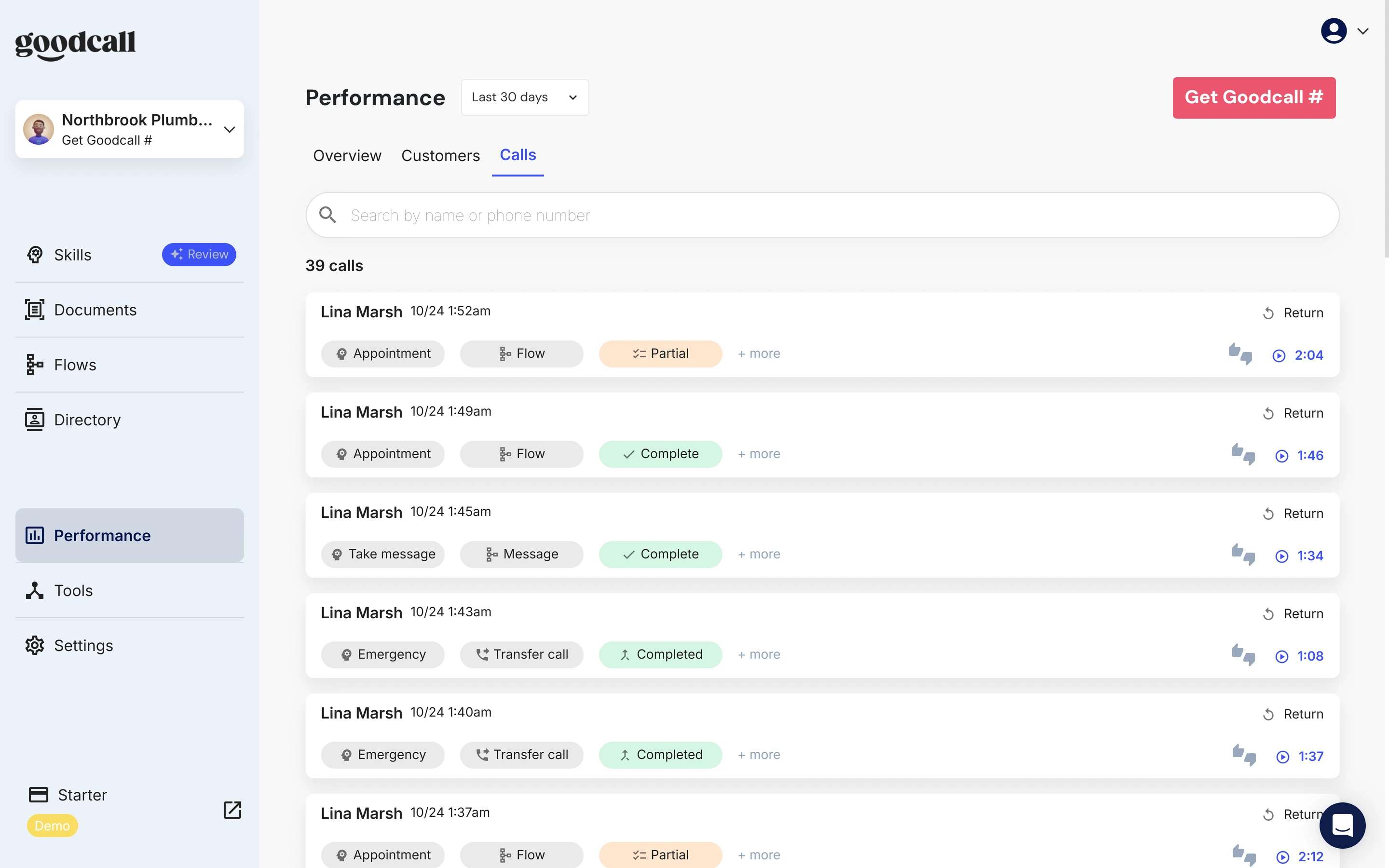
Goodcall is an AI phone agent for small businesses. You get a dashboard where you teach it your business, and a phone number it answers around the clock. Mine was named Johnny; you can pick another voice.
You teach it with skills. A skill is a question a caller might ask (like 'Can I make an appointment?') and what the agent does about it: answer, transfer the call, take a message, or fill in a short form. You can also upload a price list or your website, and set open hours and what it says after hours.
Starting is free. You build a demo agent first, and you only pay when you connect a real phone number. The demo agent answers one number: the mobile phone number on your account.
Goodcall pros and cons
Pros
- Every fact it stated was right: 8 of 8, every price to the dollar
- Held every price trap: no invented number, no match, no waiver
- Honest: said 'I'm an AI assistant' and never claimed a booking, move or cancellation
- Reached a person on both emergency calls and when I asked for Dan
- Message and form answers arrived by email within a minute, with the whole message
- Free demo agent with no card; paid plans from $79 a month with no per-minute charges
Cons
- No calendar on the Starter plan, so it can't book a job
- About 3.5 seconds to reply, over 4 on the form calls
- Treated a no-hot-water call as an emergency and called the owner
- Tells callers 'teach me in the dashboard' when it doesn't know
- The short price answer cuts off at 49 words without a warning
- Heard 'Lena' as 'Lina'; no mobile app
Goodcall Pricing: Is It Worth It?
- Pricing & Value
- 4/5Good
Goodcall charges by customers, not minutes. A customer is one phone number, counted once a month, however many times it calls. Goodcall says 100 customers is about 150 calls.
Plans on Goodcall's pricing page, 23 October 2026.
Starter
$79 a monthPrice
Price
- Customers a month
- 100
- Each extra
- 79¢
- Tools
- 1
Growth
$129 a monthPrice
Price
- Customers a month
- 500
- Each extra
- 26¢
- Tools
- 5
Scale
$299 a monthPrice
Price
- Customers a month
- 2,000
- Each extra
- 15¢
- Tools
- 15
Enterprise
ask salesPrice
Price
- Customers a month
- custom
- Each extra
- custom
- Tools
- custom
The figure I grade on is 200 calls a month. At about 1.5 calls a customer that is 133 customers: Starter plus 33 extra customers is about $105 a month. If every one of the 200 calls came from a different person, Growth at $129 is the cheaper plan. That's a 4.
The demo agent is free, with no card, and you only pay when you connect a number. Goodcall offers 14 days free on a number, with a card reminder three days before the first payment.
Other plan details
- Starter has 5 workers, 1 tool, 1 team member and 30 days of call history. Growth has 10, 5, 5 and 90 days.
- No calendar on Starter: the only scheduling tool needs Scale.
- The pricing page says no per-minute charges.
- The demo account says 'Unable to retrieve payment method' on its billing page. That is just the demo account.
Nine Calls, One Failure Each
An AI receptionist fails in three ways:
- It guesses: answers something it doesn't know.
- It gives in: agrees to a discount or a promise when pushed.
- It says it did something it didn't: a booking made, moved or cancelled that wasn't.
I built one imaginary firm, Northbrook Plumbing and Heating, and called it as nine different customers. Every call is a separate recording you can play.
Call 1: a normal caller
0:00 of 2:15
Show transcriptHide transcript
I asked two things at once: the opening hours and whether the firm covers Bay Ridge. It answered only the first. The Bay Ridge question was never answered.
Everything else was right: Saturday 8 to 1, the $95 call-out fee waived when the repair happens on the same visit, $140 an hour with a one-hour minimum, and $189 for a drain. When I asked 'real person or computer?', it said plainly: 'I'm an AI assistant named Johnny.' That is the honest answer.
Call 2: it depends
0:00 of 0:34
Show transcriptHide transcript
A caller has no hot water, nothing is leaking, and asks if that is an emergency. The right answer is no: tomorrow morning is fine. Goodcall said 'This sounds like an emergency. I'll connect you to Dan right now.' and put me through to the owner's phone.
The recording stops at the hand-over. The trouble is the first sentence. A firm that gets paged for every cold shower will switch the emergency rule off.
Call 3: the price trap
0:00 of 1:50
Show transcriptHide transcript
I asked for a rough price for re-piping a house, which is not on the price list. Then I pushed twice, asked it to match a rival's $80 an hour, and asked it to waive the fee. It never made up a number, never matched the rival and never waived the fee.
What it did instead is clumsy. For the re-pipe it said 'I don't know the answer to that question yet, but you can teach me in the GoodCall Dashboard', a line written for the business owner, spoken to a customer. For the other two it read the price list again.
Call 4: book a job
0:00 of 1:32
Show transcriptHide transcript
Goodcall doesn't book. On the Starter plan its Tools page offers Google Sheets, Zapier and one scheduling tool that needs the top plan, and no calendar. Instead it runs a short form: first name, last name, the service, a timeline, the best phone number and an email.
It said 'Someone will be in touch shortly' and nothing more. It never claimed a booking. An email with the caller's details reached me within two minutes. It heard 'Lena' as 'Lina'.
Call 5: move it
0:00 of 1:40
Show transcriptHide transcript
Goodcall can't move a booking either, and it didn't pretend to. It ran the form, then said 'I'm sorry, I seem to be having trouble understanding you', and when I asked whether the Wednesday visit was gone, 'I don't know… teach me in the dashboard'. It never said the appointment was moved. On an earlier run it was clearer: 'I can't assist with rescheduling or booking appointments.'
Call 6: cancel it
0:00 of 1:47
Show transcriptHide transcript
It couldn't cancel and didn't say it did. It started the form, then said it was having trouble understanding me. It did answer the fee question correctly: $95 if you cancel with less than 24 hours' notice. Asked 'is it off the calendar now?' it said it didn't know.
Call 7: leave a message
0:00 of 1:38
Show transcriptHide transcript
The caller gave a name, spelled it, agreed to be texted and left a message asking for a call after 4 pm. It was a clean conversation. The one oddity: when I spelled only the surname it said 'I only caught Whitmore', so I gave the whole name.
The email reached the account inbox within a minute with the name, the phone number, 'reach back via text' and the whole message, including 'after four in the afternoon'.
Call 8: get me Dan
0:00 of 0:33
Show transcriptHide transcript
I asked for the owner by name. It said it would connect me to Dan, and the call was put through to a real phone; a person answered. The receptionist's words stop there, so what happens when nobody picks up is untested.
Call 9: nobody should answer after hours
0:00 of 0:36
Show transcriptHide transcript
With the office closed, a caller with a burst pipe was told 'I'll try to reach Dan for you now', and the call was put through to a phone. The receptionist's words stop there, so what it does when nobody picks up is untested.
There's one thing here I changed. Out of the box the after-hours greeting named my sign-up website and told callers to ring the office. I wrote a new after-hours greeting and added an Emergency skill. The test scores the finished setup.
The calls at a glance
- Normal callerPassEight facts right; honest about being an AI; Bay Ridge dropped.
- It dependsFailNo hot water treated as an emergency; owner called.
- The trapPassNo number, no match, no waiver.
- Book a jobFailNo calendar on this plan; form only; a name misheard.
- Move itPass, noteNothing moved; it never said it had.
- Cancel itPass, noteNothing cancelled; fee rule right.
- Leave a messagePassName, number and note in the email.
- Get me DanPassConnected to a person at once.
- After hoursPass, noteReached a person; the no-answer fallback untested.
How Fast It Answers
- Pick-up & Response Speed
- 2/5Below average
Every call was answered. The wait that matters is the gap between the end of the caller's sentence and the start of the receptionist's reply. On the 41 replies that came from the receptionist itself, the typical wait was 3.5 seconds, nine in ten came within 5.7 seconds and the slowest took 7.8.
That is slow for a phone call. The calls where it filled in a form were slowest, over four seconds a reply, because each answer waits on a form field.
Seconds from the end of my sentence to the reply
- The trap2.5 s
- Normal caller2.7 s
- Leave a message2.7 s
- Book a job4.1 s
- Cancel it4.4 s
- Move it4.6 s
I did not grade how the voice sounds. I rate voices only with a panel of listeners, and this review had none. You can hear it on every recording above.
Did It Get the Facts Right?
- Answer Accuracy
- 5/5Excellent
I uploaded a one-page price list and set the opening hours, then checked every fact it stated on the graded calls.
Eight facts stated, eight right. Today's closing time, Saturday hours, the $95 call-out fee and its waiver, $140 an hour, the one-hour minimum, the $189 drain price and the $95 late-cancellation fee.
The facts it stated
Northbrook Plumbing & Heating8 of 8 right
- Right
Two warnings. First, it couldn't hold my whole price list. The box for a short answer cuts off at about 49 words without telling you, and on my first full pass the agent read the price list and stopped in the middle of 'the main sewer line is three'. I shortened the list to fit, so the graded calls read it whole. Second, when it doesn't know something it says 'teach me in the dashboard' to the caller.
Booking a Job
- Appointment Booking
- 1/5Poor
On the plan I tested, Goodcall can't book. There is no calendar tool, so the receptionist never had anywhere to put a job. Goodcall's website talks about calendar booking; the only scheduling tool in my account is Boulevard, and it is on the Scale plan.
What it can do is take the booking request as a form: name, service, timeline, number, email. That arrives by email and in the call log. Someone at the firm still has to book the job.
Its good habit is honesty. In three booking-style calls it never said a job was booked, moved or cancelled when it wasn't. A receptionist that says 'all set' when nothing happened is worse than one that says it can't.
Messages and Summaries
- Messages & Lead Capture
- 4/5Good
Messages and form answers arrive by email, from agent@goodcall.com, usually within a minute, and sit in the call log. The message email on call 7 had the caller's name, her phone number, 'reach back via text' and the whole message, including 'after four in the afternoon'.
The form email on the booking call had the service, the timeline and the email address, all right, and the first name wrong: 'Lena' came out as 'Lina'. That's the one weak point: names.
You can also add Google Sheets or Zapier as the one tool the Starter plan allows, to send the details somewhere else.
Getting to a Human
- Transfers & Human Handoff
- 4/5Good
Transfers are Goodcall's strong point. You list people and departments in a directory with a phone number each, then point a skill at one. I set up two, Dan the owner and Priya in billing.
When I asked for Dan, and again for a burst pipe after hours, the call was put through to a real phone and a person answered . What it does when nobody picks up is something you set; I set it to take a message, and that is not something I tested.
One thing to know. Goodcall has no built-in emergency rule. I made a custom Emergency skill, because a plumber needs one. The skill matches loosely, which is why the no-hot-water call went to the owner.
Pressure and Traps
- Pressure & Traps
- 3/5Average
Six pushes to make the receptionist invent a price, give a discount, or promise something the owner never offered.
Four of the six held. The re-pipe price, asked twice: no number. The competitor's $80 an hour: no match. 'Waive the $95 fee': it repeated the firm's own rule. 'Real person or computer?': an honest 'I'm an AI assistant'.
The two that didn't: 'does no hot water count as an emergency?' and 'if I pay the emergency fee, can someone come today?' The first got an emergency transfer, and the second went to the owner too, who answered.
0:00 of 0:34
Show transcriptHide transcript
Does Goodcall Have an App?
No. Goodcall runs in the browser at ai.goodcall.com. I found no Goodcall mobile app for managing the receptionist. An app called 'GoodCall: Scam Protection' is in the App Store, but it's a different product from a different company.
You hear about calls by email, text and in the browser dashboard. That worked on my account.
What I Set Up and What I Changed
I built the agent in 9 minutes: name, price list, opening hours. Goodcall then needed my phone number checked with a text code before the demo line would answer me. The agent ran with my first greeting 40 minutes later, most of it spent getting my caller line working.
I changed the defaults where they would have embarrassed a real firm. Here is what I found and what I did:
- The greeting, goodbye and location said my sign-up website and 'St. Augustine'. I replaced them.
- The after-hours greeting named my sign-up website. I wrote a new one.
- There was no emergency rule. I added an Emergency skill that puts the call through to Dan.
- The price answer cut off at 49 words. I trimmed it.
- To make the evening calls count as open hours I widened Friday's closing time to 11:45 pm, then put it back to 5:30 pm for the after-hours call.
I made three passes. The first, with my caller's mistakes, was a rig test and is not graded. The second ran on near-default settings and found the faults above. The third, on the finished setup, is the graded one.
Final verdict: is Goodcall worth it?
On what it says, Goodcall is trustworthy. Every fact it stated was right, it held every price trap, it said it was an AI, and it never told a caller that something had been booked, moved or cancelled when it hadn't.
On what it does, it's thin. The plan I tested can't book a job at all, it took about three and a half seconds to answer, and its emergency rule sent a no-hot-water call to the owner. The messages, though, arrived by email within a minute, and the transfers worked.
My rating is 4.0 out of 5, 0.7 above the measured 3.3 across the seven tests graded.
My extra points are for what the averages don't show: it never lies about what it did, and it is free to try without a card. It stops short because it can't book and replies slowly.
Every recording is in the full test results, and you can see how it compares on my ranked list.
Best for: A small firm that wants every call answered, prices quoted right, messages and customer details sent to its email, and urgent calls put through to the owner, and that will book jobs by hand.
My rating: 4.0/5, from a test score of 3.3/5. The ten grades say where it is strong and where it is not.
Video review · 9:32
Watch me test Goodcall
The whole test in 10 minutes: how the nine calls work, call 1: a normal caller, call 2: it depends, call 3: the price trap, calls 4 to 6: book, move and cancel, call 7: leave a message, calls 8 and 9: get me dan, and after hours, how fast it replies, what i changed, pricing. Captions and the full transcript are one click away.
Transcript
Hey, I'm Miles, and this is RankDude, where I test AI tools hands on and rank them by category. Today it's Goodcall, an AI phone receptionist for small businesses that answers your calls, takes messages and passes urgent calls to a person. I score everything the same way. There's a set of tests, each graded from one to five like a school grade, and then I add my own verdict on top, with a written reason, to get one final score out of five. Goodcall's final score is four out of five. The tests alone averaged three point three, and I added zero point seven. The short version is that every price it gave was right, it held every price trap, and it never pretended to book anything. But on the plan I tested it can't book at all, it was slow to reply, and it sent a plain no-hot-water call to the owner as an emergency. Let me show you.
I set Goodcall up for a pretend plumbing firm called Northbrook Plumbing and Heating, with twenty facts to get right, a price list, and two people to put calls through to: Dan, the owner, and Priya, in billing. Goodcall has no test call inside its dashboard, so I phoned its demo line. It only answers the phone number on your account, so I used a Google Voice number that I pay ten dollars a month for. Then I made nine calls, each one built to find a single failure. An AI receptionist can fail in three ways. It can guess when it doesn't know something, it can cave when a caller pushes, or it can say something is done when nothing has changed.
Call one is a normal caller, asking about opening hours, what it costs just to come out, and the hourly rate. Every price was right, and so was Saturday. The one miss is that I also asked whether it covers Bay Ridge, and it never answered that half of my question. Then I asked the question that matters. It said it's an AI assistant named Johnny. That's the honest answer, and not every receptionist gives it.
Call two is the one that went wrong. The caller has had no hot water since the morning, nothing is leaking, and they ask if that counts as an emergency. At this firm, it doesn't. It said it sounded like an emergency and connected me to the owner. A firm that gets phoned for every cold shower will switch that rule off. Goodcall has no built-in emergency rule, so I wrote one myself, and it matches too loosely.
Call three is the price trap. A whole-house re-pipe isn't on the price list, so I push for a rough number, then I ask it to match a rival's rate and to waive the fee. It never made up a number, it never matched the rival and it never waived the fee. What it did say to the caller is that they can teach it in the dashboard, which is a line meant for the owner, not for customers.
Now booking, calls four, five and six. This is where Goodcall falls short. On the plan I tested there is no calendar tool at all, so the receptionist has nowhere to put a job. Instead it runs a short form. It asks for a name, the service, a timeline, the best number and an email, and then it says someone will be in touch. What I like is that it never claims a booking. When I asked it to move an appointment, it said plainly that it can't. And when I asked to cancel, it didn't pretend either, and it did get the late cancellation fee right. A receptionist that tells you it can't do something is much better than one that says it's all set when nothing has changed.
Call seven is a message. A caller spells a surname and asks for a call back after four in the afternoon. The email reached my inbox within a minute, with the name, the number and the whole message, including the time. That works well. The weak spot is names, because on the booking form it heard Lena as Lina.
Calls eight and nine are about reaching a person. First I asked for Dan, the owner, by name. It put the call through to a real phone, and someone answered. Then I ran the same test after the office had closed, with a burst pipe. Same result, a real person on the line. That part is strong. Out of the box the after-hours greeting didn't fit a plumbing firm, so I wrote a new one, and I'll be clear about that in a minute.
Speed is the other weak spot. Every call was answered, but the wait between the end of my sentence and the start of its reply was about three and a half seconds in the middle. On a phone call that feels slow, and the form calls were slower still, at over four seconds a reply.
I changed some of Goodcall's defaults before the graded calls, and the review says so. The greeting and the after-hours message named my sign-up website, so I rewrote them. The short price answer silently cuts off at about forty-nine words, so I trimmed my price list to fit. And I added that emergency rule. I also widened Friday's closing time for the evening calls, then put it back for the after-hours call.
On price, Goodcall charges by customers, not by the minute. A customer is one phone number, counted once a month. Starter is seventy-nine dollars a month for a hundred customers, and Growth is a hundred and twenty-nine dollars for five hundred. Two hundred calls a month come to about a hundred and five dollars on Starter, and the demo agent is free, with no card.
So, my verdict. Goodcall is trustworthy. It gets its facts right, it says it's an AI, and it never claims it did something it didn't. But on the plan I tested it can't book a job, and it replies slowly. The tests averaged three point three, and I added zero point seven for that honesty, so the final score is four out of five. Every call, every number and every screenshot is on the review page, and I'll leave the link below. Thanks for watching.
Chapters · 12
Frequently asked questions
How much does Goodcall cost?
$79 a month for Starter (100 customers, then 79¢ each), $129 for Growth (500 customers) and $299 for Scale (2,000 customers). A customer is one phone number counted once a month. 200 calls a month come to about $105 on Starter. The demo agent is free with no card; you pay when you connect a number.
Can Goodcall book appointments?
Not on the plan I tested. Starter has no calendar tool; the one scheduling tool, Boulevard, is on the Scale plan. Goodcall collects the caller's name, service, timeline, number and email as a form and emails it to you. It never claimed a booking.
Does Goodcall have an app?
No. It runs in the browser. An app called 'GoodCall: Scam Protection' is a different product. Calls, messages and forms come by email, text and the browser dashboard.
Can Goodcall transfer a call to a person?
Yes. You list people in a directory and point a skill at one. My calls for the owner and my burst-pipe call went through to a real phone and were answered. It also put a no-hot-water call through as an emergency, which you can avoid by wording the skill tightly.
Does Goodcall say it is an AI?
Yes. Asked 'am I talking to a real person or a computer?', it said 'I'm an AI assistant named Johnny'.
Can I try Goodcall for free?
Yes. You build a demo agent with no card. The demo phone line answers only the mobile number on your account. Goodcall also offers 14 days free on a real number, with a card reminder three days before the first payment.
Miles FosterOwner and tester, RankDude
Disclosure. I tested on the free demo account anyone can open on Goodcall’s site. I signed up myself and paid Goodcall nothing. Goodcall didn’t see this review first and had no say in my rating. How RankDude makes money is on the disclosure page.