
Slidesgo Review: AI Presentation Maker, Pricing & My Test Results
My rating
A fast themed first draft that needs checking and tidying. Little control afterwards.
Best for: a quick first draft on a tight budget. Not for brand-exact decks, charts or figures you cannot check.

Tested and written by Miles Foster
Based on 8 graded tests and my verdict. How I rate
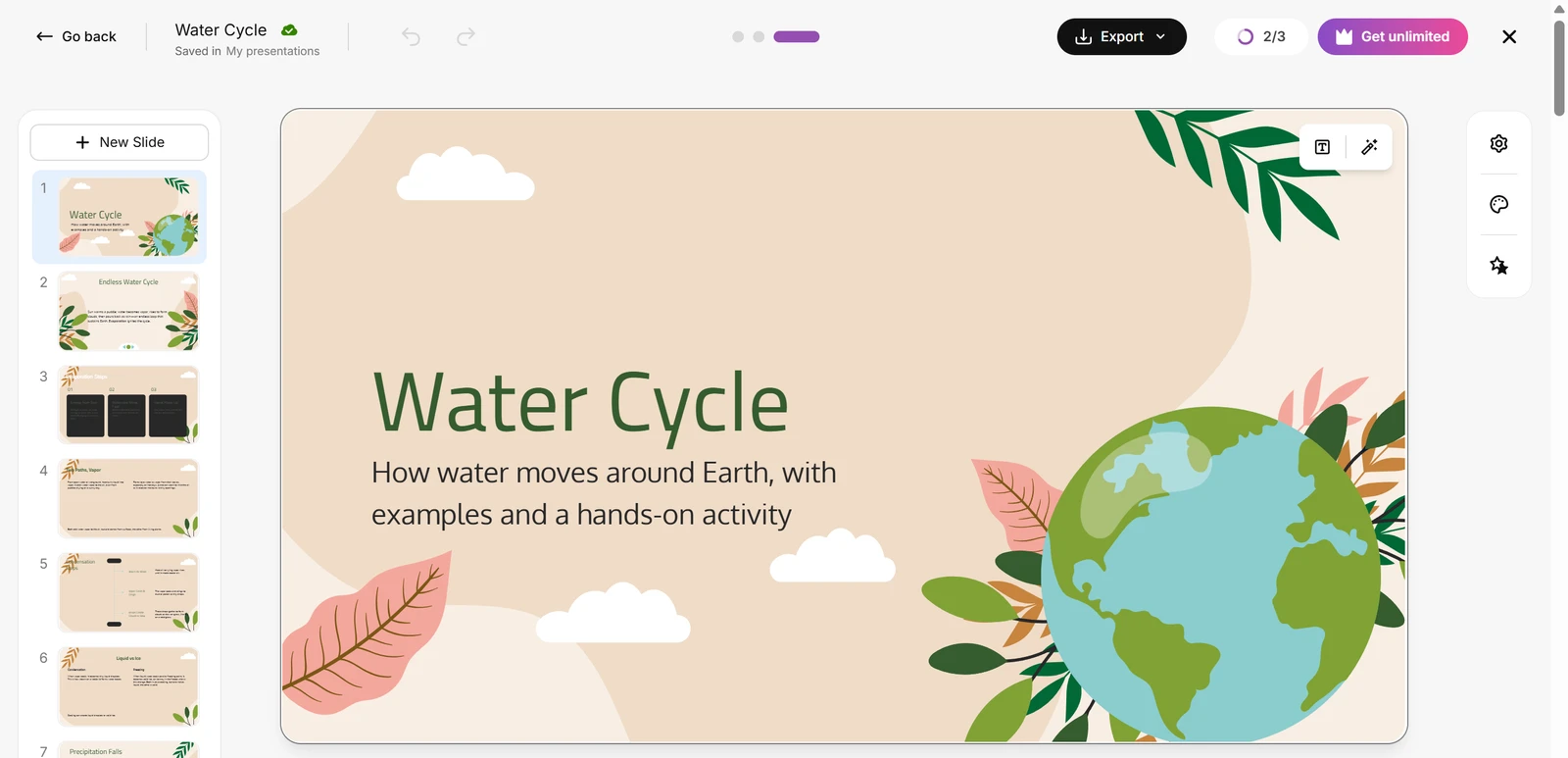
I tested Slidesgo hands-on on its free plan, the way I test every AI presentation maker. I asked for a water cycle deck and a pitch deck, checked every slide and made twelve edits.
Every measurement is in the Slidesgo test results.
My Slidesgo AI Presentation Maker Test Results
| Category | Grade | In short |
|---|---|---|
| Structure from a PromptRight shape, wrong slide counts | 3/5Average | |
| Slide DesignMany overflows and broken words | 2/5Below average | |
| Content AccuracyGood science, some invented figures | 2/5Below average | |
| Use of a Supplied DocumentMost of the document, two additions | 2/5Below average | |
| Editing ControlHalf the edits are not possible | 2/5Below average | |
| Brand & Theme ControlNo logo, colour or font control | 1/5Poor | |
| SpeedA deck in about a minute and a half | 4/5Good | |
| Pricing & ValueFree plan, paid under ten dollars | 5/5Excellent | |
| My verdict | +0.6 | |
| Overall | 3.2/5Average |
What Is Slidesgo?
Slidesgo is a template site that also has an AI presentation maker. You type a topic or attach a file, you pick a theme, and it writes slides in an editor that you can export to PowerPoint.
It is run by Freepik Company, whose terms apply. The free plan gives 3 AI presentations and 3 downloads a month; Premium is $3 a month paid yearly.
How I Tested Slidesgo
You may wonder how fair this is: every AI presentation maker gets the same three briefs: a water cycle deck, a pitch deck from a six-page document and a quarterly review from a table. I ran the first two and stopped, because a third would have used all 3 of the free plan's AI presentations. Eight of ten tests were graded; charts and export fidelity were left out.
My tools
Last checked 12 Nov 2026Slidesgo pros and cons
Pros
- Two decks in about a minute and a half
- Pitch deck covered 13 of 15 points
- Reads an uploaded PDF
- Whole-deck theme change
- AI rewrite of a single slide
- No card needed for the free plan
- Premium under ten dollars a month
Cons
- Invented figures in both decks
- 19 layout faults in 26 slides
- Slide counts miss the request
- Six of twelve edits impossible
- No logo, colour or font control
- Free exports carry an attribution slide
Slidesgo Pricing
Premium is $3 a month paid yearly, or $5.99 a month, and removes the attribution slide. The free plan gives 3 AI presentations and 3 downloads a month.
Slidesgo plans and prices
Live data· last check 12 November 2026| Plan | Price a month | |
|---|---|---|
| Free3 AI presentations and 3 downloads a month, attribution slide | $0 | 3 AI presentations and 3 downloads a month, attribution slide |
| PremiumMonthly: unlimited AI presentations and downloads (150 a month cap), no attribution | $5.99 | Monthly: unlimited AI presentations and downloads (150 a month cap), no attribution |
- VAT and local taxes may apply
- Up to 1000 users; larger needs via contact us
- Subscriptions renew automatically unless cancelled
I did not buy a plan, so renewal prices and the Premium editor were not tested.
Slidesgo Free Plan Limits
The free plan gives 3 AI presentations and 3 downloads a month. I made two decks, the water cycle and the pitch deck, so a third would have passed the 85 per cent line where I stop.
Free exports end with an attribution slide. The pricing section has the plans.
Slidesgo Speed
Slidesgo finished the water cycle deck in about 1 minute and the pitch deck in about 1 minute 38 seconds. The pitch deck sat at 59 per cent for about 30 seconds, then completed.
Slidesgo Deck Structure
Slidesgo got 11 of 14 points right. Both decks had a title slide, a sensible order and a close, but they came back at 14 slides for 12 asked and 12 for 10 asked, and the pitch deck makes its ask three times.
You choose a range of slides, not a number, so you cannot ask for an exact count.
Slidesgo Content Accuracy
Slidesgo wrote correct science but five invented items that were not in my brief. The water cycle deck ends with scores of "100%" and "1/1" for a diagram that does not exist.
The pitch deck added "180,000 Initial SAM" and a launch "within 6 months", neither of which is in the document.
Slidesgo Slide Design
Slidesgo's first drafts had 7.3 faults per ten slides: 19 in 26 slides. Words break in the middle, text runs out of its box, and five water cycle slides have more than 60 words.
Contrast was fine until I changed the theme, which turned two slides into black cards with dark text.
Slidesgo Charts and Images
I left charts ungraded. The only brief with a table of figures is the quarterly review, and that would have been a third AI presentation.
Without that deck I had no chart test to run, so charts are left out of the grade, not scored.
Slidesgo Editing
I could make six of twelve edits: move a slide, regenerate one, shorten a text with AI, insert a slide, change the theme and undo three steps. The AI rewrites took 6 to 9 seconds.
I found no way to change a layout, add notes or comments, drag an object or use my own picture.
Slidesgo Brand Control
Slidesgo has no brand control on the free plan: no logo, colour or font upload and no template import. The theme picker filters by style, colour and industry.
Slidesgo Document Upload
Slidesgo read my six-page PDF and covered 13 of 15 points, with the prices, customers, team and ask all right. It missed the start in 2023 in Leeds and the competitor detail.
Slidesgo Attribution and Rights
Free exports end with a slide that says "Please keep this slide for attribution", and the terms say you must not remove it unless you buy a licence that allows it.
That slide also carries a placeholder email and phone number, which you would have to delete before you present.
Slidesgo Reviews From Users
Slidesgo has 2.0 out of 5 on Trustpilot from 59 reviews, read on 5 November 2026: 51 per cent give five stars and 44 per cent give one. Recent complaints you can read there are about charges with no way to cancel, and a theme change that redid a finished deck.
Final verdict: is Slidesgo worth it?
Slidesgo is worth trying if you need a themed first draft in a couple of minutes and will check every number and fix the layout yourself. It read my document well and the price is low.
It is not the tool if you need a deck you can trust as it comes, a brand kit, charts or fine control. The free plan also gives only 3 AI decks a month.
The eight tests I could grade average 2.6 out of 5. I rate Slidesgo 3.2 because the free plan let me run eight of the ten tests.
See the Slidesgo test results and how I rate.
Best for: People who need a quick first draft and will fix it by hand, on a tight budget.
Video review · 2:43
Watch me test Slidesgo
The whole test in a few minutes, from screen recordings of the tests. Captions and the full transcript are one click away, and the video has a page of its own.
Transcript
Hi, I'm Miles. I tested Slidesgo hands on, on its free plan, and here's the short version. Its AI maker built a water cycle deck and a pitch deck in about a minute and a half each, and the pitch deck covered thirteen of fifteen points from my document. But both decks held figures that were not in my brief, slides had text running out of its box, and I could make only six of twelve edits. My rating is three point two out of five, from eight tests.
So what is Slidesgo? It's a template site with an AI presentation maker. You type a topic or attach a file, you pick a theme, and it writes slides in an editor that you can export to PowerPoint. The free plan gives you three AI presentations and three downloads a month.
First, structure. I asked for twelve slides on the water cycle and got fourteen. I asked for a ten slide pitch deck and got twelve, with the ask made three times. Both had a title slide, a sensible order and a close. That is eleven of fourteen points.
Then design. I checked every slide, twenty six in all, and counted nineteen faults. Words break in the middle, labels run out of their boxes, and the cover's subtitle sits on top of its title. That's about seven faults for every ten slides.
On accuracy, the science was right, but Slidesgo made things up. The water cycle deck ends with scores of one hundred per cent for a diagram that does not exist, and the pitch deck added a market size and a launch date that are not in my document.
I attached a six page PDF about a made up compost company. The pitch deck got the prices, customers, team and the ask right, thirteen of fifteen key points. It missed when and where the company started, and the competitor detail.
Next, twelve edits. Six worked: moving a slide, regenerating one, shortening a text with AI, adding a slide, changing the theme and undo. Six did not, including layouts, notes, comments and using my own picture. And the theme change turned some cards black with text you cannot read.
On speed, the water cycle deck took about a minute and the pitch deck about a minute and a half. That's quick, and nothing failed.
A catch on the free plan: every export ends with a slide that says please keep this slide for attribution. The terms say you must not remove it unless you buy a licence that allows it.
On price, Premium removes that slide and costs about eight shekels fifty a month when paid yearly, in my browser. That's well under ten dollars. There is no brand kit on the free plan, so I could not use my logo, colours or font.
So, is Slidesgo worth it? Yes, as a quick first draft that you check and tidy yourself. It's not for decks you can trust as they come. The eight tests average two point six, and I rate it three point two, because the free plan let me run eight of ten tests.
Chapters · 12
Frequently asked questions
How much does Slidesgo cost, and is there a free plan?
Yes, free. It gives 3 AI presentations and 3 downloads a month. Premium is $5.99 a month, or $3 a month paid yearly, as shown in my browser.
Is Slidesgo legit and safe?
Yes, it is. It is run by the Freepik group. I signed in with Google and entered no card. Its Trustpilot score is 2.0 from 59 reviews, with complaints about cancelling.
Does Slidesgo put its name on free decks?
Yes. Free exports end with a slide that says "Please keep this slide for attribution". The terms say not to remove it unless you buy a licence that allows it.
Can I export a Slidesgo deck to PowerPoint?
Yes, with limits. The editor exports a .pptx, and the free plan allows 3 downloads a month. Free files end with the attribution slide, so delete it only if you buy a licence that allows it.
Can Slidesgo use my own brand and template?
No. I found no way to add a logo, colours or a font, or to import a .pptx template.
What did I not test?
The quarterly review. A third deck would have used all 3 free AI presentations. Charts and export fidelity were left out, and no paid plan was bought.

Miles FosterOwner and tester, RankDudeMiles Foster is a pen name: the owner of RankDude, a private person, runs every test himself.
Disclosure. I tested on the free demo account anyone can open on Slidesgo’s site. I signed up myself and paid Slidesgo nothing. Slidesgo didn’t see this review first and had no say in my rating. How RankDude makes money is on the disclosure page.