
Presentations.AI Review: AI Presentation Maker, Pricing & My Test Results
My rating
A capable editor and a faithful PDF pitch deck, but template text and invented details need a careful read, and exports are paid.
Best for: a first draft from a PDF or a short brief that you will check by hand. Not for a deck you must trust without reading.

Tested and written by Miles Foster
Based on 8 graded tests and my verdict. How I rate
I tested Presentations.AI hands-on on its free plan, the way I test every AI presentation maker: three fixed briefs, every slide checked, twelve edits, the terms and the prices.
Every measurement is in the Presentations.AI test results.
My Presentations.AI AI Presentation Maker Test Results
| Category | Grade | In short |
|---|---|---|
| Structure from a PromptAgenda and slide count missed in two decks | 4/5Good | |
| Slide DesignPlaceholder text and empty panels on some slides | 3/5Average | |
| Content AccuracyInvented figures on one slide and one chart | 2/5Below average | |
| Use of a Supplied DocumentEvery point covered, one claim added | 2/5Below average | |
| Editing ControlMost edits worked, no comments | 3/5Average | |
| Charts & ImagesLine chart is real, bar chart is wrong | 2/5Below average | |
| SpeedA few minutes a deck, with a question stop | 3/5Average | |
| Pricing & ValueA paid plan under twenty-five dollars | 3/5Average | |
| My verdict | +0.6 | |
| Overall | 3.4/5Average |
What Is Presentations.AI?
Presentations.AI is an AI presentation maker. You describe a deck or upload a file, answer a question or two, and it builds editable slides in the browser.
The free plan gave me 400 credits. Exports to PowerPoint and PDF start with Pro at $20 a month paid yearly.
How I Tested Presentations.AI
Every AI presentation maker gets the same three briefs: a ten-slide quarterly review from a table of figures, a twelve-slide water cycle deck from one line, and a ten-slide pitch deck from a six-page PDF. I check every slide, then try twelve fixed edits.
My tools
Last checked 12 Nov 2026Presentations.AI pros and cons
Pros
- All 15 key points of the PDF covered
- Line chart is a real, editable chart
- One click restyles every slide
- Reorder, insert and notes work free
- AI text edits cost 5 credits each
- Paid plan from $20 a month
Cons
- Template text left on two decks
- Invented figures on one slide
- Bar chart adds my figures together
- Water cycle deck came back with 10 slides
- Every export needs a paid plan
- A company question holds up the build
- No comments, and undo did not undo the theme
Presentations.AI Pricing
The cheapest plan with export is Pro at $20 a month, billed yearly, with 5,000 credits a year. Gold is $100 a month for 50,000 credits.
Presentations.AI plans and prices
Live data· last check 12 November 2026| Plan | Price a month | |
|---|---|---|
| Starter400 credits on my account, no export | $0 | 400 credits on my account, no export |
| ProBilled yearly: 5,000 credits a year, PowerPoint and PDF export | $20 | Billed yearly: 5,000 credits a year, PowerPoint and PDF export |
| GoldBilled yearly: 50,000 credits a year, frontier models | $100 | Billed yearly: 50,000 credits a year, frontier models |
- Prices shown are for the US; actual price may vary by country (purchasing power parity).
- Pro and Gold are listed billed annually; no month-to-month price is shown.
The page says its prices are for the US and may vary by country, and the plan chooser in my editor showed shekels. I did not buy a plan, so I could not see a paid export.
Presentations.AI Free Plan Limits
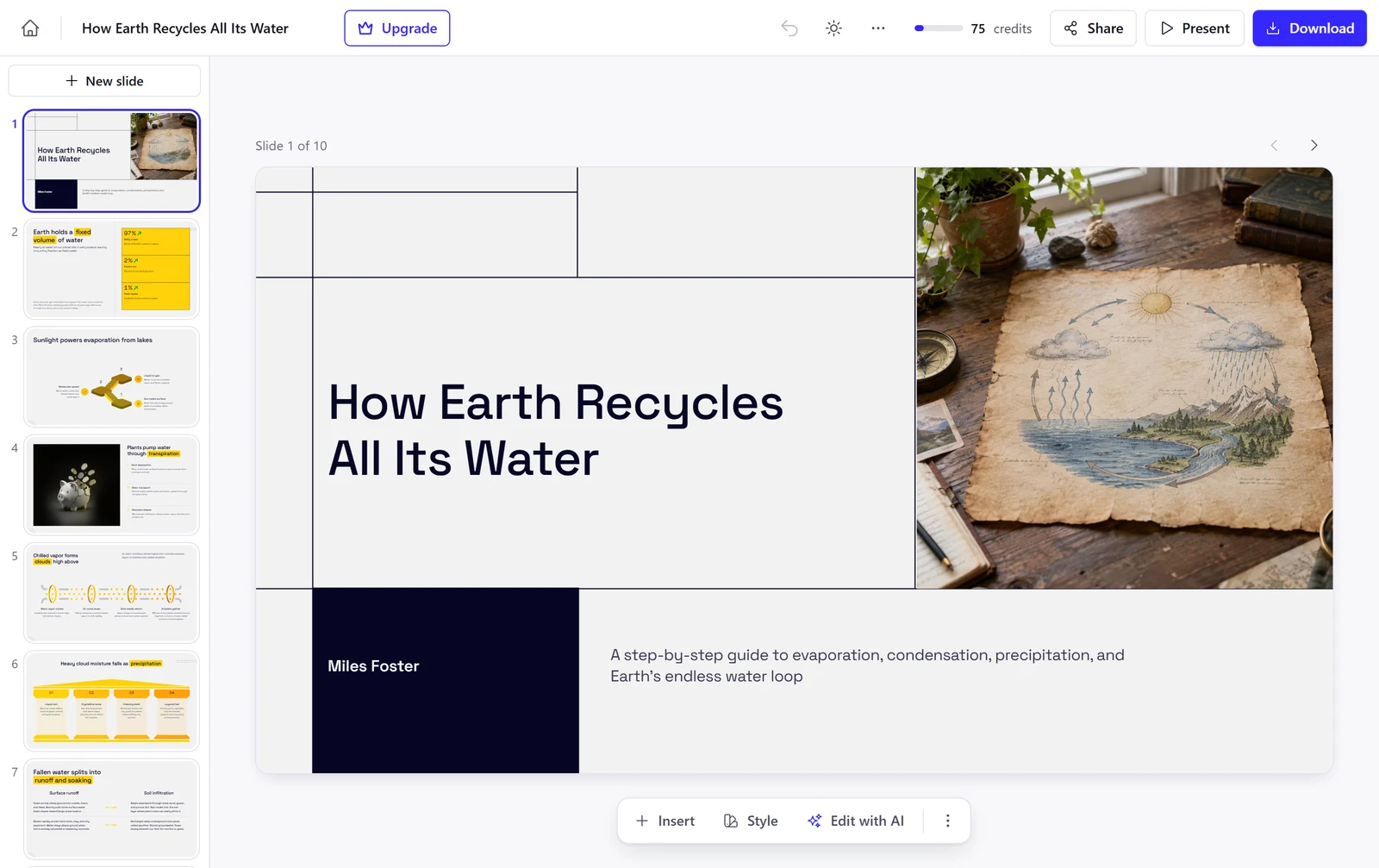
The free plan gave me 400 credits, and each ten-slide deck cost 100. The three decks used 300, my edits used 25 more, and 75 were left.
I left out two tests. Brand control needs the Brand Kit, which has a Pro badge, and every export opened the plan chooser.
Presentations.AI Brief to Finished Deck
Presentations.AI took a median of 3.8 minutes to build a deck. The water cycle deck took 3 minutes 7 seconds and the quarterly review 4 minutes 28 seconds.
Both stopped on a box that asks "What company is this presentation for?" and the deck only arrived after I closed it. The pitch deck sat on that box for over 20 minutes while I was away, then finished within a minute, so I did not count it.
Presentations.AI Deck Structure
Presentations.AI met 19 of 21 structure points over three decks. The pitch deck had all seven.
The quarterly review lost a point because its agenda was the outline of a startup pitch. The water cycle deck lost one because I asked for 12 slides and got 10.
Presentations.AI Accuracy
Presentations.AI invented figures on one slide. Every number in my table was right, but slide 9 added "Annual plan at a 20% discount", "First value in under five minutes" and "Reps engage accounts past 10 seats".
In the water cycle deck I found one minor error. It labels 1 per cent of Earth's water as available fresh surface water, while the USGS table puts most liquid fresh water underground.
Presentations.AI Slide Design
Presentations.AI's slides had 10 layout faults in 30 slides, which is 3.3 in every ten. The look is clean, but some slides are not finished.
Slide 10 of the same deck prints "Visual Insight: Key Graphic Highlight", and slide 4 shows a piggy bank on a slide about plants. The quarterly review puts very small text at the foot of tall empty panels on three slides.
Presentations.AI Charts and Images
Presentations.AI got two of three charts right. The line chart is a real chart with an Edit chart button, and I changed a value in its data sheet.
The bar chart stacks Q2 on Q3 and labels each bar with the total, which is not in my table. No picture shows where it comes from, and the image picker and the terms say nothing about licences.
Presentations.AI Editing
Nine of twelve edits worked with normal controls: reorder, layout, shorter text, a new slide, chart data, notes, moving a block and a deck-wide theme, plus Remix to redesign a slide.
Three did not. The image picker opened but my chosen picture did not replace the photo, seven clicks on Undo did not remove the theme, and I found no way to leave a comment. The Edit with AI menu says 5 credits each.
Presentations.AI Use of a Supplied Document
Presentations.AI covered all 15 points of my six-page PDF, in a ten-slide pitch deck. The founders, the $1.5 million round, the churn and the use of funds were all right.
One claim is not in the document: slide 8 says the second roaster will "double batch capacity". The scale counts that as invented, which is why this grade is low.
Presentations.AI Exports
Every export is behind a paywall. The Download button opened the plan chooser, which says "Every paid plan includes editable PowerPoint and PDF export with no watermark."
So I could not compare a downloaded file with the deck. You can still share a link for free.
Presentations.AI Usage Rights
Presentations.AI's terms say it "does not claim ownership of Your Content". You do give it a licence that is "perpetual, irrevocable, worldwide, non-exclusive", to run the service for you and its other users.
The terms say nothing about who owns the text and pictures the AI writes for you. They also say there are "NO REFUNDS", and you may cancel at least 30 days before the renewal date.
Presentations.AI Reviews: What Other Users Say
Trustpilot shows Presentations.AI at 1.5 out of 5 from 40 reviews, read on 5 November 2026. The 1-star bar is by far the longest.
One reviewer says the presentations are fine but the tool "changes constantly". The profile says the company has not replied to negative reviews. My test did not find a fault that explains a score this low, so read a few reviews before you pay.
Final verdict: is Presentations.AI worth it?
Presentations.AI is worth trying if you want a quick first draft from a PDF or a short brief and you will read every slide before you share it. It kept all 15 points of my six-page document, and nine of the twelve edits worked.
It is not the tool if you need a deck you can trust without checking, a chart that follows your table, or a PowerPoint file you do not pay for. Two decks carried template text, and one slide held figures I never gave.
The eight tests I could grade average 2.8 out of 5. I rate Presentations.AI 3.4 because the two tests I could not run, brand control and exports, are paid features and the editor itself is strong.
See the Presentations.AI test results and how I rate.
Best for: People who want a quick first draft from a PDF or a one-line brief, and who will read every slide before sharing it.
Video review · 2:59
Watch me test Presentations.AI
The whole test in a few minutes, from screen recordings of the tests. Captions and the full transcript are one click away, and the video has a page of its own.
Transcript
Hi, I'm Miles. I tested Presentations dot A I hands on, on its free plan, and here's the short version. It built three ten slide decks in a few minutes each, and covered all fifteen points of my PDF. But it left template text and invented details on the slides, the bar chart adds my figures together, and every export needs a paid plan. My rating is three point four out of five, from eight tests.
So what is Presentations dot A I? It's an AI presentation maker. You describe a deck or upload a file, answer a question or two, and it builds editable slides in your browser. The free plan gave me four hundred credits.
Each ten slide deck cost a hundred credits. Three decks took three hundred, my edits took twenty five more, and seventy five were left. I stopped there, short of the eighty five per cent line.
Now the speed. The water cycle deck took three minutes seven seconds, and the quarterly review took four and a half minutes. Both stopped on a question about the company's website until I closed it. The pitch deck sat on that question for twenty minutes while I was away, so I didn't count it.
Structure first. Across three decks it met nineteen of twenty one points, but the agenda in my business review listed Problem and Solution, as if it were a start up pitch. Then accuracy. Every figure from my table was right, yet the next steps slide added invented figures, like a twenty per cent discount, and the bar chart showed totals I never gave.
With my six page PDF, it covered all fifteen key points in a ten slide pitch deck. One slide says the second roaster will double capacity, and that isn't in the document, so the grade is low.
On design, I counted ten layout faults in thirty slides. The slides look clean, but the water cycle deck still prints key label twice, and a piggy bank appears on a slide about plants.
Charts next. The line chart is a real chart, and I changed a value in its data sheet. The bar chart stacks the two quarters, so North reads eight hundred and forty, and no picture says where it comes from.
For editing, nine of my twelve edits worked. I reordered slides, changed a layout, shortened text, added a slide, edited chart data, typed notes, moved a block and changed the whole theme in one click. But undo did not take the theme back, I couldn't replace the photo, and there are no comments.
Exports are the catch. The Download button opened the plan chooser, so every export needs a paid plan, and I never held a PowerPoint file.
On rights, the terms say Presentations dot A I does not claim ownership of your content, but you give it a wide licence to run the service. They say nothing about who owns what the AI writes, and there are no refunds.
On price, Pro is twenty dollars a month billed yearly, and Gold is a hundred. The free Starter plan has no export.
So is it worth it? Try it if you want a quick first draft from a PDF and you'll read every slide. Skip it if you need a deck you can trust without checking, or a PowerPoint file for free. The eight tests average two point eight, and I rate it three point four out of five.
Chapters · 14
Frequently asked questions
How much does Presentations.AI cost, and is there a free plan?
Yes, free. I got 400 credits and a ten-slide deck cost 100. Pro is $20 a month, billed yearly.
Is Presentations.AI legit and safe?
It worked. I signed in with Google and entered no card. Trustpilot shows 1.5 from 40 reviews, so read a few before you pay.
Who owns the decks I make with Presentations.AI?
You keep it. The terms say Presentations.AI "does not claim ownership of Your Content", and they give it a licence to run the service. They do not say who owns what the AI writes.
Can I export a Presentations.AI deck to PowerPoint or PDF?
Not free. The Download button opened the plan chooser. Paid plans include editable PowerPoint and PDF export with no watermark.
What did I not test?
Two tests. The Brand Kit has a Pro badge and every export is paid, so I left out both tests. I also could not confirm the image replacement.

Miles FosterOwner and tester, RankDudeMiles Foster is a pen name: the owner of RankDude, a private person, runs every test himself.
Disclosure. I tested on the free demo account anyone can open on Presentations.AI’s site. I signed up myself and paid Presentations.AI nothing. Presentations.AI didn’t see this review first and had no say in my rating. How RankDude makes money is on the disclosure page.