
PicWish Review: AI Image Generator, Pricing & My Test Results
My rating
Accurate and sharp, but slow and silent on image rights. Check ownership before business use.
Best for: a few accurate pictures and posters a day. Not for work you will sell, until PicWish answers who owns the images.

Tested and written by Miles Foster
Based on 6 graded tests and my verdict. How I rate
I tested PicWish hands-on on its free plan, giving its AI image generator 2 of my 40 fixed prompts. I timed each image, opened the upscaler and read the terms.
Every measurement is in the PicWish test results.
My PicWish AI Image Generator Test Results
| Category | Grade | In short |
|---|---|---|
| Prompt AdherenceEvery detail right, on two easy prompts | 5/5Excellent | |
| Text in ImagesEvery word of the poster spelled right | 5/5Excellent | |
| Resolution & Upscaling2,048 pixel images, upscaler needs credits | 3/5Average | |
| Speed per ImageAbout a minute for each picture | 2/5Below average | |
| Usage Rights, Watermarks & PrivacyThe terms say nothing on the images | 1/5Poor | |
| Pricing & Value3 free a day, cheap paid month | 3/5Average | |
| My verdict | +0.2 | |
| Overall | 3.4/5Average |
What Is PicWish?
PicWish is an AI photo editor that began with tools such as background removal and photo enhancement. Its AI Designer is a chat box: you describe a picture or upload a photo, pick a model and get an image.
You pay in credits. The free plan gives you 3 images a day. Paid plans start at $4.99 a month when you pay yearly.
How I Tested PicWish
Every image generator gets the same 40 written prompts, and I keep the first image of each. On the free plan I ran 2 of them and six of the ten tests, and left four tests out. I stopped at 1 free image left.
My tools
Last checked 12 Nov 2026PicWish pros and cons
Pros
- Every asked-for detail right
- Every set word spelled right
- 2,048 pixel images
- 3 free images a day
- Free plan needed no card
- No watermark on the files I saved
Cons
- About a minute per image
- Terms say nothing on the images
- Upscaler needs credits
- Only 3 free images a day
- No content credentials in the files
PicWish Pricing
- Pricing & Value
- 3/5Average
Pro costs $9.99 a month, or $4.99 a month billed yearly, and gives 450 credits. The free plan costs nothing and I entered no card. A weekly plan is also listed.
Until 31 December 2026 a Nano Banana Pro image at 2K costs 5 credits in Economy Mode, about $0.056 on the yearly Pro price; the regular rate is 12 credits, about $0.13. Max is $29.99 a month. Prices read on 12 November 2026.
PicWish plans and prices
Live data· last check 12 November 2026| Plan | Price a month | |
|---|---|---|
| Free3 free images a day, Nano Banana Pro in Economy Mode | $0 | 3 free images a day, Nano Banana Pro in Economy Mode |
| Pro450 credits a month, 100 HD downloads a day, 3-day free trial | $9.99 | 450 credits a month, 100 HD downloads a day, 3-day free trial |
| Max2,000 credits a month, 15,000 HD downloads a month | $29.99 | 2,000 credits a month, 15,000 HD downloads a month |
- Monthly view also lists a Weekly Pro plan at $5.99/wk (90 credits/week)
- Free trial is charged automatically after 72 hours
- Downgrades are not supported; upgrades apply remaining value
If you want the exact cost, check the checkout: I did not buy a plan, so the credit costs come from the plans page and the offer table, not from a receipt.
PicWish Prompt Adherence
- Prompt Adherence
- 5/5Excellent
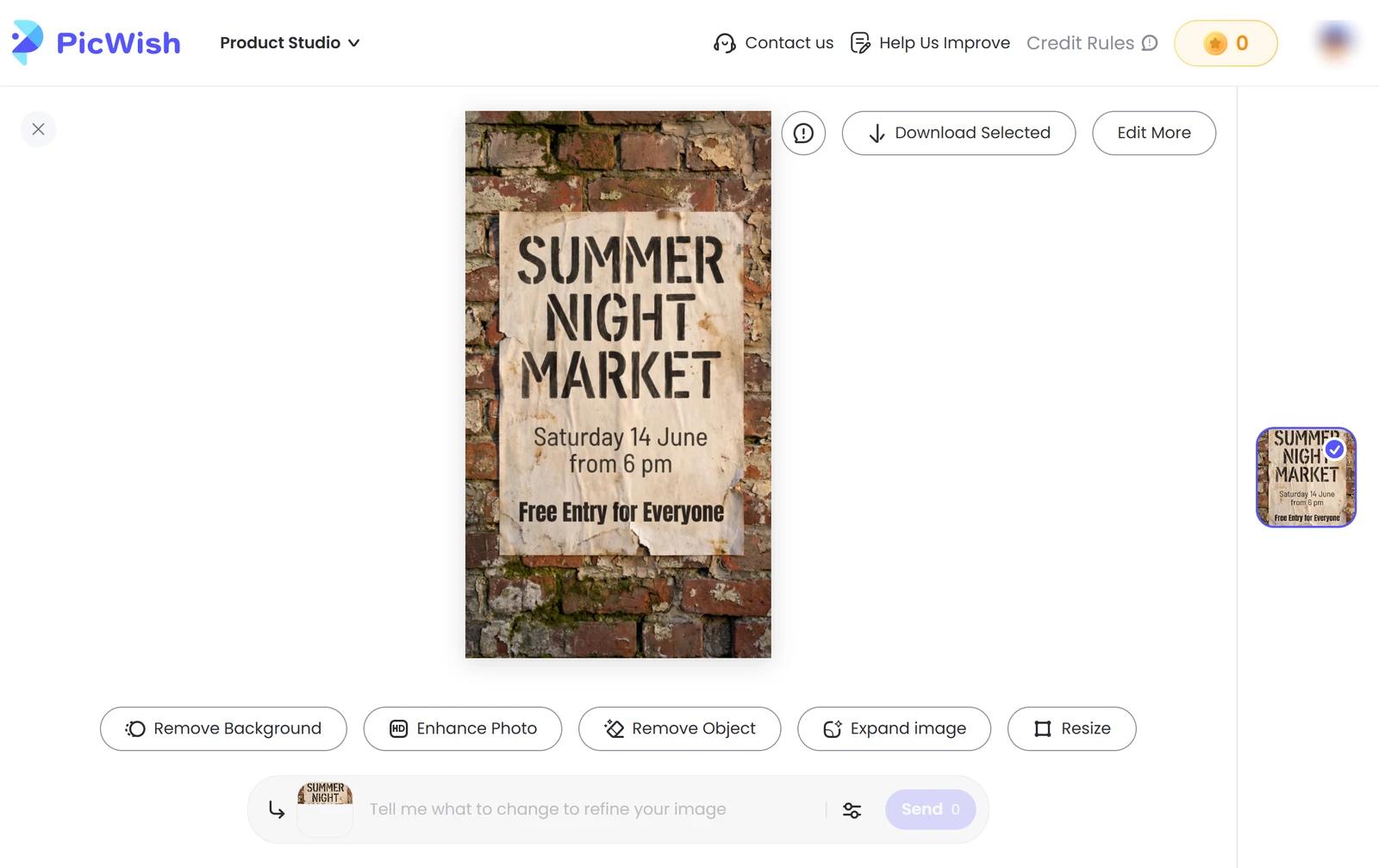
PicWish got 13 of 13 asked-for details right across my 2 prompts. The elderly man had a white beard, round glasses and a blue wool cardigan on a park bench in soft light. The poster had its three lines in the places I asked for, on a brick wall.
It added one thing: a steel thermos with steam in the man's hands. Neither prompt had counts or positions to miss, so this is the easy end of the test, and you should run your own busy scene before you rely on it. The busy scenes were not run.
PicWish Photorealism
I could not grade photorealism, because one portrait is not a sample of 24. The man on the bench looks like a photograph: five fingers on each hand, matching eyes and natural skin, even at 100 percent.
If you need photos of people, run your own check on a few images before you pay: look at hands, teeth and any printed text.
PicWish Text in Images
- Text in Images
- 5/5Excellent
PicWish spelled every word I set: 13 of 13 on a night market poster, in the right three places, with nothing extra.
It is one poster, 13 of the 60 words in the test. The date line wrapped onto a second line, which the prompt allowed.
PicWish Image Size and Upscaler
- Resolution & Upscaling
- 3/5Average
PicWish makes images 2,048 pixels square on the 1:1 frame, about 4.2 megapixels. On its Auto ratio the poster came out at 1,536 by 2,752. Both are PNG files; the download panel offers JPEG at quality 80.
The upscaler, Enhance Clarity, shows a preview with a "PicWish" mark and asks 2 credits to save. My balance was 0, and the preview failed with "Unknown error: Failed to fetch", so I could not compare an upscale with its original.
PicWish Speed per Image
- Speed per Image
- 2/5Below average
PicWish took 57.6 seconds for the portrait; the poster was not timed. Both ran on Nano Banana Pro in Economy Mode.
The app shows a grey placeholder while it works, and nothing failed. Stable Mode is described as faster, but I did not time it, and one timed image is not 40.
PicWish Free Plan Limits
PicWish gives 3 free images a day on the free plan, and the credit balance reads 0. I made 2 and stopped at 1 left: on every free plan I stop at 85 percent of the allowance.
I entered no card. Style range, consistency and editing need many more images than this, so I left them out.
PicWish Usage Rights
- Usage Rights, Watermarks & Privacy
- 1/5Poor
The terms say nothing about the images you make. They cover the website, say they are "governed by the laws of China" and allow personal, non-commercial use of the website's own material.
So who owns the images, whether you may sell them and whether your prompts train models are all unanswered. The two files I saved had no watermark and no content credentials label.
Final verdict: is PicWish worth it?
PicWish is worth a look if you want accurate pictures and posters with correct wording from a chat box. It got every detail and every word right and gave me large files without a watermark.
It is slow, about a minute for the image I timed, and the free plan stops after 3. Before you use its images for work, ask PicWish who owns them: the terms do not say.
The six tests I could run average 3.2 out of 5. I rate it 3.4 because the free plan let me run six of the ten tests.
See the PicWish test results and how I rate.
Best for: People who want a few accurate images a day from a chat box, with strong models, and who will check the rights before using them in business.
Video review · 3:59
Watch me test PicWish
The whole test with the screen recordings: the image, the timing, the poster, the upscaler, the terms and the prices. Captions and the full transcript are one click away, and the video has a page of its own.
Transcript
Hi, I'm Miles. I tested PicWish, an A I photo editor with a chat box that makes images, on its free plan. Here's the short version. It got all thirteen asked-for details right and spelled every word of a poster. But each image took about a minute, and the terms say nothing about who owns the images. My rating is three point four out of five, from the six tests I could run.
So what is PicWish? It started as a set of photo tools, like background removal and photo enhancing. Its A I Designer is a chat box where you describe a picture and pick a model. You pay in credits, and the free plan gives you three images a day.
Every generator gets the same written prompts. I ran two of my forty. An elderly man with a white beard, round glasses and a blue cardigan on a park bench, and a night market poster. Thirteen of thirteen details were right. It added a steaming thermos I never asked for, and I did not run the busy scenes.
I could not grade photorealism, because one portrait is not a sample of twenty-four. But the man on the bench looks like a photograph. Five fingers on each hand, matching eyes, natural skin, even at full size.
Text is a strength. The poster has three lines of set wording, thirteen words, and every word is spelled right and sits where I asked. Nothing extra was printed.
Images come out at two thousand and forty-eight pixels square on the one to one frame. The upscaler, Enhance Clarity, asks two credits to save, and my balance was zero. The preview then failed with an error, so I could not compare an upscale.
Speed is the weak spot. Here is the portrait being made, in real time. I press send, a grey placeholder fills the space, and after fifty-seven point six seconds the image appears. The poster was not timed. Both ran on Nano Banana Pro in Economy Mode, and nothing failed. One minute for one image is slow.
The free plan gives three images a day. I made two and stopped at one left, which is eighty-five percent of the allowance, rounded down. I entered no card.
Here is the catch. The terms of service say nothing about the images you make. They cover the website, and they say they are governed by the laws of China. Who owns the images, whether you can sell them, and whether prompts train models are all unanswered.
Pro is nine ninety-nine a month, or four ninety-nine a month if you pay yearly, with four hundred and fifty credits. Until the end of December, a Nano Banana Pro image costs five credits, about six cents. I did not buy a plan to check.
My verdict: PicWish is worth a look for accurate pictures and posters with correct wording. But it is slow, the free plan stops after three, and you should ask who owns the images before using them for work. The six tests average three point two, and I rate it three point four out of five.
Chapters · 13
Frequently asked questions
How much does PicWish cost, and is there a free plan?
Yes. The free plan gives you 3 images a day. Pro is $9.99 a month, or $4.99 a month paid yearly.
Is PicWish legit and safe?
Yes, in my test. I signed in with Google, entered no card and was never charged.
Who owns the images I make with PicWish?
Not stated. The terms of service say nothing about generated images. Ask PicWish in writing before you use them in business.
How long does PicWish take to make an image?
About a minute. I timed the portrait at 57.6 seconds on Nano Banana Pro in Economy Mode; the poster was not timed.
Can I use PicWish images commercially?
Not stated. The terms do not say whether you may sell or publish generated images, on the free plan or a paid one. I did not buy a plan to test it.
What did you not test?
Four tests. Photorealism, style range, consistency and editing were left out: the free plan gives 3 images a day, and the upscaler asks for credits.

Miles FosterOwner and tester, RankDudeMiles Foster is a pen name: the owner of RankDude, a private person, runs every test himself.
Disclosure. I tested on the free demo account anyone can open on PicWish’s site. I signed up myself and paid PicWish nothing. PicWish didn’t see this review first and had no say in my rating. How RankDude makes money is on the disclosure page.