
ImagineArt Review: AI Image Generator, Pricing & My Test Results
My rating
Accurate, sharp portraits, but slow and with too few free credits to judge. Free use is personal only.
Best for: a few sharp portraits to try it. Not for work you will sell, until you pay.

Tested and written by Miles Foster
Based on 6 graded tests and my verdict. How I rate
I tested ImagineArt hands-on on its free plan, giving its AI image generator 2 of my 40 fixed prompts, then timing each image, trying the upscaler and reading the terms and the prices.
Every measurement is in the ImagineArt test results.
My ImagineArt AI Image Generator Test Results
| Category | Grade | In short |
|---|---|---|
| Prompt AdherenceEvery detail right, on two portraits | 5/5Excellent | |
| Photorealism & AnatomyOne image passed, one had an odd X shape | 2/5Below average | |
| Resolution & UpscalingBig native images, upscale never returned | 3/5Average | |
| Speed per ImageSlow, over half a minute each | 3/5Average | |
| Usage Rights, Watermarks & PrivacyFree use is personal, training needs consent | 2/5Below average | |
| Pricing & ValueThree free images, about 11 cents each on Basic | 2/5Below average | |
| My verdict | +0.2 | |
| Overall | 3.0/5Average |
What Is ImagineArt?
ImagineArt is an AI image generator that also makes video and audio, upscales pictures and edits them. You type a prompt, press Generate and get a picture. On the free plan, Auto chose the model, ImagineArt 2.0.
You pay in credits. The free plan showed 100. Paid plans start at $13 a month when you pay yearly.
How I Tested ImagineArt
Every image generator gets the same 40 written prompts, and I keep the first image of each. On the free plan the credits paid for 2 of them, so I graded six of the ten tests from very small samples and left four out. I stopped before the credits ran out.
My tools
Last checked 12 Nov 2026ImagineArt pros and cons
Pros
- Every portrait detail right
- 2,048 pixel images
- No watermark on saved files
- Training only with consent
- Free plan needed no card
Cons
- 36 seconds an image
- Free credits made three images
- Free use is personal only
- Odd X shape in one background
- Upscale never returned
- Page claims far more images
ImagineArt Pricing
- Pricing & Value
- 2/5Below average
A paid plan starts at $13 a month. The free plan costs nothing and I entered no card. Basic gives 3,000 credits a month and is $13 a month if you pay yearly, about $0.11 an image billed monthly at the 26 credits I paid.
Ultimate is $50 a month and Creator $120. Prices read on 12 November 2026.
ImagineArt plans and prices
Live data· last check 12 November 2026| Plan | Price a month | |
|---|---|---|
| Free100 credits, three images, free generations public | $0 | 100 credits, three images, free generations public |
| Basic3,000 credits a month, no private generations | $13 | 3,000 credits a month, no private generations |
| Ultimate16,000 credits a month, 12 concurrent images | $50 | 16,000 credits a month, 12 concurrent images |
| Creator45,000 credits a month, 16 concurrent images | $120 | 45,000 credits a month, 16 concurrent images |
- Other per-month prices of $9, $34, $83 and $175 appear without clear billing terms, conflicting with the card prices
- Monthly and Quarterly (2 months free) toggles exist but their prices are not shown
- Enterprise plan is custom pricing via Contact Sales, not included
The page says Basic makes "≈ 600 images", which is 5 credits an image. My images cost 26 each, so the count depends on the model and the task.
ImagineArt Prompt Adherence
- Prompt Adherence
- 5/5Excellent
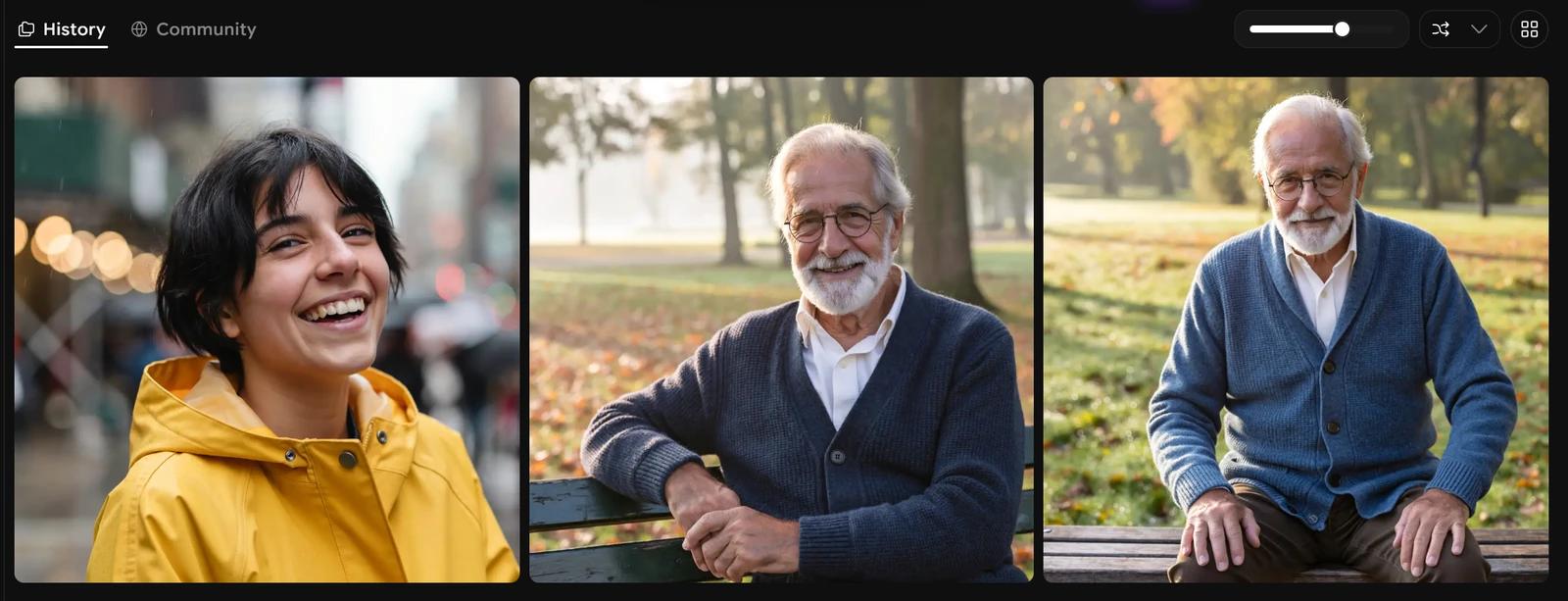
ImagineArt got 12 of 12 asked-for details right across my two portrait prompts. The man had a white beard, round glasses and a blue wool cardigan and sat on a park bench in soft morning light. The woman laughed, with short black hair, freckles and a yellow raincoat in front of a blurred street.
Both prompts were portraits, the easy case. I could not run the busy scenes where counting objects goes wrong.
ImagineArt Photorealism
- Photorealism & Anatomy
- 2/5Below average
ImagineArt made one of two images that pass as a photograph. The man on the bench has natural skin, eyes and two correct hands.
The woman's face and raincoat look real, but a translucent X shape cuts through the blurred street on her left. It belongs to nothing in the scene. I ran two images once, not 24 twice.
ImagineArt Text in Images
- textRendering
- n/a/5Not scored
I did not test text in images. The test needs six prompts with set wording, and the free credits stopped at three images. The grade is left out, not scored.
Run on a paid plan, this test would show whether ImagineArt spells signs, posters and notes right.
ImagineArt Image Size and Upscaler
- Resolution & Upscaling
- 3/5Average
ImagineArt makes images 2,048 pixels square, 4.2 megapixels, as JPEG. The settings list Auto, 1K, 2K and 4K.
The upscaler offers 2x to 16x for 8 credits. After I pressed Generate at 2x the page showed a spinner for 14 minutes and returned nothing, and no credits were taken. I could not compare the result.
ImagineArt Speed per Image
- Speed per Image
- 3/5Average
ImagineArt took a median of 36.2 seconds for each image: 36.3 and 36.0 seconds. Nothing failed.
A sale pop-up opened over the page after each image. Two timings are a small sample, so treat the number as a first reading.
ImagineArt Free Plan Limits
ImagineArt showed 100 credits on the free plan. The first prompt used 51 credits for two variations and the second used 26 for one image, so the credits paid for three images.
I stopped with 23 left, because another image would have used more than the allowance. That is why text, styles, consistency and editing were not run.
ImagineArt Usage Rights
- Usage Rights, Watermarks & Privacy
- 2/5Below average
On the free plan use of your images may be limited to "non-commercial, personal purposes". Paid subscribers may use outputs commercially.
By default ImagineArt "will not use your personal content for AI model training without your consent". Free generations are public, since the cheapest paid plan lists Private Generations as an extra it does not include. The saved files showed no watermark and no content credentials marker.
Final verdict: is ImagineArt worth it?
ImagineArt is worth a try if you want a few sharp, accurate portraits. It followed both prompts exactly and made large files without a watermark.
It is slow at about 36 seconds an image, the free credits stop at three images, and free use is personal only. One of my two images carried a strange X shape in the background, and the upscaler never returned.
The six tests I could run average 2.8 out of 5, from a sample of two images. I rate it 3.0 because the free plan let me run six of the ten tests.
See the ImagineArt test results and how I rate.
Best for: People who want sharp 2,048 pixel portraits that follow the prompt closely, and are ready to pay before using them in business.
Video review · 2:32
Watch me test ImagineArt
ImagineArt's own pages, recorded after the test: prompts, timing, size, upscale, rights and prices. Captions and the full transcript are one click away, and the video has a page of its own.
Transcript
Hi, I'm Miles. I tested Imagine Art, an A I image generator, on its free plan. Here's the short version. It got every detail right on both of my portrait prompts and made big images, but each one took about thirty-six seconds, and the free credits paid for only three pictures. My rating is three point zero out of five, from the six tests I could run.
So what is Imagine Art? You type a prompt, press Generate and get a picture. It also makes video and audio, upscales pictures and edits them. You pay in credits, and the free plan showed me a hundred.
Every generator gets the same written prompts. I ran two of my forty, both portraits. An elderly man on a park bench and a laughing woman in a yellow raincoat. Every written detail was there, twelve out of twelve. Both were the easy case, so treat that as a first look.
For photos, one of two passed. The man looks real, with correct hands. The woman's face is convincing, but a see-through X shape cuts across the blurred street behind her, and it belongs to nothing in the scene.
I did not test text in images. That test needs six prompts, and the free credits stopped at three pictures, so I left it out rather than guess.
Images come out at two thousand and forty-eight pixels square. That is large. I tried the upscaler at two times. It shows a price of eight credits, then a spinner. After fourteen minutes nothing had come back, so I could not compare it.
Speed is the weak spot. Both images took about thirty-six seconds. Nothing failed, but a sale pop-up opened over the page after each one.
The free plan runs out fast. The first prompt used fifty-one credits for two variations, the second used twenty-six. That is three images from a hundred credits, so I stopped with twenty-three left.
On rights, the terms say free use may be limited to personal purposes. Paid subscribers may use outputs commercially. By default, ImagineArt will not use your personal content for training without your consent.
The cheapest paid plan is Basic, thirteen dollars a month, or nine dollars if you pay yearly, for three thousand credits. At the cost I paid, that is about eleven cents an image. The page says six hundred images, so check the cost for your model.
My verdict: worth a try for a few sharp, accurate portraits. But it is slow, the free credits are few, and free use is personal only. The six tests average two point eight, and I rate it three point zero out of five.
Chapters · 11
Frequently asked questions
How much does ImagineArt cost, and is there a free plan?
Yes. The free plan showed 100 credits, enough for three images. Basic is $13 a month, or $13 a month paid yearly.
Is ImagineArt legit and safe?
Yes, in my test. I signed in with Google, entered no card and was never charged.
Can I use ImagineArt images commercially?
Not on free. The terms say free use may be limited to personal purposes. Paid subscribers may use outputs commercially. I did not buy a plan to test it.
Who owns the images I make with ImagineArt?
Depends on plan. The terms say ImagineArt owns the service and its content, except the outputs it licenses to you. Free use may be personal only; paid use may be commercial.
Does ImagineArt train on my images?
Not by default. The terms say it will not use your personal content for training without your consent. Generations are public by default.
What did you not test?
Four tests. Text in images, style range, consistency and editing were left out: the free credits paid for three images.

Miles FosterOwner and tester, RankDudeMiles Foster is a pen name: the owner of RankDude, a private person, runs every test himself.
Disclosure. I tested on the free demo account anyone can open on ImagineArt’s site. I signed up myself and paid ImagineArt nothing. ImagineArt didn’t see this review first and had no say in my rating. How RankDude makes money is on the disclosure page.