
Decohere AI Review: AI Image Generator, Pricing & My Test Results
My rating
Very quick and good at styles, but it cannot spell and free images are not for business.
Best for: quick pictures in many styles. Not for pictures with words, or work you will sell, until you pay.

Tested and written by Miles Foster
Based on 8 graded tests and my verdict. How I rate
I tested Decohere AI hands-on on its free plan, giving its AI image generator 34 of my 40 fixed prompts. I timed each image, counted every detail, checked the words and read the terms.
Every measurement is in the Decohere AI test results.
My Decohere AI AI Image Generator Test Results
| Category | Grade | In short |
|---|---|---|
| Prompt AdherencePortraits fine, busy scenes badly miscounted | 3/5Average | |
| Photorealism & AnatomyFaces pass, hands and labels give it away | 3/5Average | |
| Text in ImagesAlmost every word I set was misspelled | 1/5Poor | |
| Style RangeEight of ten styles looked right | 4/5Good | |
| Resolution & UpscalingSmall images and no free upscaler | 2/5Below average | |
| Speed per ImageAbout a second for five pictures | 5/5Excellent | |
| Usage Rights, Watermarks & PrivacyFree images are for non-commercial use | 2/5Below average | |
| Pricing & ValueMany free pictures, cheap paid month | 5/5Excellent | |
| My verdict | +0.6 | |
| Overall | 3.7/5Good |
What Is Decohere AI?
Decohere AI is an AI image generator that also makes video, upscales pictures and trains AI characters. You type a prompt and the Realtime AI page draws five pictures at once.
You pay in credits. The free plan gives a daily allowance of realtime images and nothing else. Paid plans start at $7.99 a month when you pay yearly.
How I Tested Decohere AI
Every image generator gets the same 40 written prompts, and I keep the first image of each. On the free plan I ran 34 of them and eight of the ten tests, and left two tests out. I stopped when the app said the daily limit was reached.
My tools
Last checked 12 Nov 2026Decohere AI pros and cons
Pros
- Five images in about a second
- Eight of ten styles recognisable
- Portraits and products mostly good
- About 200 free images a day
- Free plan needed no card
- Creator plan includes a commercial license
Cons
- Almost every set word misspelled
- Busy scenes miscount objects
- Hands and labels give it away
- Images only 768 pixels square
- Free images are non-commercial
- Quality generator and upscaler are paid
Decohere AI Pricing
- Pricing & Value
- 5/5Excellent
A plan with a commercial license starts at $29.99 a month, or $19.99 a month paid yearly. The free plan costs nothing and I entered no card. Creator gives 400 credits a month, and a quality image costs 1 credit for 4 images, so about $0.019 an image on the monthly price.
Explorer is $9.99 a month and Director $59.99. Prices read on 12 November 2026.
Decohere AI plans and prices
Live data· last check 12 November 2026| Plan | Price a month | |
|---|---|---|
| FreeFree daily realtime images with a wait, watermark, non-commercial use only | $0 | Free daily realtime images with a wait, watermark, non-commercial use only |
| Explorer50 credits a month, upscale, video, no watermark | $9.99 | 50 credits a month, upscale, video, no watermark |
| Creator400 credits a month, AI characters, commercial license | $29.99 | 400 credits a month, AI characters, commercial license |
| Director1,000 credits a month, fastest generation, commercial license | $59.99 | 1,000 credits a month, fastest generation, commercial license |
- Monthly billing costs more per month than yearly billing
- Director $29.99 is a limited time offer, struck-through price is $59
- Enterprise plans not listed on page
I did not buy a plan, so the per-image cost comes from the plans page and its questions. Unused credits expire at the end of the billing period; refill credits do not.
Decohere AI Prompt Adherence
- Prompt Adherence
- 3/5Average
Decohere AI got 123 of 179 asked-for details right across my 34 prompts. Portraits, products and styles were mostly right. The busy scenes were where it failed: the kitchen had two apples and a red jug, and the beach had no child and no boat.
The street scene put a woman in a red coat with a brown dog in the middle, not the left, and showed two pigeons, not three. When you ask for exact counts or places, check the picture.
Decohere AI Photorealism
- Photorealism & Anatomy
- 3/5Average
Decohere AI made 15 of 24 images that pass as photographs. The man on the bench, the laughing woman, the pancakes and the perfume bottle had good skin, eyes and light.
Nine images failed. Hands merged into knives and cables in the chef and headphone pictures, and watch dials, labels and badges carried made-up letters. I counted four hand faults and no face faults.
Decohere AI Text in Images
- Text in Images
- 1/5Poor
Decohere AI spelled 5 of 61 words I set, across a shop sign, a honey label, a poster, a book cover, a fridge note and street signs. None of the six images was fully correct.
The sign reads "HIOORUR BEAN" and the poster "SUMMER NLIGHT MAKET". Every image also carried extra lines of letters that read nothing. If you need words in a picture, add them yourself afterwards.
Decohere AI Style Range
- Style Range
- 4/5Good
Decohere AI got 8 of 10 styles right for the same lighthouse: oil painting, watercolour, pencil, flat vector, woodblock, anime, 1970s film and ink line art. The lighthouse, rocks and dusk light stayed in every one.
Pixel art came out as a smooth illustration with no pixel grid, and the clay render looked like a computer render with no clay.
Decohere AI Image Size and Upscaler
- Resolution & Upscaling
- 2/5Below average
Decohere AI makes images 768 pixels square, about 0.6 megapixels. The app offers wide 16:9, square 1:1 and tall 9:16 frames.
The upscaler, which makes images four times bigger for 2 credits, is on the paid plans only, so I could not upscale. A small image that cannot grow on the free plan is a real limit for print or a big screen.
Decohere AI Speed per Image
- Speed per Image
- 5/5Excellent
Decohere AI took a median of 1.6 seconds to show the first image, and each run drew five. The fastest took 0.8 seconds and the slowest 2.1. My timer checks about every 0.8 seconds, so each figure is accurate to within that.
Nothing failed and there was no queue until the daily limit. This is the quickest part of the product.
Decohere AI Free Plan Limits
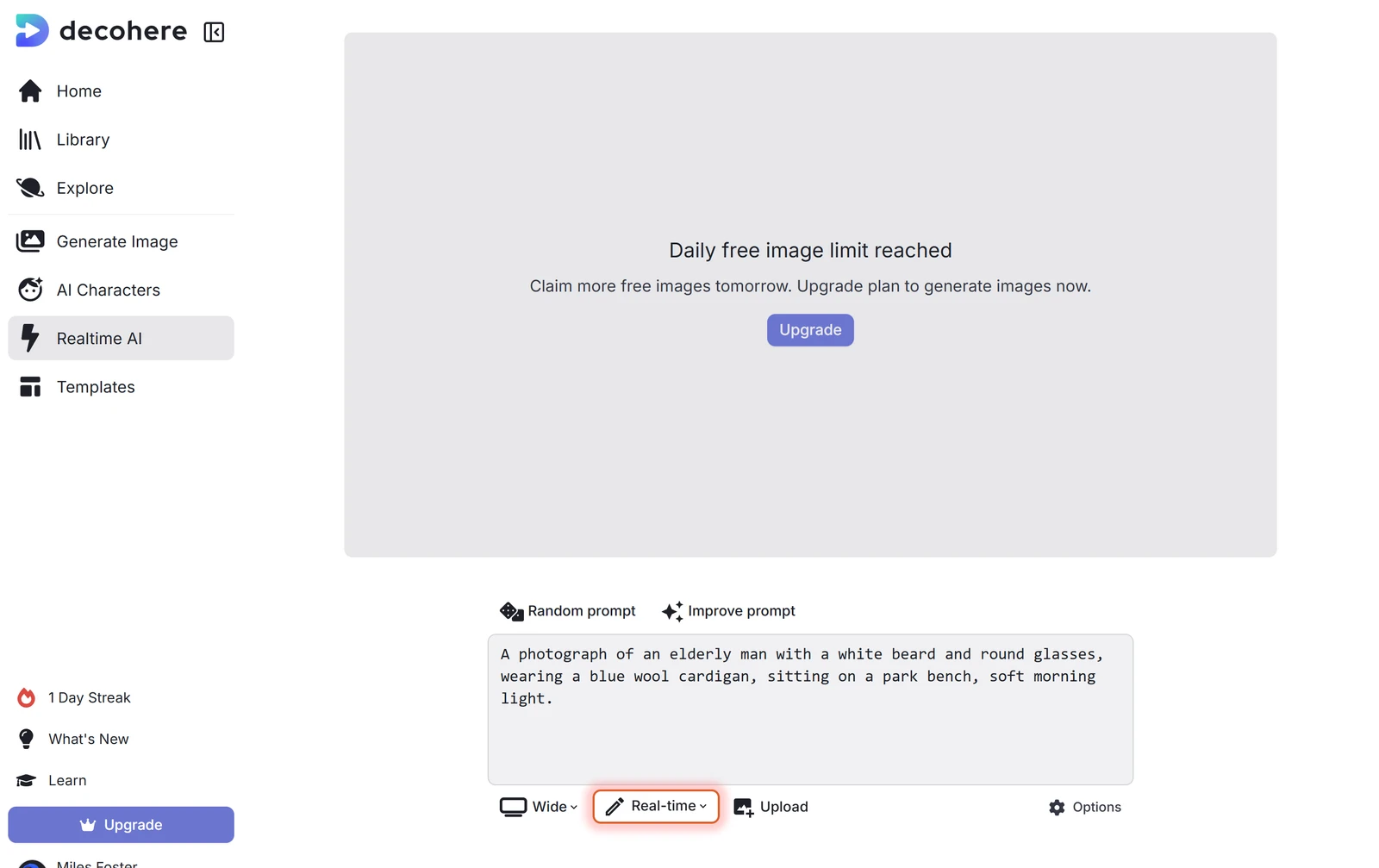
Decohere AI announced 200 realtime images for the day when I first signed in, and I got 197 of them from 38 prompt runs. Then the page said "Daily free image limit reached" and "Claim more free images tomorrow".
The quality generator, the upscaler, video and watermark removal all need a paid plan. Because the limit ended my session, I could not run the consistency or editing tests.
Decohere AI Usage Rights
- Usage Rights, Watermarks & Privacy
- 2/5Below average
On the free plan you may not use Decohere AI images for business. The terms license free output under Creative Commons Noncommercial, and the pricing questions say the Creator plan is the first with commercial rights.
The terms also let Decohere use your content to improve the service without asking, and name only "public datasets" as the training source. I did not test a download, so I did not see the watermark the plans page says free images carry.
Final verdict: is Decohere AI worth it?
Decohere AI is worth trying if you want quick pictures in many styles and a free daily allowance. It drew five images in about a second, hit eight of ten styles and made good portraits and product shots.
It is not the tool for pictures with words, busy scenes with exact counts, or work you will sell while you stay on the free plan, because free output is licensed for non-commercial use. The images are small and the upscaler is paid.
The eight tests I could run average 3.1 out of 5. I rate it 3.7 because the free plan let me run eight of the ten tests.
See the Decohere AI test results and how I rate.
Best for: People who want fast, small images in many styles, with a free daily allowance to try it, and who will pay before using the images for business.
Video review · 10:31
Watch me test Decohere AI
The whole test with the screen recordings: prompts, timing, wording, styles, rights and prices. Captions and the full transcript are one click away, and the video has a page of its own.
Transcript
Hi, I'm Miles. I tested Decohere A I, an A I image generator, on its free plan. Here's the short version. It draws five pictures in about a second, and eight of ten styles came out right. But it spelled only five of sixty-one words I set, and on the free plan you may not use the images for business. My rating is three point seven out of five, from the eight tests I could run.
So what is Decohere? You type a prompt and the Realtime page draws five pictures at once. It also makes video, upscales pictures and trains A I characters. You pay in credits, and the free plan gives you a daily allowance of realtime images and nothing else.
Every generator gets the same written prompts. I ran thirty-four of my forty. Portraits and products were mostly right. The busy scenes were not. The kitchen had two apples and a red jug, and the beach had no child and no boat. In all, a hundred and twenty-three of a hundred and seventy-nine details were right.
For photos, fifteen of twenty-four images passed. The man on the bench, the laughing woman and the pancakes look real. But hands merge into knives and cables, and watch dials and labels carry made-up letters.
Text is the weak spot. I asked for a shop sign, a poster, a book cover and a handwritten note, sixty-one words in all, and five were spelled right. The sign reads Hioorur Bean. Every image also carried extra lines of letters that read nothing.
Styles are a strength. I asked for the same lighthouse in ten styles, and eight were recognisable, from oil painting to ink line art. The pixel art had no pixel grid, and the clay render had no clay.
Images come out at seven hundred and sixty-eight pixels square, about half a megapixel. The upscaler, four times bigger for two credits, is for paid plans only, so I could not upscale anything.
Speed is the best part. The first image showed in a median of one point six seconds, and the slowest took two point one. Nothing failed.
The free plan stopped me. I got a hundred and ninety-seven images from thirty-eight prompts, then the page said, daily free image limit reached. That ended my session, so I could not run the consistency or editing tests.
Here is the catch. The terms license free output under Creative Commons Noncommercial. The Creator plan is the first with a commercial license. Decohere may also use your content to improve the service without asking.
Creator costs twenty-nine ninety-nine a month, or nineteen ninety-nine if you pay yearly. A quality image costs one credit for four images, about two cents each on the monthly price. I did not buy a plan to check.
My verdict: Decohere is worth trying for quick pictures in many styles. But don't use it for pictures with words, or for work you will sell on the free plan. The eight tests average three point one, and I rate it three point seven out of five. The full results are on the test results page.
Chapters · 14
Frequently asked questions
How much does Decohere AI cost, and is there a free plan?
Yes. The free plan announced 200 realtime images for the day; I got 197 before it stopped me. Creator, with a commercial license, is $29.99 a month, or $19.99 a month paid yearly.
Is Decohere AI legit and safe?
Yes, in my test. I signed in with Google, entered no card and was never charged.
Who owns the images I make with Decohere AI?
Depends on plan. The terms say you own your assets, but on the free plan they license them to you under Creative Commons Noncommercial.
Can I use Decohere AI images commercially?
Not on free. The pricing questions say the Creator plan has a commercial license, and Explorer and Free do not. I did not buy a plan to test it.
What did you not test?
Two tests. Consistency and editing were left out because the daily limit ended the session. I also did not test a download, the upscaler or the quality generator.

Miles FosterOwner and tester, RankDudeMiles Foster is a pen name: the owner of RankDude, a private person, runs every test himself.
Disclosure. I tested on the free demo account anyone can open on Decohere AI’s site. I signed up myself and paid Decohere AI nothing. Decohere AI didn’t see this review first and had no say in my rating. How RankDude makes money is on the disclosure page.